Project overview: the Medilane voice receptionist
Start here · About 15 minutes · No code · Every screenshot below is the real app, running locally with Docker, answering with real models.
Medilane Clinic is a fictional clinic in Pune with five doctors. Its callers do not fill in forms: they talk. In the browser they press a green button and speak in English, Hindi or Hinglish (Hindi and English mixed in one sentence). An AI receptionist listens, answers questions from the clinic's own documents, and books, moves or cancels appointments, but only after checking who is calling and only after the caller says "yes" to a read-back. It never gives medical advice. When a caller describes an emergency, it tells them to call 112 straight away and alerts the front desk, without waiting for a language model. Front-desk staff watch every call live and take over whenever the receptionist hands a caller to them; admins manage doctors, documents, prompts and users.
This page is a guided tour of the finished product. The 21 modules after it take every part apart and show how to build it.
Open the full-size architecture diagram
The tour
The tour follows one synthetic patient, Rahul Verma (born 12 March 1988), a few other callers, one front-desk member (frontdesk@medilane.local) and one admin (admin@medilane.local). All data is synthetic: the doctors, the 40 patients, their appointments and the clinic documents were written for this project.
1. The call page
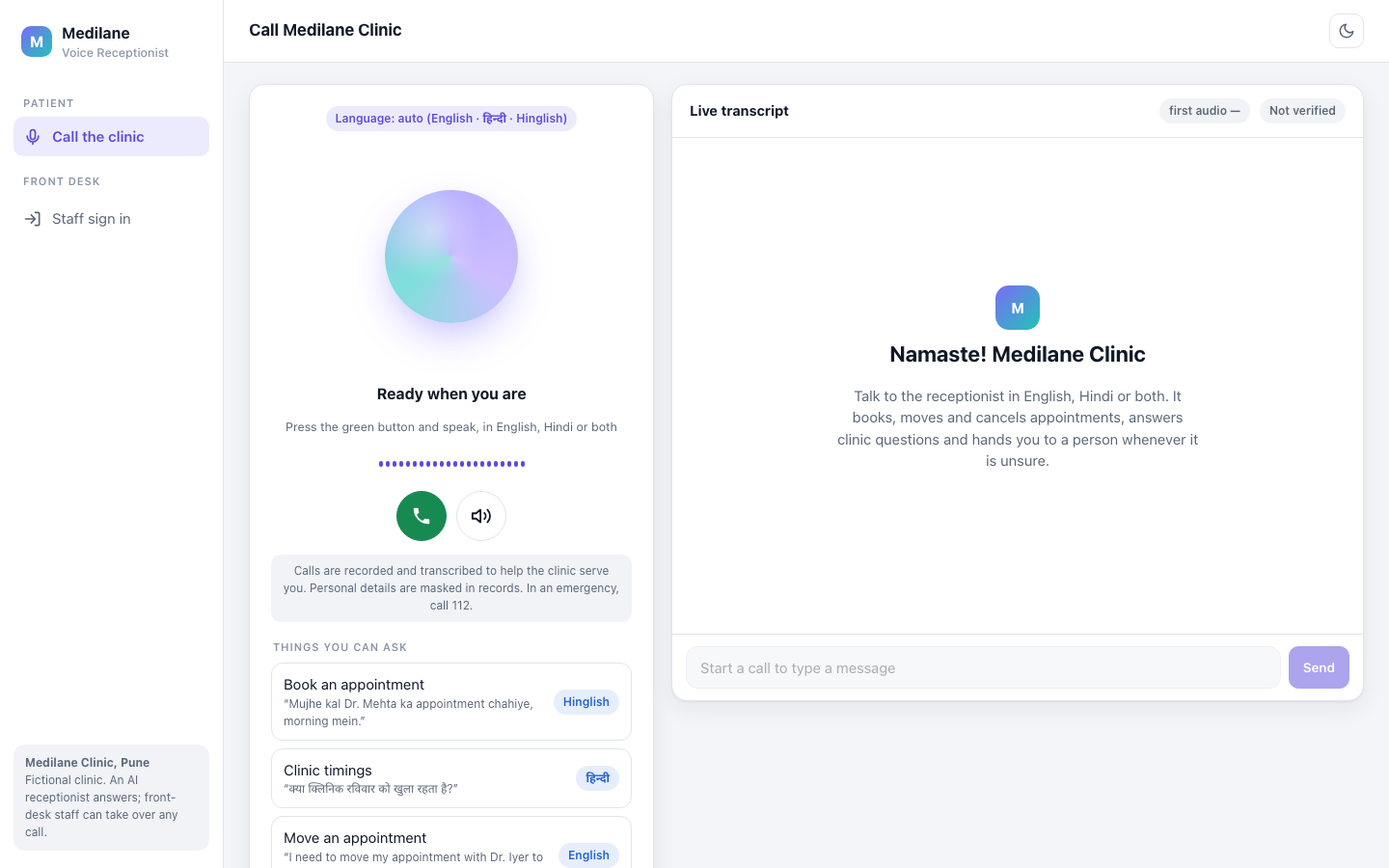
The public call page. Callers need no account. The badge says the language is detected automatically, the notice under the buttons says calls are recorded and that personal details are masked, and the cards suggest things to say in each language. The transcript on the right fills in as the call goes on. The browser page is Module 19; the short-lived voice token that starts each call is Module 6.
2. A real voice turn
These two screenshots are a real spoken turn. A recorded English question, "Is the clinic open on Sunday?", was played into the page as its microphone. Everything after that was the live system: the page's audio worklet sent 16 kHz audio over the WebSocket, Silero VAD noticed when the question ended, Whisper on Groq turned it into text, the agent searched the clinic documents and wrote the reply, and Kokoro spoke it on the CPU, sentence by sentence.
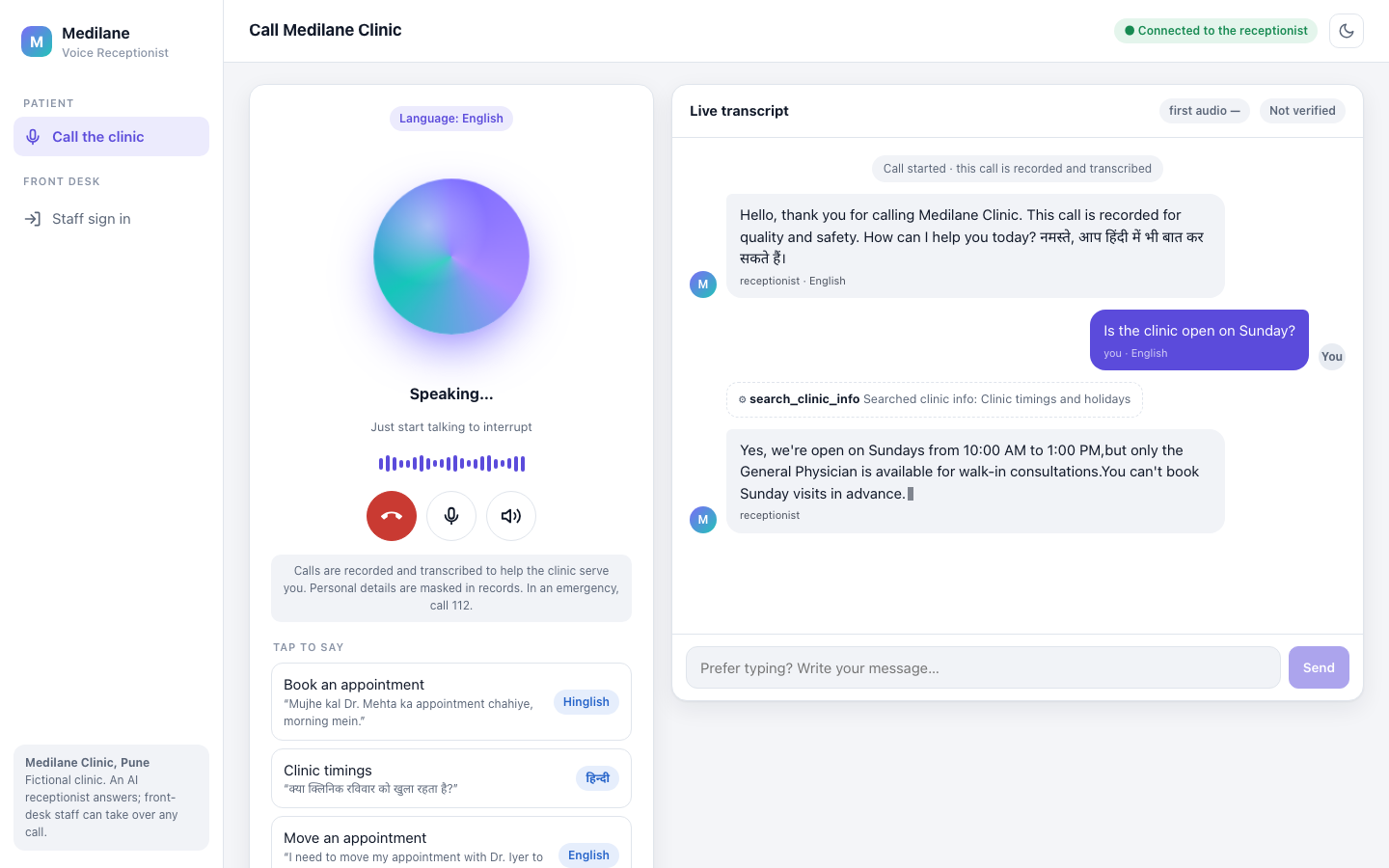
While it speaks. The orb shows "Speaking...", the hint says "Just start talking to interrupt", and the answer is still arriving word by word. Above it, the tool line shows that the receptionist searched the document "Clinic timings and holidays" before answering (Modules 2, 8, 9 and 14).
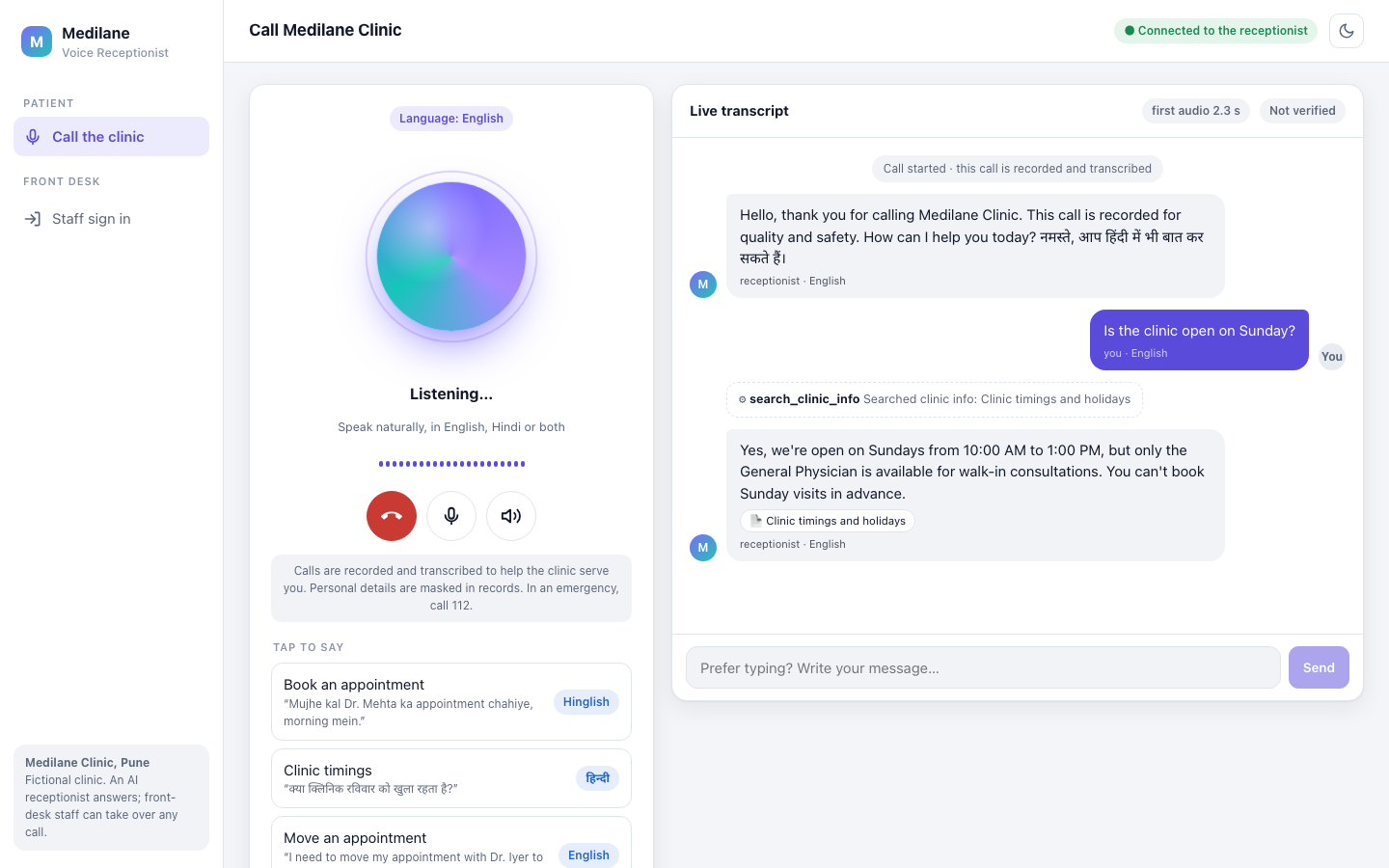
The finished answer: open on Sunday 10 AM to 1 PM, General Physician only, walk-in, no bookings. The pill under the answer names the document it came from (document search is Module 12), and the chip at the top says the caller heard the first audio 2.3 seconds after they stopped speaking.
From here on, the caller's words were typed into the message box of the same live call. A typed message skips only the microphone, VAD and Whisper. It goes through the same WebSocket to the same agent, with the same tools and the same safety checks, and Kokoro still speaks the reply. The transcript marks each such message "typed".
3. Booking an appointment
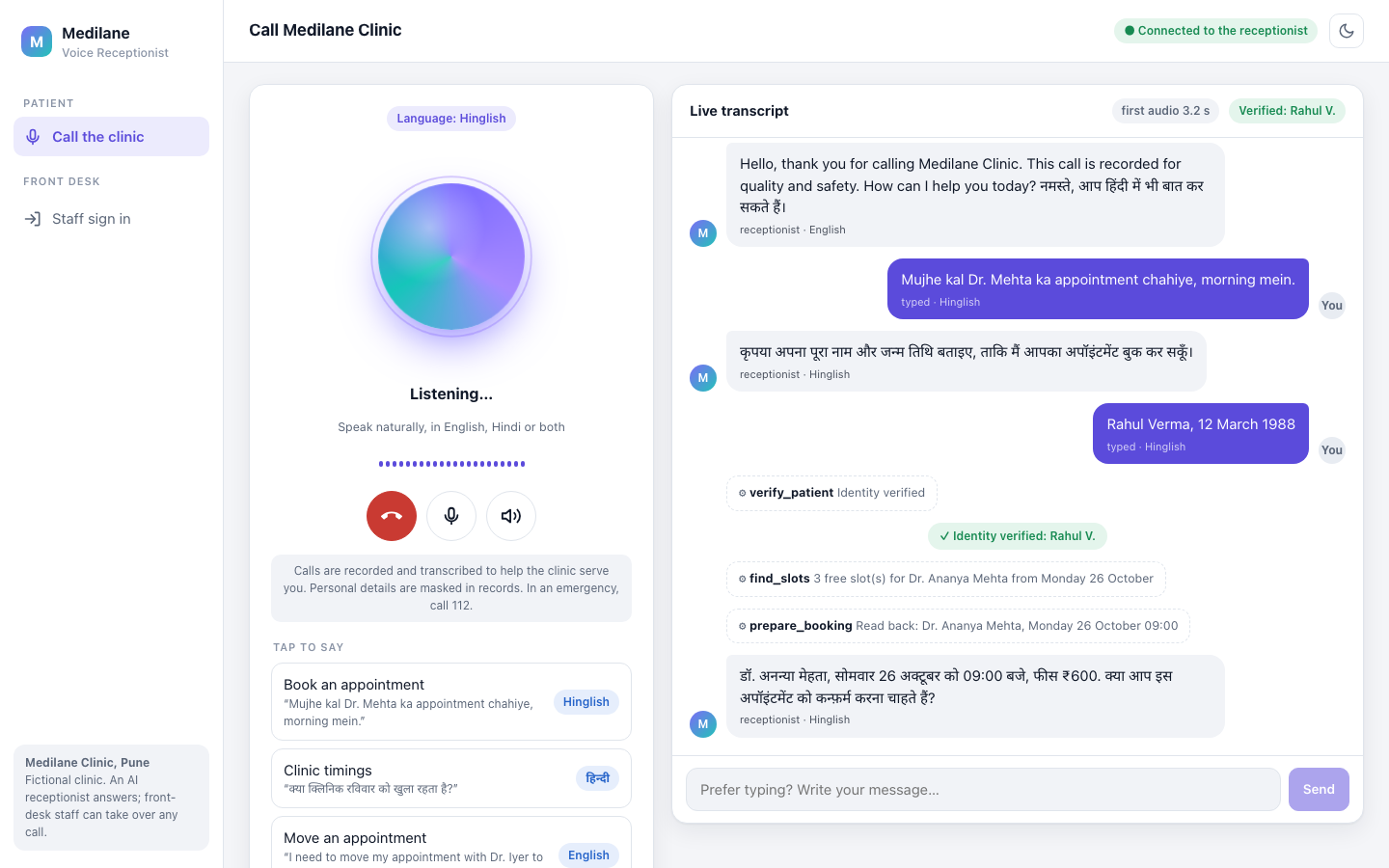
Rahul types the running example: "Mujhe kal Dr. Mehta ka appointment chahiye, morning mein." The receptionist first asks for his full name and date of birth. "Rahul Verma, 12 March 1988" matches a patient, so verify_patient marks him verified (the green chip at the top). Only then does it look for slots (find_slots: three free for Dr. Ananya Mehta from Monday 26 October, because Sunday is walk-in only) and prepare a booking. It reads back the first free slot, Monday 26 October at 09:00, with the fee, ₹600, and asks him to confirm. Nothing is booked yet (Modules 7 and 11).
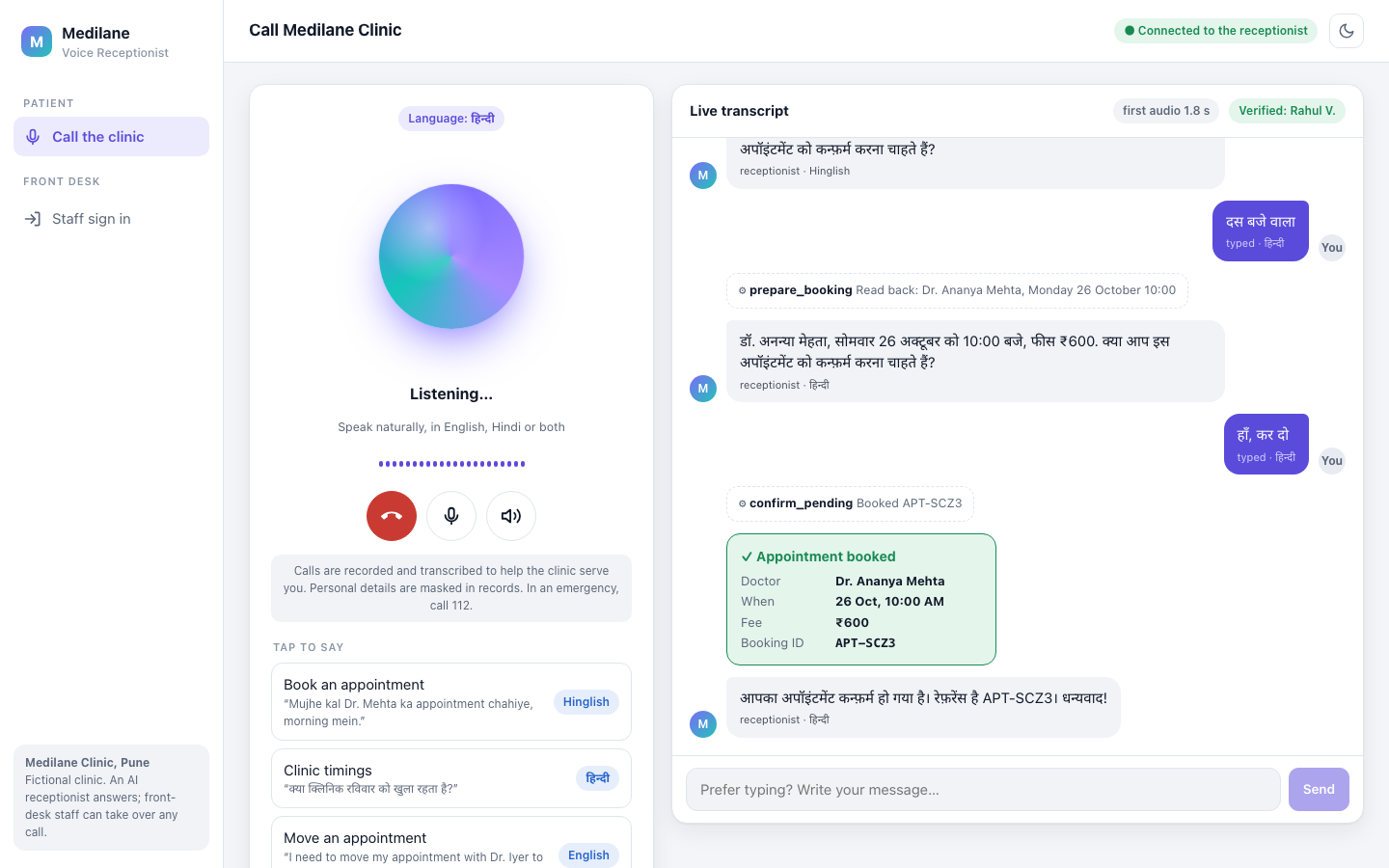
Rahul wants another time: "दस बजे वाला" (the ten o'clock one). The receptionist prepares the booking again and reads back the new time, Monday 26 October at 10:00, ₹600; the language badge has switched to Hindi. Only after his "हाँ, कर दो" (yes, go ahead) does confirm_pending book it. The green card shows Dr. Ananya Mehta, 26 Oct, 10:00 AM, ₹600 and the booking ID APT-SCZ3, and the reply repeats the reference. This last answer reached him 1.8 seconds after he finished.
The booking only happens when the caller says yes to a read-back they have just heard: when Rahul chose another time, the 09:00 read-back was dropped and a new one prepared. An earlier take of these screenshots caught a real bug in exactly this confirm rule (a new time read back, the old one booked), now fixed with tests; Module 11 tells that story.
4. Hindi, emergencies and interruptions
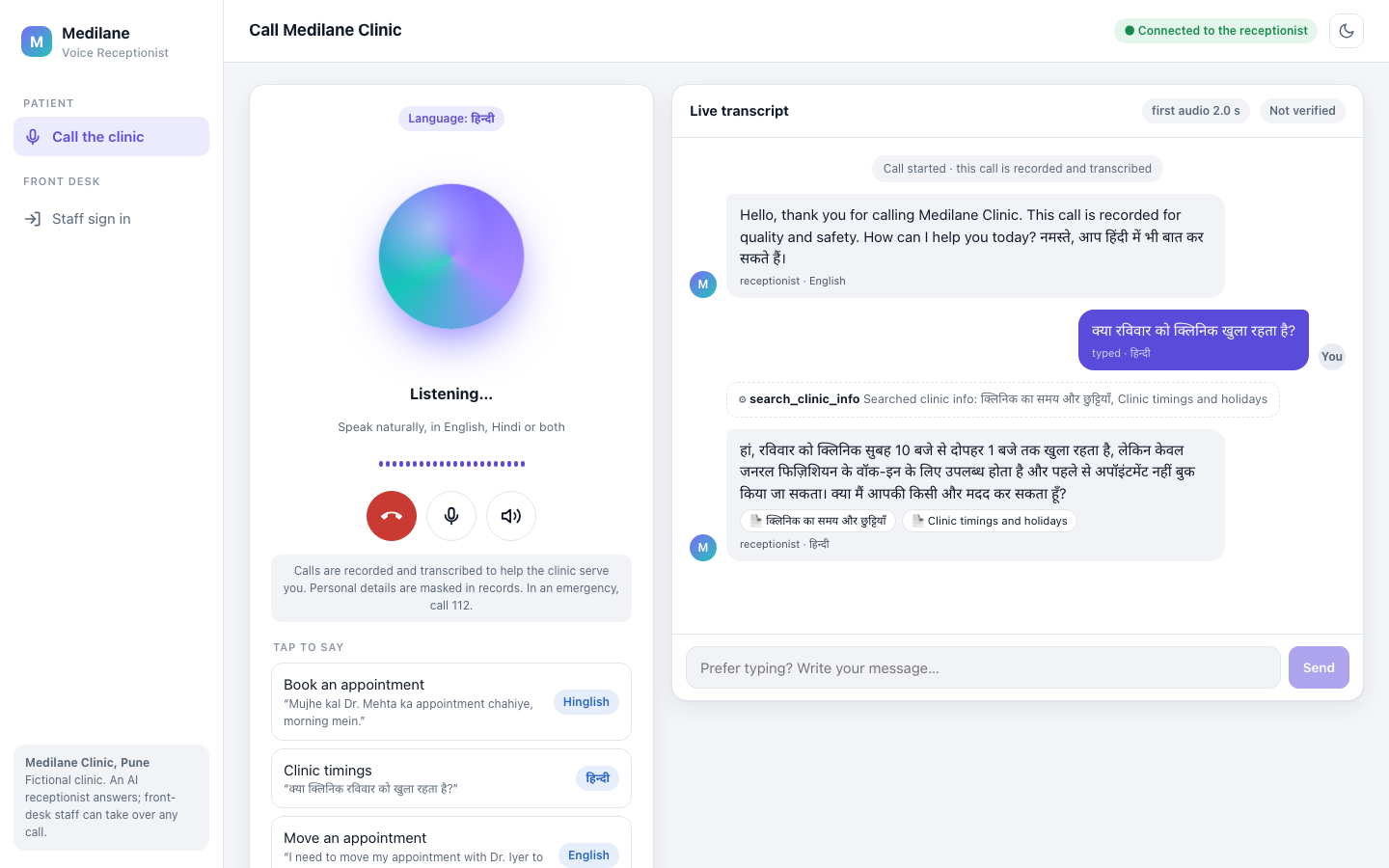
Hindi. "क्या रविवार को क्लिनिक खुला रहता है?" The receptionist searched the clinic documents and answered in Hindi, written in Devanagari so the Hindi voice can read it aloud. The two source pills are the Hindi and the English version of the timings document (the search is Module 12; Hindi and Devanagari are Module 10).
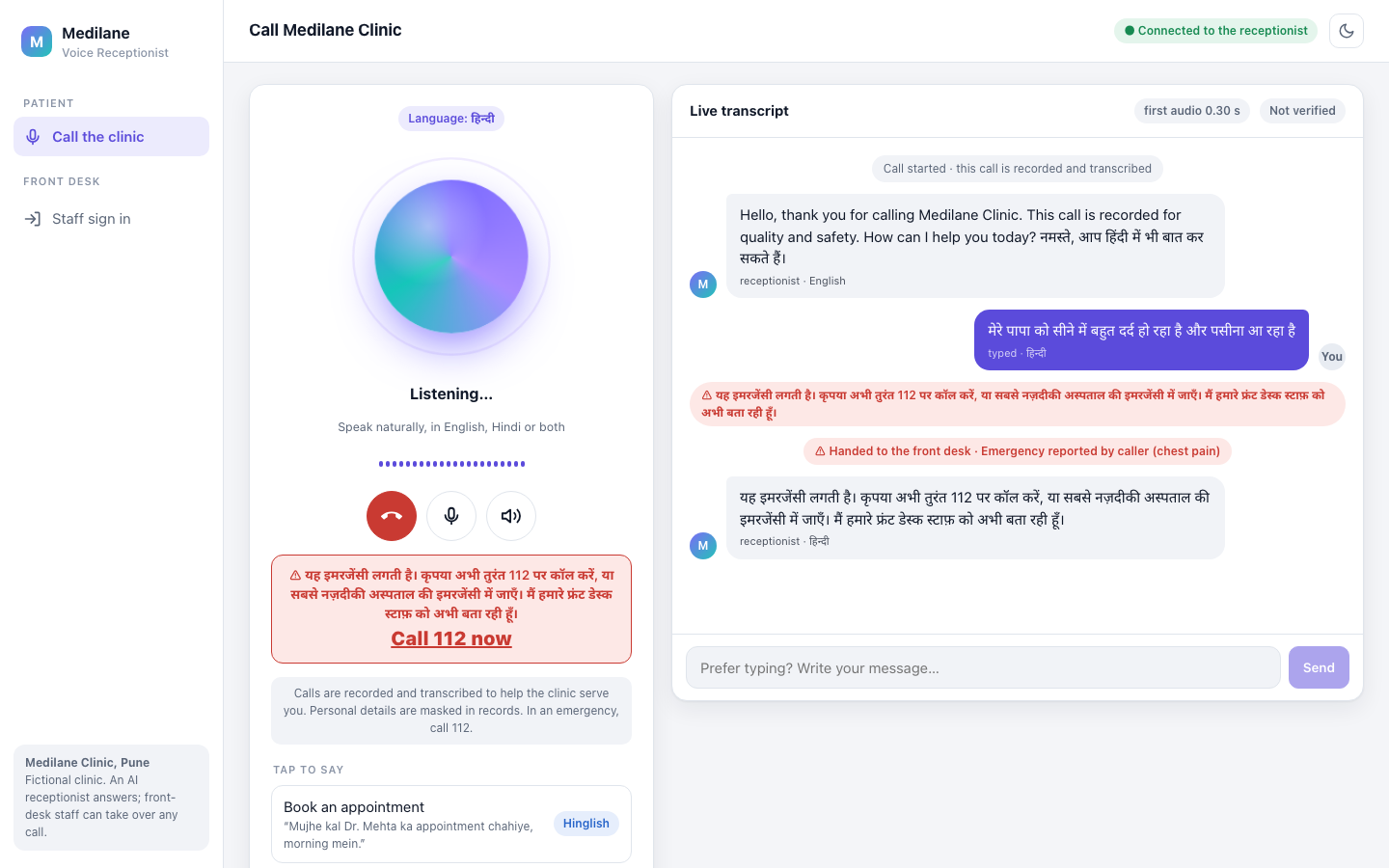
An emergency. "मेरे पापा को सीने में बहुत दर्द हो रहा है और पसीना आ रहा है" (my father has bad chest pain and is sweating). A rule check catches it before any model runs: the reply tells the caller to call 112 or go to the nearest hospital emergency, the page shows a red "Call 112 now" banner, and the call is handed to the front desk as an emergency. First audio here was 0.30 seconds (Module 15).
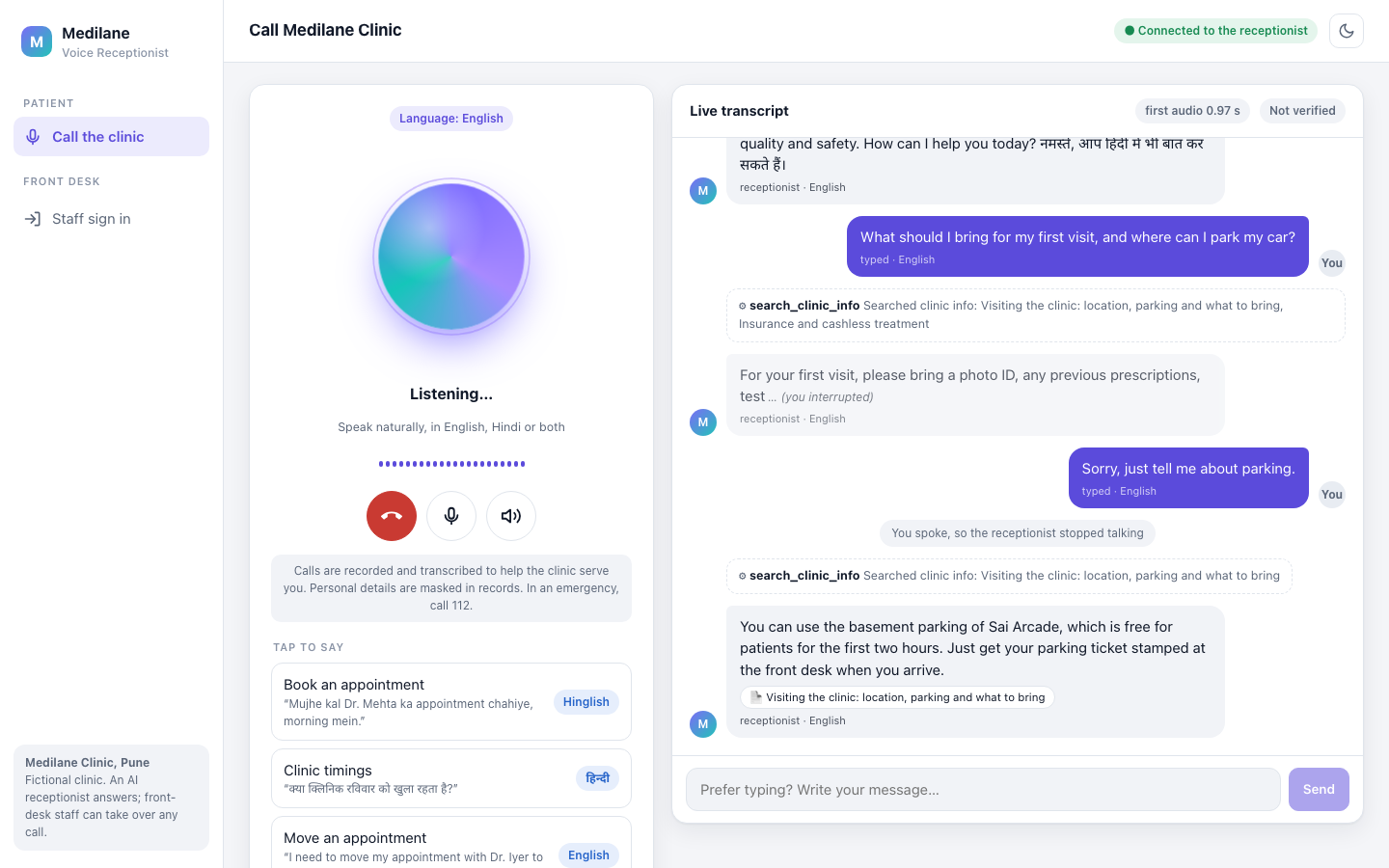
Barge-in. The caller asked what to bring and where to park, then cut in with "Sorry, just tell me about parking." The receptionist stopped mid-sentence (the answer ends with "(you interrupted)"), dropped the rest, and answered only the parking question from the documents: the basement of Sai Arcade, free for the first two hours with a stamped ticket. Here the interruption was typed; typing while the receptionist speaks interrupts it, just as speaking does (Module 14).
5. On a phone
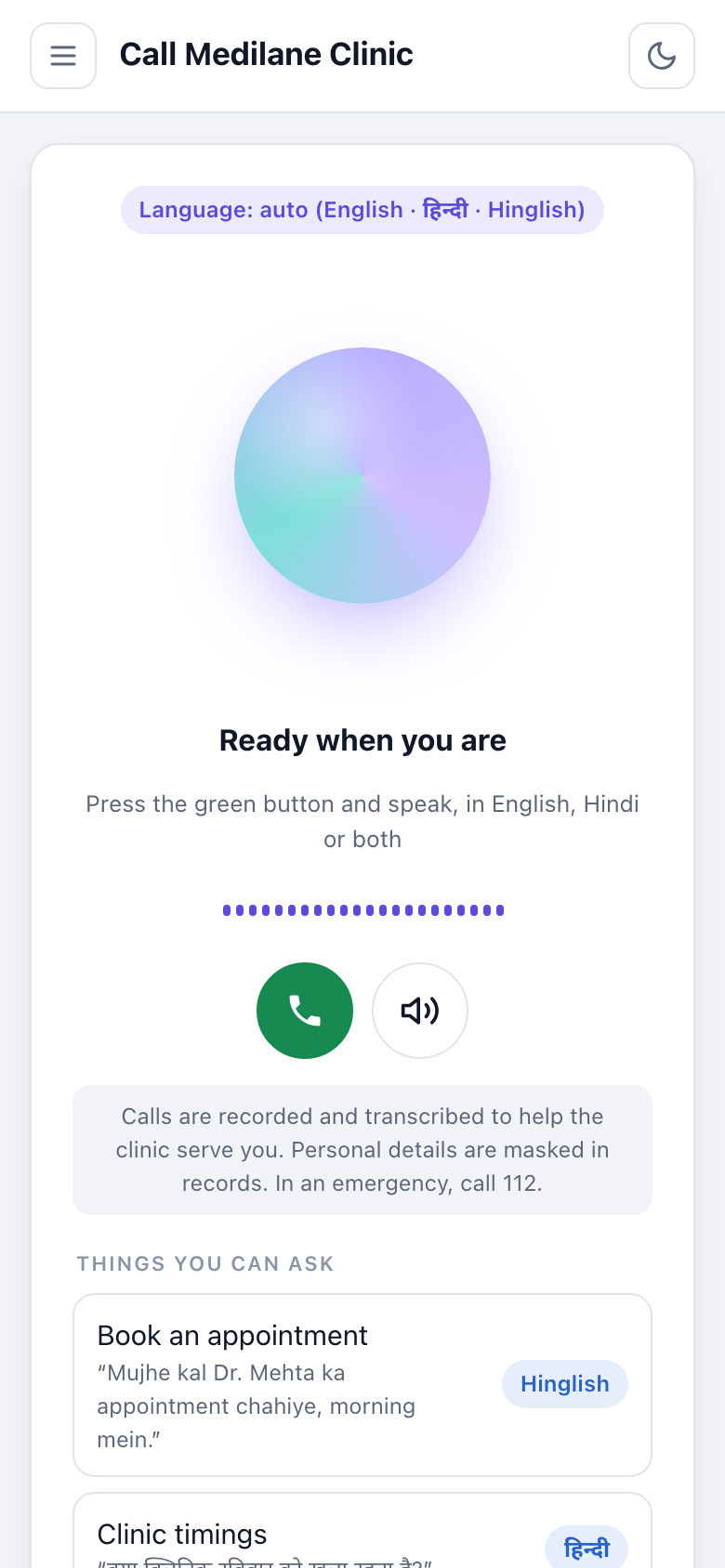
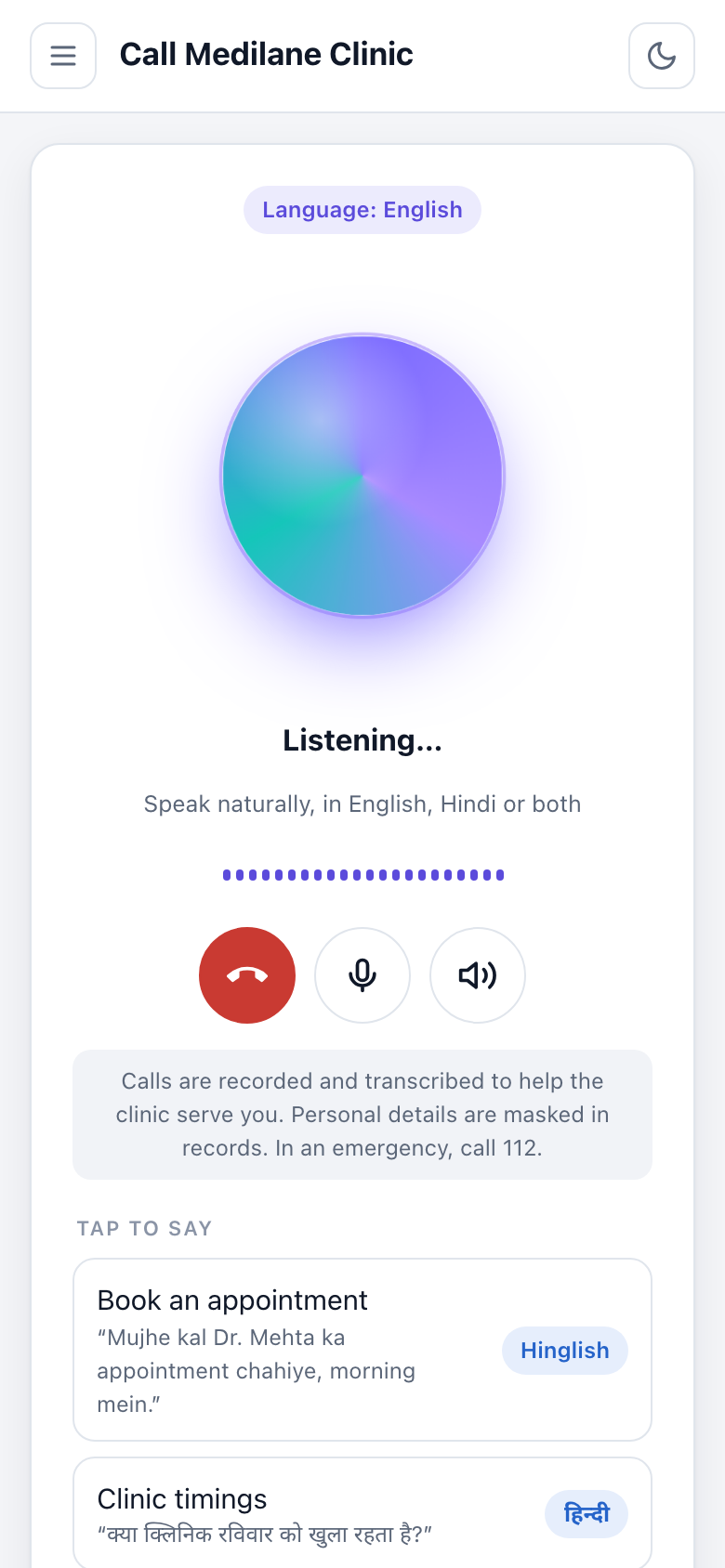
The same page at phone width: before a call, and during one, with the language badge switched to English, the receptionist listening, and the hang-up, microphone and speaker buttons. The same React page fits the narrow screen (Module 19).
6. The front desk
The front desk signs in at /staff/login. Here the signed-in user is Asha Pillai, with the front_desk role.
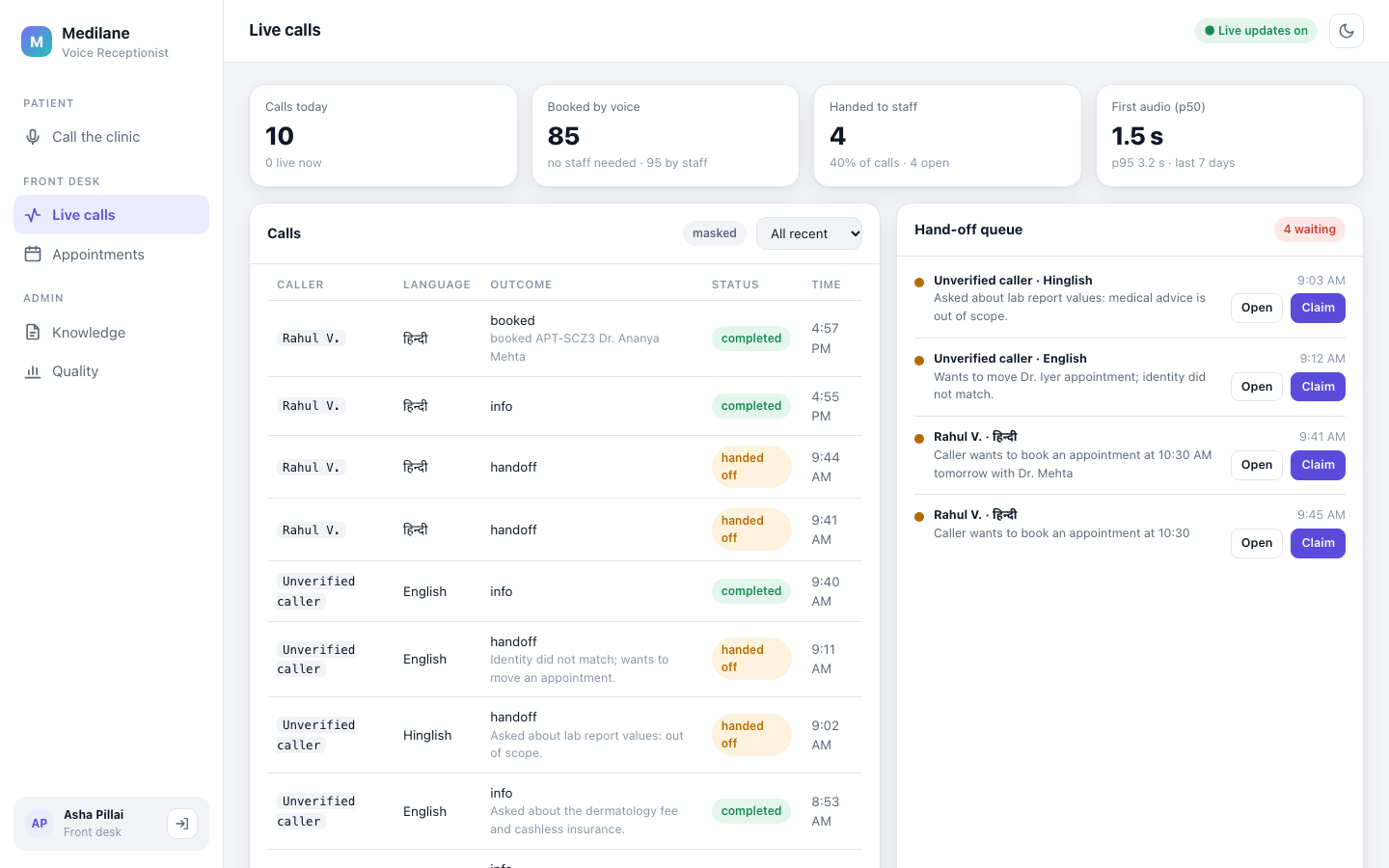
Live calls. The counters: 10 calls today, 85 bookings by voice and 95 by staff, 4 calls handed to staff, and first audio 1.5 s at the median (3.2 s at p95) over the last 7 days. The call list shows each caller's language and outcome; Rahul's booking, APT-SCZ3 with Dr. Ananya Mehta, is at the top. Unverified callers are never named, and the list is labelled "masked". On the right, 4 hand-offs wait: an unverified Hinglish caller who asked about lab report values (medical advice is out of scope), an English caller whose identity did not match, and two of Rahul's calls from that morning, when the models had run out (step 8), asking for 10:30 with Dr. Mehta. Staff can open or claim each one. Updates arrive live over a server-sent event stream for the front desk, without a page reload (Module 18).
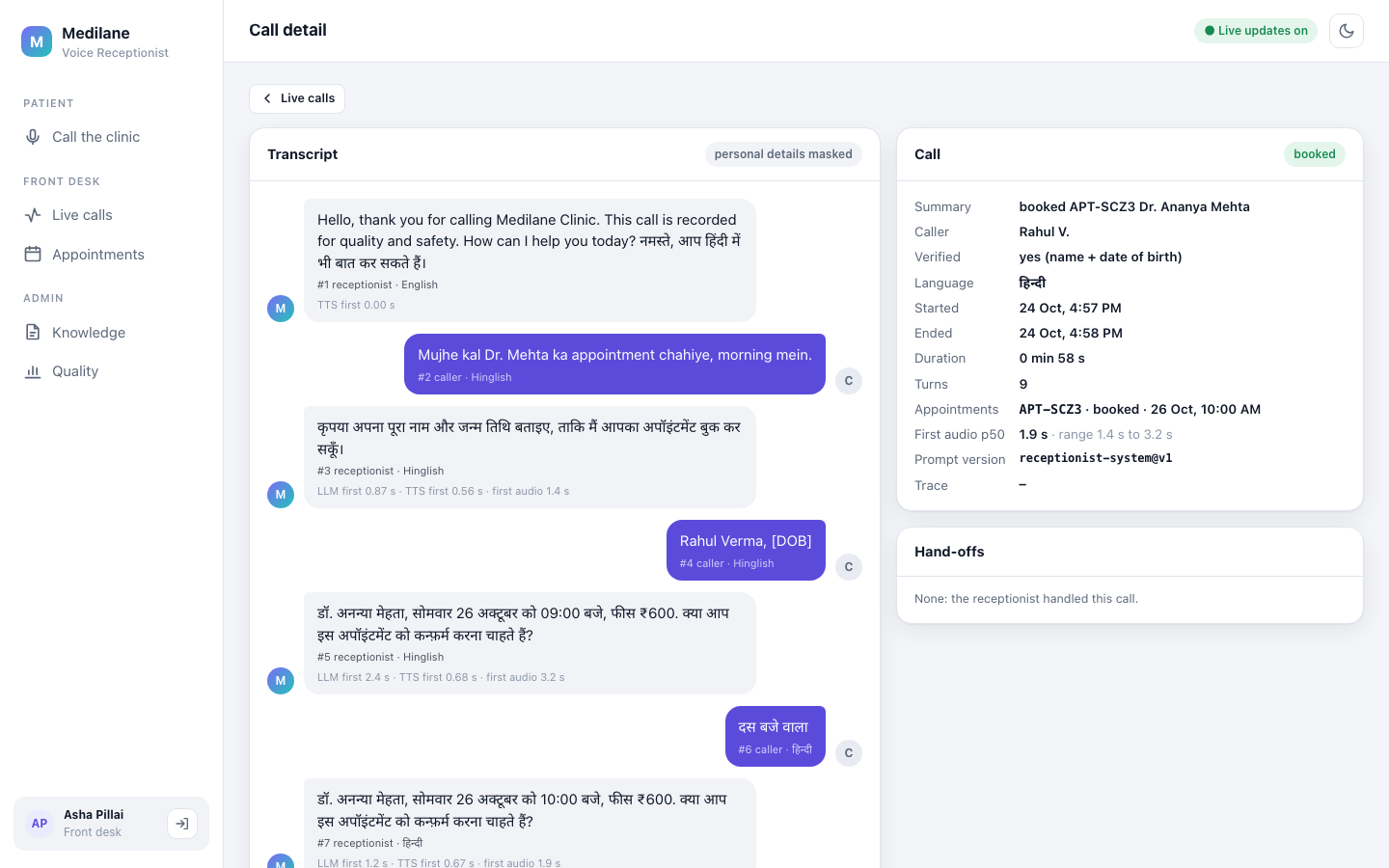
Opening Rahul's call. The transcript is masked: his date of birth shows as [DOB]. Each receptionist turn lists its timings; the 09:00 read-back reached him 3.2 s after he finished, the 10:00 one after "दस बजे वाला" 1.9 s. The panel on the right sums up the call: booked APT-SCZ3 with Dr. Ananya Mehta for 26 Oct at 10:00 AM, verified by name and date of birth, Hindi, 58 seconds, 9 turns, first audio 1.9 s at the median (1.4 to 3.2 s), prompt version receptionist-system@v1, and no hand-offs: the receptionist handled this call alone, so the front desk had nothing to do (Module 18).
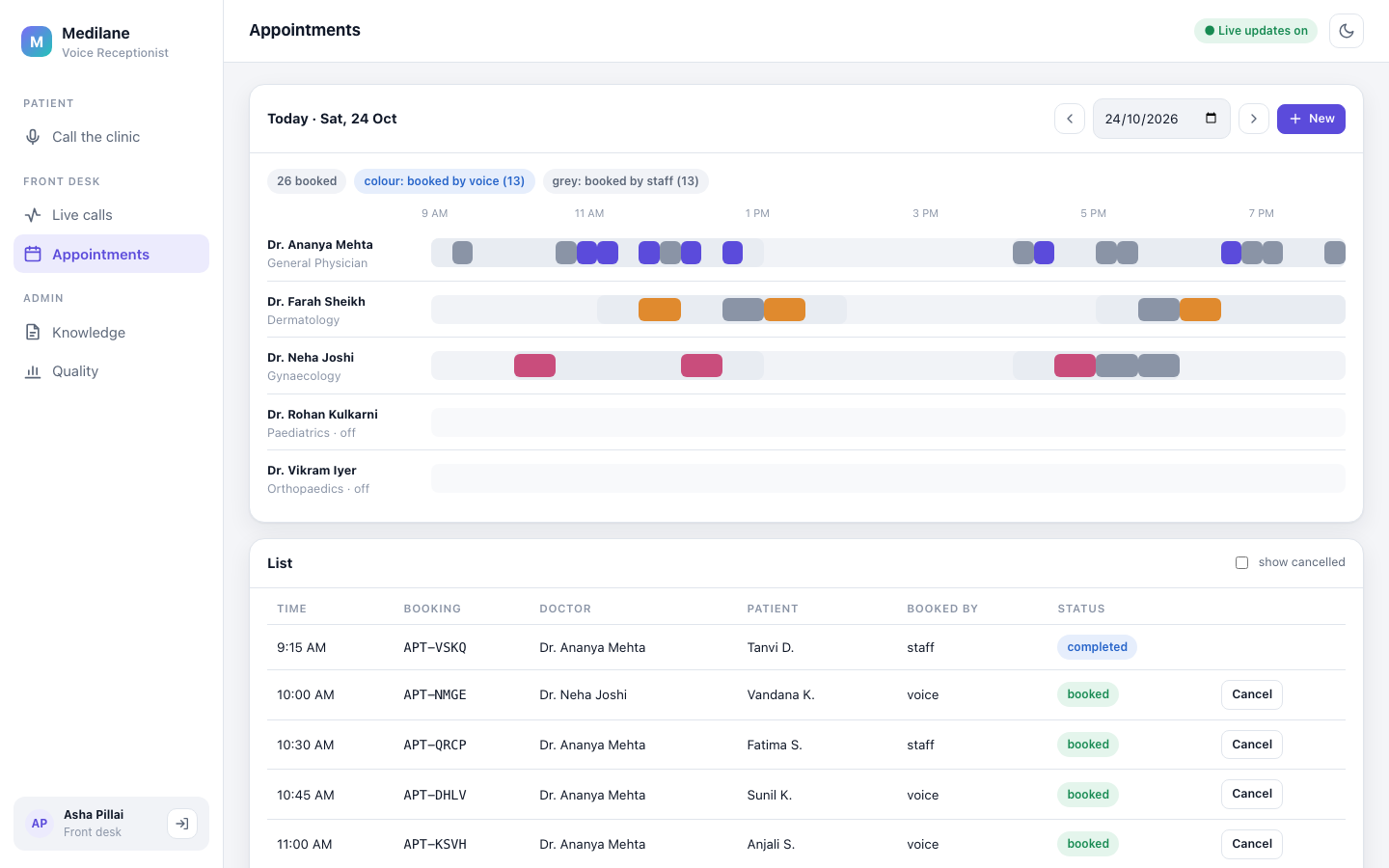
Appointments for Saturday 24 October: 26 booked, 13 by voice (coloured) and 13 by staff (grey). Dr. Kulkarni and Dr. Iyer are off on Saturdays. Staff can add or cancel bookings by hand; the same safe booking code runs for them and for the receptionist (Module 7).
7. The admin side
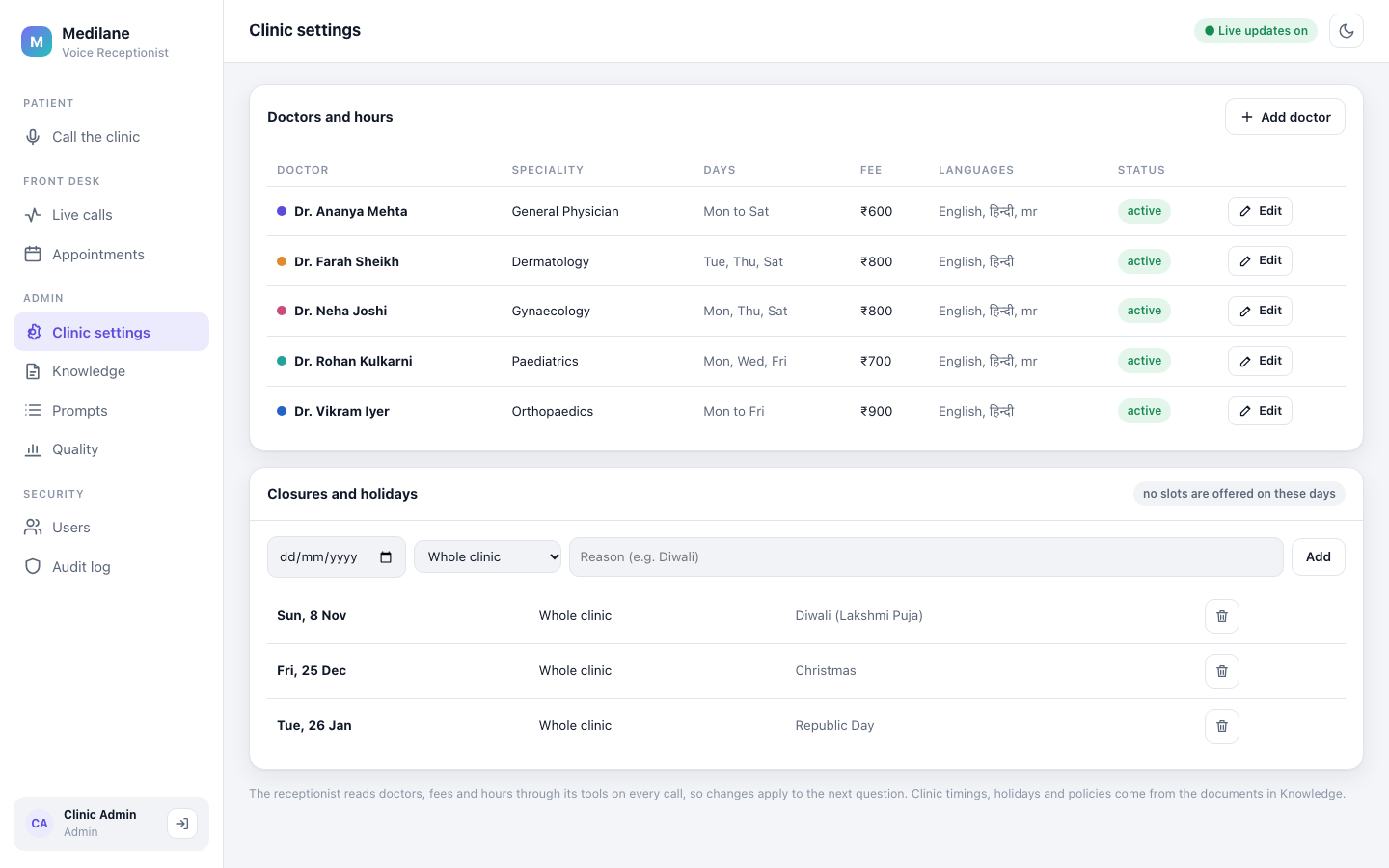
Clinic settings: the five doctors with their days and fees, and the holidays (Diwali, Christmas, Republic Day) on which no slots are offered. The note at the bottom says it plainly: the receptionist reads doctors, fees and hours through its tools on every call, so a change applies to the next question (Module 7).
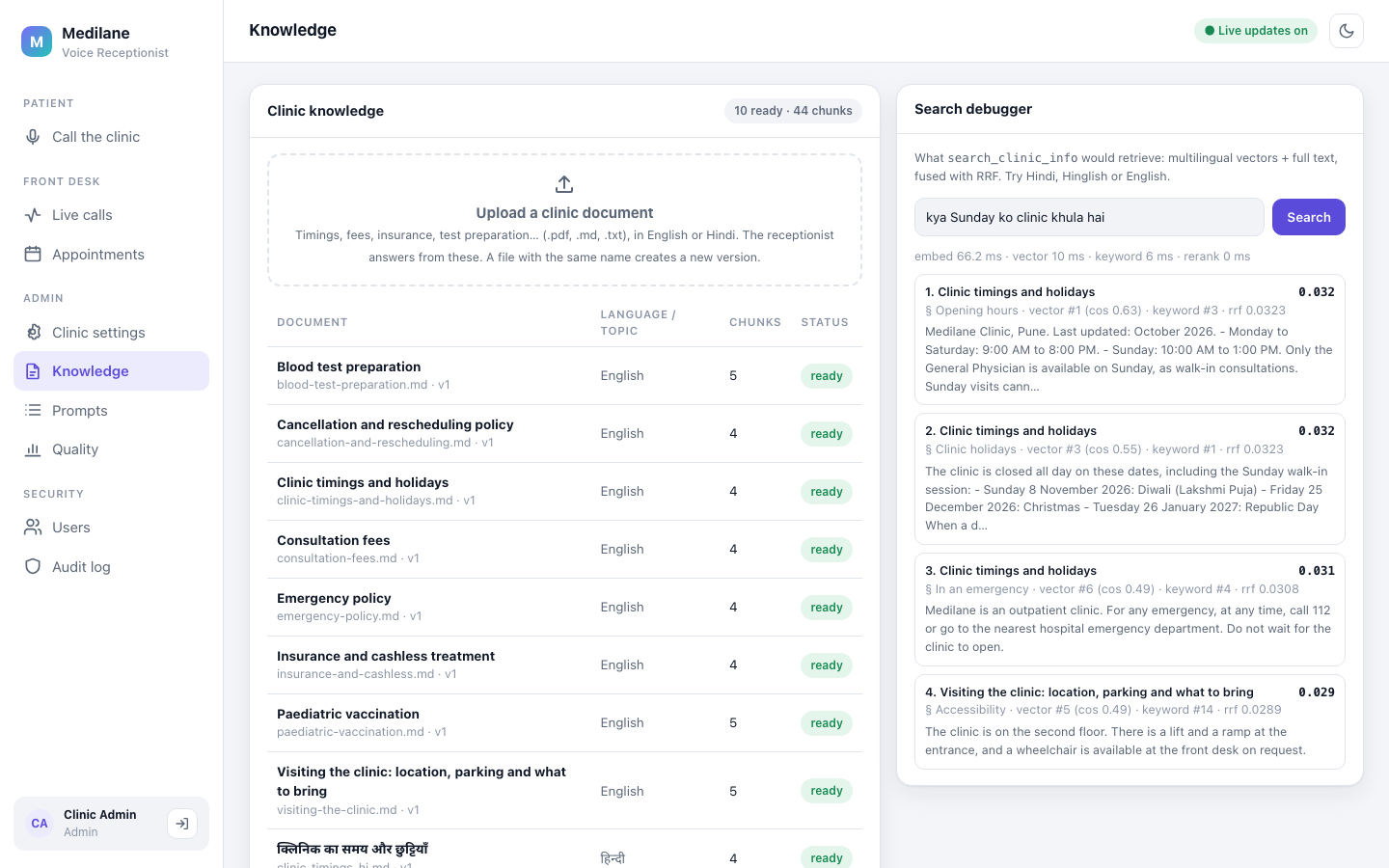
Knowledge: ten documents, ready, split into 44 chunks. An admin can upload a new one in English or Hindi. The search debugger shows what the receptionist would find for a question. Here the Hinglish "kya Sunday ko clinic khula hai" finds the "Opening hours" section of the timings document first, with its vector rank, keyword rank and fused score (Module 12).
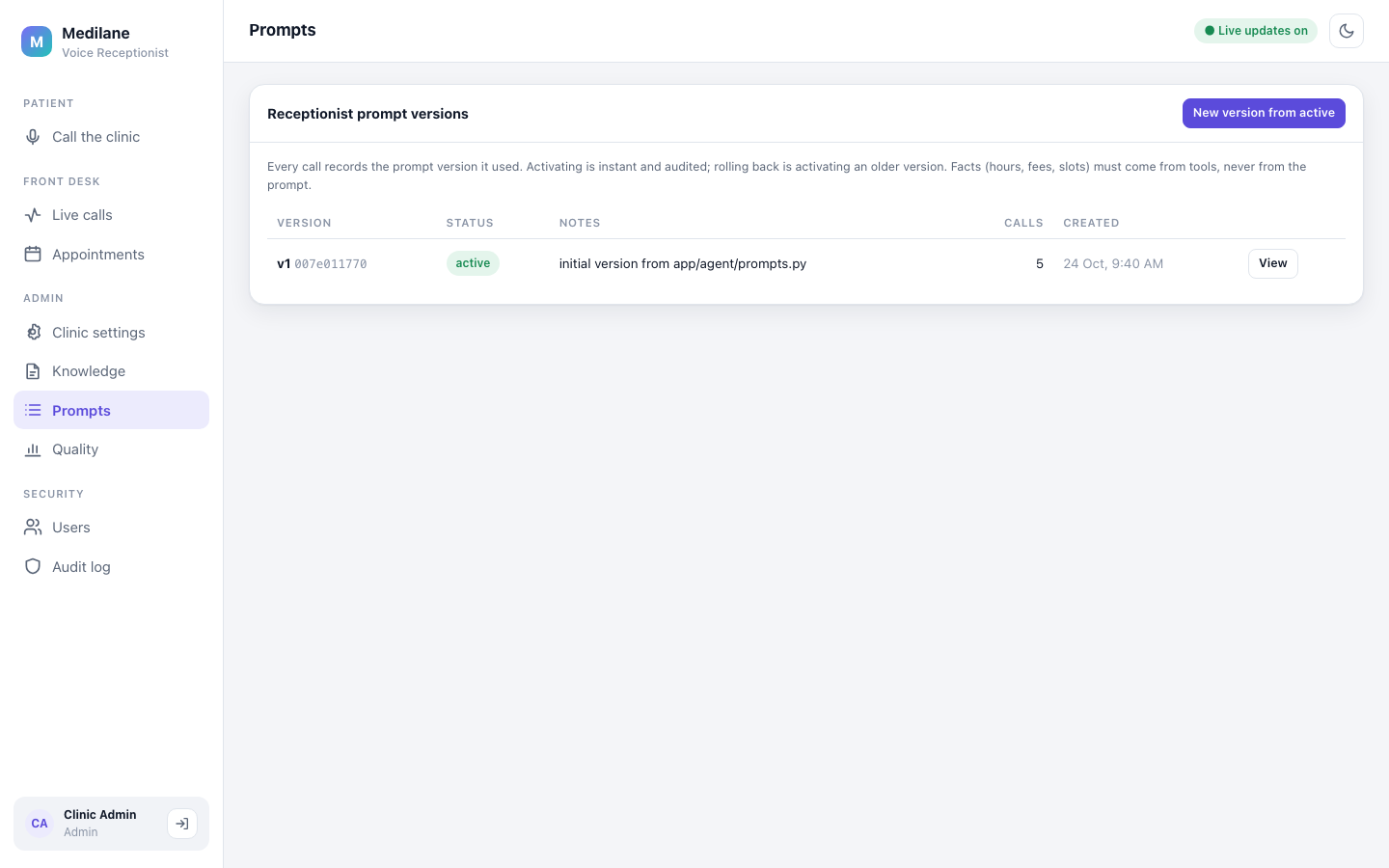
Prompts. The receptionist's instructions are versioned; here v1 is active and 5 calls have used it. Every call records the version it used, activating a version is audited, and rolling back means activating an older one. Facts such as hours, fees and slots must come from tools, never from the prompt (Module 16).
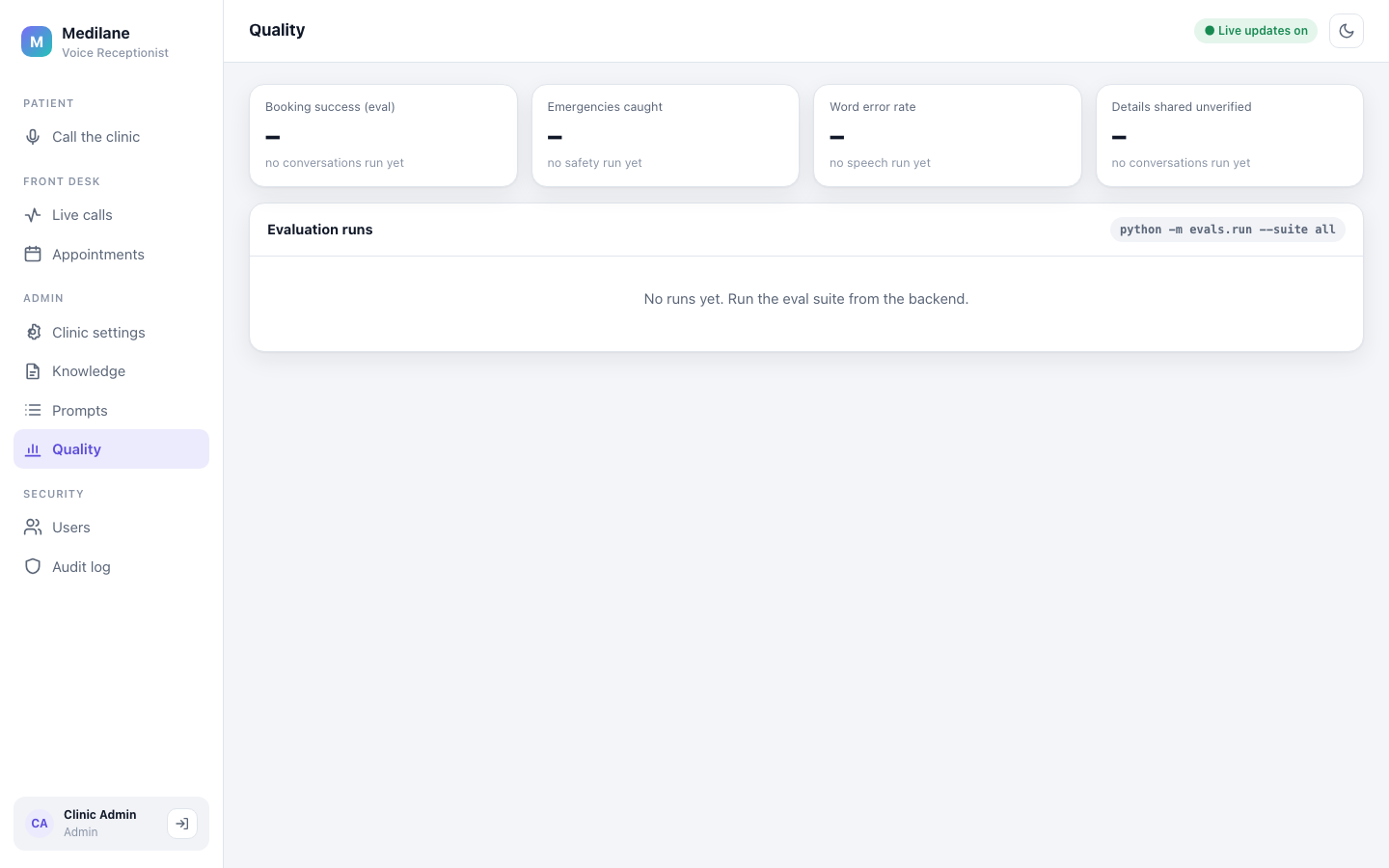
Quality: the evaluation runs stored in this database. It is a fresh one, so the four tiles (booking success, emergencies caught, word error rate, details shared unverified) show dashes and the page names the command that fills it, python -m evals.run --suite all. The results of the runs so far are in the table below and in Module 17.
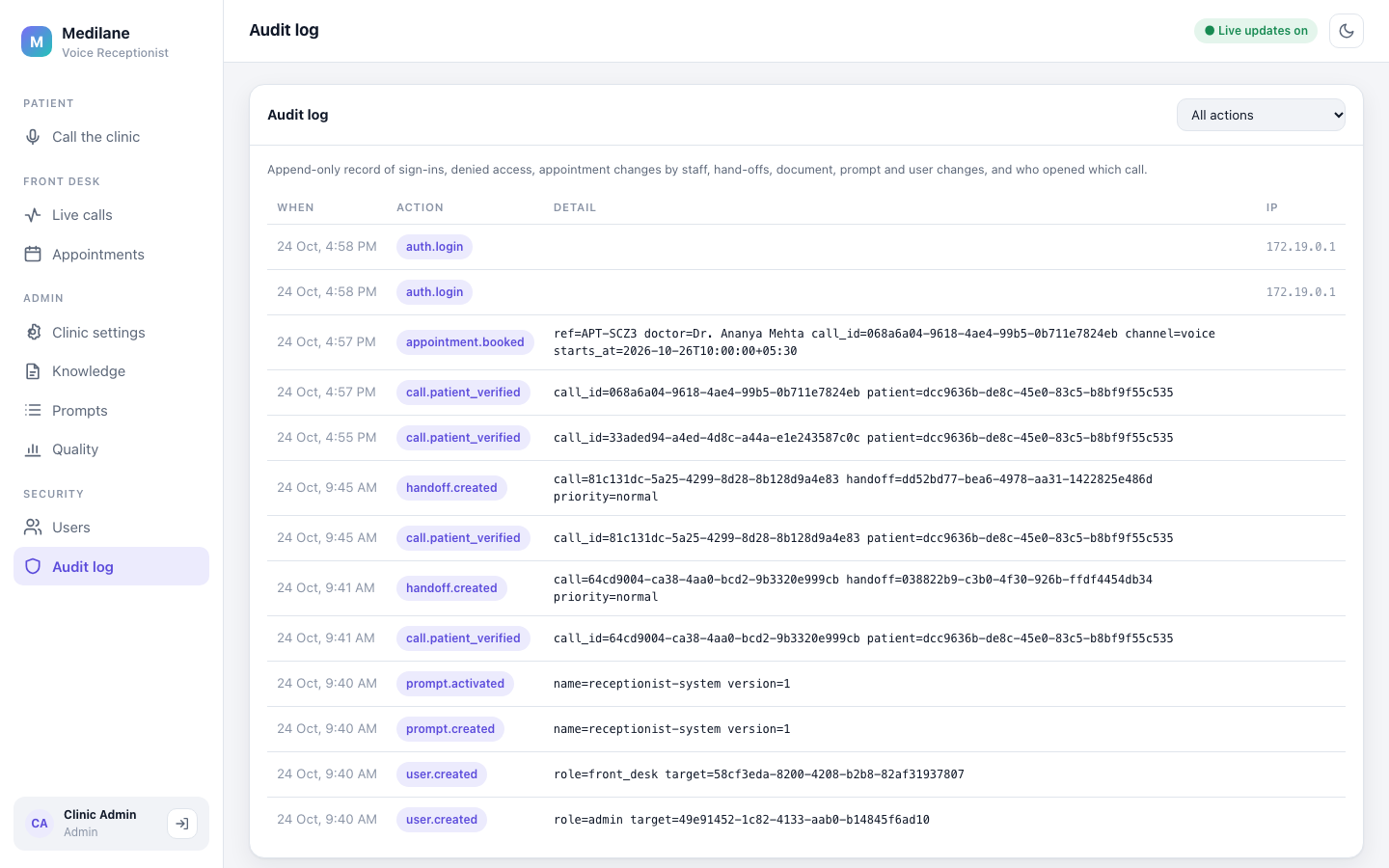
The audit log: an append-only record of sign-ins, bookings, verifications, hand-offs, prompt changes and new users. The appointment.booked row is Rahul's booking APT-SCZ3 with Dr. Ananya Mehta, starting 26 October at 10:00 India time (+05:30). Patients appear as IDs, never as names or dates of birth. Sign-ins and the audit log are Module 6.
8. When the models run out
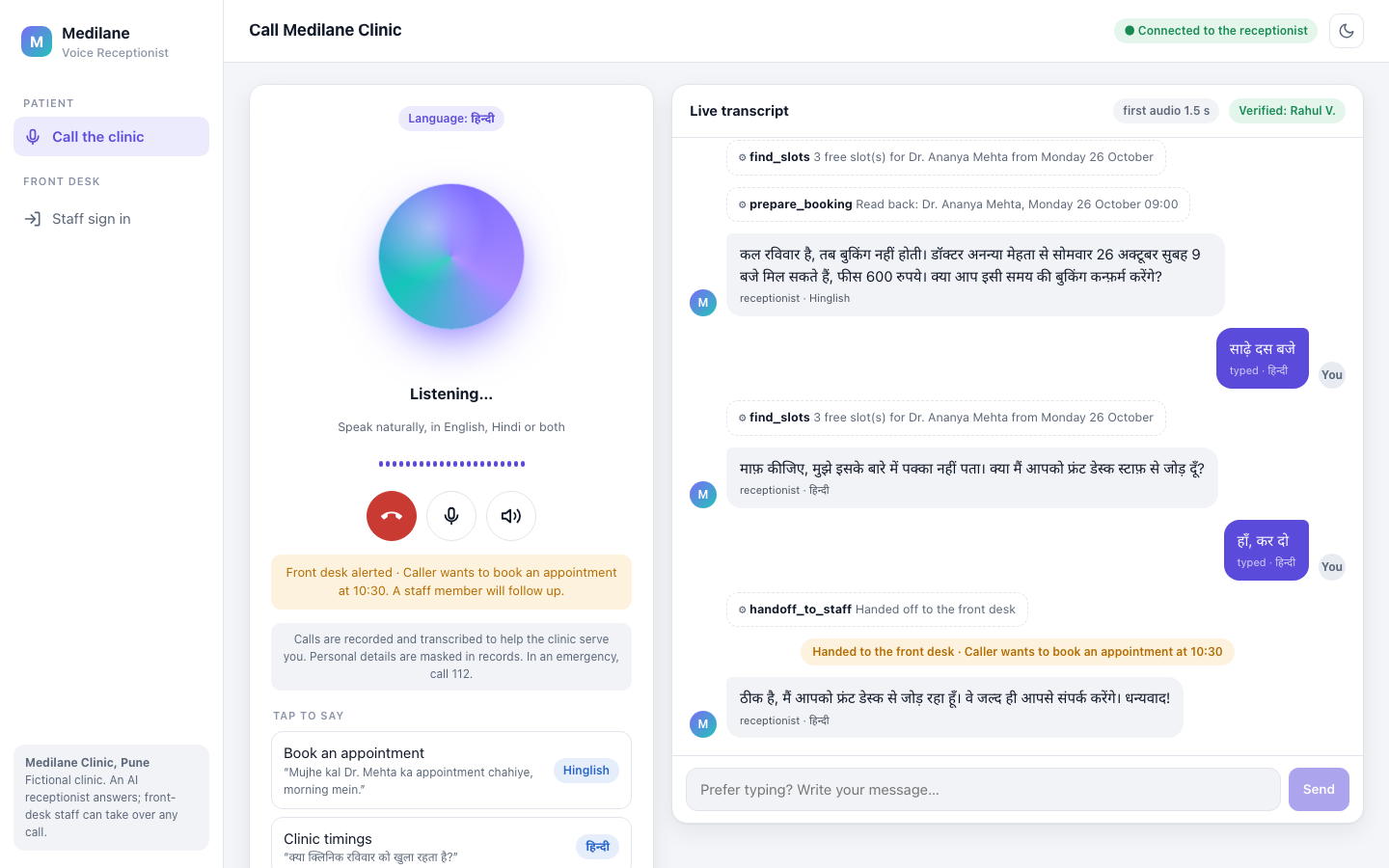
An honest failure. During testing, the large model used up its free daily quota on Groq and the fallback model hit its per-minute limit. Rahul had heard a read-back for 09:00 and asked for "साढ़े दस बजे" (half past ten). With no model able to answer, the receptionist did not guess: it said it was not sure and offered the front desk. His "हाँ, कर दो" answered that offer, so handoff_to_staff ran, not a booking. The front desk was alerted that the caller wants an appointment at 10:30. The new slot search had already cancelled the 09:00 read-back, so a yes could never book it. The fallback model is Module 16; the confirm rule is Module 11.
9. Behind one turn
Every turn records how long each stage took: speech to text, the model's first words, the first spoken sentence, and the first audio the caller hears. These are real turns from live calls through the Docker stack.
What is inside
| Part | What it does | Module |
|---|---|---|
| The problem and the solution | why a clinic phone line needs this, and the listen, think, act, speak loop | 1, 2 |
| Design | model and infrastructure choices, the high-level and the low-level design | 3, 4, 5 |
| Sign-in and voice sessions | staff passwords, roles, two-step codes, short-lived single-use call tokens | 6 |
| Clinic and booking | doctors, slots in Asia/Kolkata time, bookings that never double-book | 7 |
| Listening | voice activity detection, Whisper speech to text | 8, 9 |
| Languages | English, Hindi and Hinglish, scripts, text made ready for speech | 10 |
| The agent | a LangGraph graph with clinic tools, identity checks and confirm-before-change | 11 |
| Clinic knowledge | multilingual search over the clinic documents, searched before speaking | 12 |
| Speaking | Kokoro text to speech, sentence by sentence, on the CPU | 13 |
| The live call | streaming both ways, barge-in, reconnects | 14 |
| Safety | emergency rules, scope limits, injection checks, Indian personal-data masking | 15 |
| Models and prompts | rule routing, a fallback model, free-tier limits, prompt versions | 16 |
| Evaluation | conversation, safety, language, retrieval, speech and latency suites with a release gate | 17 |
| Watching calls | traces, metrics, the live front-desk stream, masked transcripts | 18 |
| Frontend | the call page and the staff app | 19 |
| Containers | one command runs the whole stack locally | 20 |
| Cloud | Google Cloud with Terraform, keyless CI/CD | 21 |
Three things are not part of this project, and the modules say so where it matters: a real phone line (callers use the browser), tests with real human callers (all test audio is synthetic voices), and a deploy that was actually run on Google Cloud (the Terraform validates, but it was never applied).
Results in numbers
Measured on 23 and 24 October 2026 with the evaluation suites; Module 17 explains every formula and lists every run, including the failed ones.
| What was measured | Result | Pass mark |
|---|---|---|
| 33 scripted calls in three languages (code around the model) | all correct, 0 disclosures before verification, 0 changes without a yes | 0.85 correct, 0 slips |
| 11 calls with the real gpt-oss-120b (large tier) | 11 of 11 correct; gpt-oss-20b managed 6 of 11 | 0.85 |
| 12 real replies in three languages, right script (gpt-oss-120b) | 12 of 12 on 24 October, after a fix (11 of 12 the day before) | 95% |
| 26 emergencies and 18 look-alikes | all 26 caught, 0 false alarms | every emergency, at most 10% false alarms |
| 33 clinic questions, right section in the top 3 | 97% (MRR 0.831) | 85% |
| Whisper on 25 synthetic clips | word error rate 2.0% (Hindi 4.0%) | 8% English, 15% Hindi and Hinglish |
| Silence to first audio, real agent, 4 turns | median 2.1 s, slowest 2.8 s | 2.5 s and 4 s |
The tech stack
| Layer | Choice |
|---|---|
| Frontend | React, TypeScript, Vite, served by nginx; an AudioWorklet microphone at 16 kHz and 24 kHz playback |
| API | Python, FastAPI with one WebSocket per call, SQLAlchemy, Alembic |
| Data | PostgreSQL 17 with pgvector and full-text search, Redis |
| Listening | Silero VAD on the CPU; Whisper large-v3 on Groq |
| Thinking | LangGraph; open models on Groq: gpt-oss-20b (small), gpt-oss-120b (large), Qwen 3.8 27B (fallback) |
| Speaking | Kokoro-82M on the CPU, an English and a Hindi voice |
| Retrieval | a multilingual MiniLM embedding model, keyword search, fused by RRF |
| Quality and safety | emergency rules before any model, Prompt Guard 2, a central personal-data masker, evaluation suites with a release gate |
| Observability | Langfuse traces, Prometheus metrics, a live event stream for the front desk |
| Delivery | Docker Compose locally; Cloud Run, Cloud SQL, Memorystore and Terraform on Google Cloud; GitHub Actions |
Run it yourself
You need Docker Desktop and one free API key from Groq, which runs both Whisper and the language models. Create it at console.groq.com (sign in, API Keys, Create API Key; it is shown only once). Langfuse keys are optional, for tracing. Copy .env.example to .env and paste the keys there, never into code:
GROQ_API_KEY=gsk_****
LANGFUSE_PUBLIC_KEY=pk-lf-****     # optional
LANGFUSE_SECRET_KEY=sk-lf-****     # optional
What you should see
Nothing yet: the file only holds settings, and git ignores it. Then one command starts everything:
cd source-code
docker compose up -d --build
docker compose ps
What you should see
The first build downloads the voice and embedding models and bakes them into the image, so it takes a while. When docker compose ps shows the api and web services as healthy, open http://localhost:8090, allow the microphone and press the green button. Say you are Rahul Verma, born 12 March 1988, and ask for an appointment with Dr. Mehta. Staff sign in at http://localhost:8090/staff/login as frontdesk@medilane.local (password FrontDesk-Demo-2026) or admin@medilane.local (password ChangeMe-Admin-2026). These are published demo passwords; set SEED_FRONTDESK_PASSWORD and SEED_ADMIN_PASSWORD before the first start for anything public. Module 20 explains every container, and Module 21 puts the same system on Google Cloud.
Where to go next
Read the modules in order. Module 1 starts with the problem a clinic phone line has, and each module after it opens one box of the system map at the top of this page.