When building an AI application, one question appears again and again:
Can the language model answer the user, or does it need to do something in the real world?
An AI agent becomes useful when the system needs to retrieve information, choose an action, use a tool, inspect the result, and continue until the task is complete.
The important point is that an agent is not simply a smarter chatbot. It is a system around a model. The model provides language understanding and decision making, while tools, state, permissions, validation, and stopping rules control what the system can actually do.
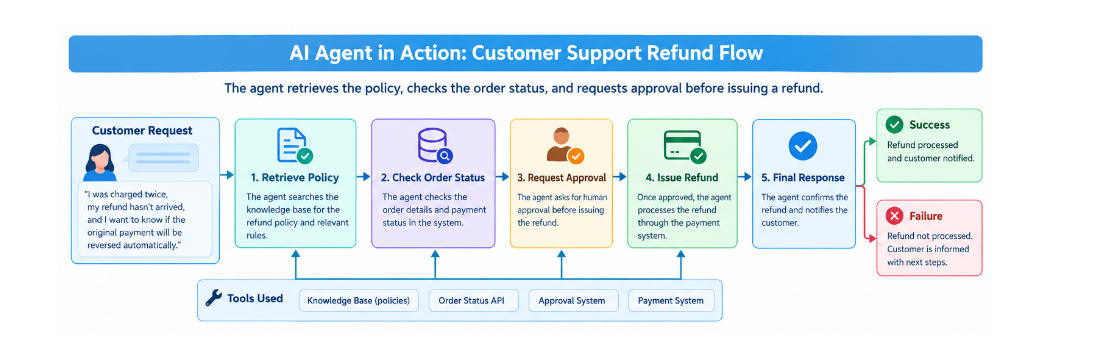
This article uses one practical example throughout: a customer asks for a refund. The support agent retrieves the refund policy, checks the order status, requests human approval, and only then simulates the refund.
1. What is an AI agent?
An AI agent is a system where a language model helps decide the next step needed to reach a goal. The next step may be answering the user, retrieving information, calling an API, asking for clarification, requesting approval, or stopping because the task cannot safely continue.
The key difference is control of the next action. A normal chatbot may generate an answer immediately. An agent can observe tool results and decide what should happen next.
For example, a customer says, “I want a refund for order ORD 1234.” The agent does not simply say that refunds are possible. It retrieves the current policy, checks the actual order, evaluates the rules, and asks for approval before the refund action.
This matters because the model should not invent facts that belong to external systems. The order database should provide the order status. The policy system should provide the refund rules. The agent coordinates those sources.
2. Chatbots versus workflows versus agents
A chatbot mainly produces a conversational response. It is useful when the user needs information, explanation, brainstorming, or simple assistance.
A workflow follows a predefined sequence. For example: check order, check policy, request approval, issue refund.
An agent can choose the next step based on what it observes. If the order does not exist, it may ask for the correct order number. If the order is still processing, it can explain why a refund cannot be issued. If the policy information is unavailable, it can stop instead of guessing.
The trade off is important. Workflows are more predictable. Agents are more flexible but introduce more uncertainty, latency, and cost. If the process is already predictable, an agent may be unnecessary.
3. When should you use an agent?
Use an agent when the task has meaningful uncertainty or several possible paths.
A customer support agent is a good example because different requests require different actions. One customer may only need the refund policy. Another may need an order lookup. A third may need escalation.
Other real world examples include a coding agent that investigates a failing test and chooses which files to inspect, a research agent that searches several approved sources and decides which evidence is relevant, and an operations agent that checks current inventory before deciding whether to create a replenishment request.
Do not use an agent when ordinary code can solve the task more reliably. A fixed monthly report, a deterministic data transformation, or a simple validation rule usually does not need model driven decision making.
A good decision rule is simple: use the least complex architecture that reliably solves the problem.
4. Core components
A useful mental model is to think of an agent as seven connected parts.
- Model. Understands the request and helps decide the next action.
- Instructions. Define the goal, rules, allowed behavior, and boundaries.
- Tools. Provide access to external data and actions.
- State. Stores information about the current task.
- Memory. Stores useful information that may remain relevant across interactions.
- Execution loop. Repeatedly connects model decisions with tool execution.
- Stopping conditions. Define when the system must finish, stop, retry, or ask for human help.
For the refund example, state might contain the order number, policy result, order result, approval result, number of steps, and final status.
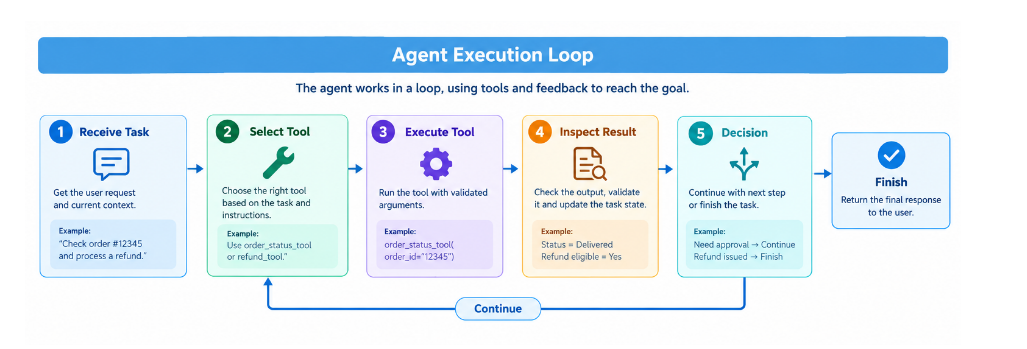
5. How the agent execution loop works
The execution loop is the heart of an agent.
Receive task → understand goal → select tool → validate arguments → execute tool → inspect result → decide next step → finish or continue
A bounded loop is essential. Without a step limit, a temporary service failure or repeated tool selection could create an expensive loop.
MAX_STEPS = 6

for step in range(MAX_STEPS):
    action = choose_next_action(state)

    if action == "finish":
        break

    result = run_validated_tool(action, state)
    state["history"].append(result)
else:
    state["status"] = "stopped_step_limit"
6. Tool calling and argument schemas
Tool calling allows the model to request a function in a structured way. The model does not directly receive unrestricted access to your database or payment system. Your application validates the request and then executes the permitted function.
from pydantic import BaseModel, Field

class OrderInput(BaseModel):
    order_id: str = Field(pattern=r"^ORD-\d{4}$")

def check_order(data: OrderInput):
    return {
        "ok": True,
        "order_id": data.order_id,
        "status": "delivered",
        "amount": 49.99
    }
7. Designing reliable tools
A good tool should have a clear purpose, predictable inputs, predictable outputs, useful errors, a timeout, and safe retry behavior.
For example, check order status should only read order information. A separate issue refund tool should perform the write action.
There is a trade off. More narrowly defined tools can be safer and easier to test, but too many similar tools can make tool selection harder.
8. State and memory
State describes what is happening in the current task. Memory describes information that may remain useful beyond the current step or conversation.
For the support agent, current state might contain the order ID and the result of the policy lookup. Long term memory might contain a customer preference such as receiving updates by email.
Memory should not replace authoritative data. If the customer remembers that an order was delivered, the agent should still check the order system before issuing a refund
9. Planning and task decomposition
Planning means breaking a goal into smaller actions and tracking progress.
Get refund policy → check order → evaluate eligibility → request approval → simulate refund
If a tool fails, the plan may need to change. A temporary order service failure might allow one retry. A missing order should not trigger endless retries.
Planning improves visibility, but it also adds model calls, tokens, and latency.
10. Single agent versus multi agent systems
Start with one agent unless there is a clear reason to add more.
A single support agent can retrieve policy, check order status, and manage the approval process.
A multi agent system becomes useful when responsibilities are genuinely different. For example, a research agent could gather evidence while a compliance agent checks whether the evidence satisfies policy requirements.
The trade off is coordination cost. Multiple agents create additional prompts, state handoffs, failure points, and debugging work.
11. Permissions and human approval
Reading information and changing information should be treated differently.
The support agent can usually read the refund policy and order status automatically. Issuing a refund is a consequential action, so the system can require human approval before it happens.
def request_approval(order_id, amount):
    return {
        "approved": True,
        "approver": "support_manager"
    }

approval = request_approval("ORD-1234", 49.99)

if approval["approved"]:
    result = {"ok": True, "refund": "simulated"}
else:
    result = {"ok": False, "refund": "not_approved"}
12. Failure handling and stopping conditions
A production agent needs clear failure behavior.
Consider this failed run:
The agent retrieves the policy successfully. The order service returns a temporary error. The agent retries once. The second attempt fails again. The agent stops and tells the customer that the order system is temporarily unavailable.
It should not invent an order status. It should not keep retrying forever. It should not issue a refund without confirming eligibility.
Useful stopping conditions include task completion, maximum steps, maximum retries, unavailable services, repeated tool calls, token limits, cost limits, and the need for human intervention.
13. How to measure agent performance
An agent should be measured as a system, not only by how natural its final answer sounds.
- Task success rate
- Tool call validity
- Average step count
- Latency
- Cost per successful task
- Unnecessary actions
If 92 of 100 refund related tasks are completed correctly, the task success rate is 92 percent.
Real evaluation should include normal requests, ambiguous requests, missing data, service failures, and requests that require escalation.
14. Direct SDK, LangChain, and LangGraph
Direct SDK implementation gives you the most control. You write the model call, tool definitions, validation, state, execution loop, and approval logic yourself.
LangChain provides higher level abstractions and integrations for models, tools, and agent loops.
LangGraph focuses on orchestration. Its current documentation describes it as a low level orchestration framework and runtime for long running, stateful agents. It is designed to mix deterministic code with model driven steps and provides capabilities such as durable execution, persistence, and human in the loop.
A practical rule is: start with direct code to understand the loop, use LangChain when higher level abstractions help, and consider LangGraph when stateful branching, persistence, long running execution, or human checkpoints become important.
15. Practical Python walkthrough
The example uses mock data. It does not call a real payment system.
Setup:
python -m venv .venv
# Windows
.venv\Scriptsctivate
pip install pydantic
Mock data and tools:
ORDERS = {
    "ORD-1234": {
        "status": "delivered",
        "amount": 49.99,
        "days_since_delivery": 10
    },
    "ORD-9999": {
        "status": "processing",
        "amount": 75.00,
        "days_since_delivery": 2
    }
}

POLICY = {
    "refund_window_days": 30,
    "requires_approval": True
}

def get_policy():
    return {"ok": True, "data": POLICY}

def check_order(order_id):
    if order_id not in ORDERS:
        return {"ok": False, "error": "NOT_FOUND"}

    return {"ok": True, "data": ORDERS[order_id]}

def eligible(order, policy):
    return (
        order["status"] == "delivered"
        and order["days_since_delivery"]
        <= policy["refund_window_days"]
    )

def run_refund(order_id, approved=True):
    policy = get_policy()
    order = check_order(order_id)

    if not order["ok"]:
        return {"success": False, "reason": order["error"]}

    if not eligible(order["data"], policy["data"]):
        return {"success": False, "reason": "NOT_ELIGIBLE"}

    if not approved:
        return {"success": False, "reason": "NOT_APPROVED"}

    return {"success": True, "reason": "REFUND_SIMULATED"}
Successful run:
run_refund("ORD-1234")

{
    "success": True,
    "reason": "REFUND_SIMULATED"
}
Failed run:
run_refund("ORD-9999")

{
    "success": False,
    "reason": "NOT_ELIGIBLE"
}
16. Common mistakes
- Using an agent for a task that a normal workflow already solves.
- Giving the model broad write permissions.
- Allowing tools to return vague or inconsistent results.
- Retrying forever when a service is unavailable.
- Treating memory as authoritative business data.
- Putting important security controls only in prompts.
- Adding multiple agents without a clear responsibility boundary.
- Measuring only final answer quality.
- Skipping realistic evaluation cases.
- Allowing a model to decide stable business rules that should be enforced in code.
The biggest mistake is treating agent autonomy as reliability.
17. Practical agent building checklist
- Define the task and success condition.
- Check whether a deterministic workflow is enough.
- Give the model only the tools it needs.
- Validate every tool argument.
- Return structured tool results.
- Keep authoritative business rules in trusted systems.
- Track state separately from long term memory.
- Limit retries, steps, tokens, and cost.
- Separate read permissions from write permissions.
- Require human approval for consequential actions when appropriate.
- Test successful and failed scenarios.
- Measure success rate, tool validity, steps, latency, and cost per successful task.
- Start with one agent and add more only when there is a clear benefit.
Final takeaway
The most useful way to think about an AI agent is not as an autonomous chatbot. Think of it as a controlled decision loop around a language model.
The model decides what may be useful next. Tools provide real information or actions. State records progress. Validation protects interfaces. Permissions limit impact. Human approval handles consequential actions. Stopping rules prevent runaway execution. Evaluation tells you whether the system actually works.
The best agent is not the one that does the most. It is the one that reliably completes the right tasks with the least unnecessary complexity.