An AI agent can have a powerful model and still fail at real-world tasks.
Imagine a coding agent asked to Fix the authentication bug in this repository. The model may know how to write code, but it also needs to understand the repository, use the right tools, follow project rules, test its changes, handle failures, and know when to ask for approval.
That surrounding system is the agent harness.
What Is Harness Engineering?
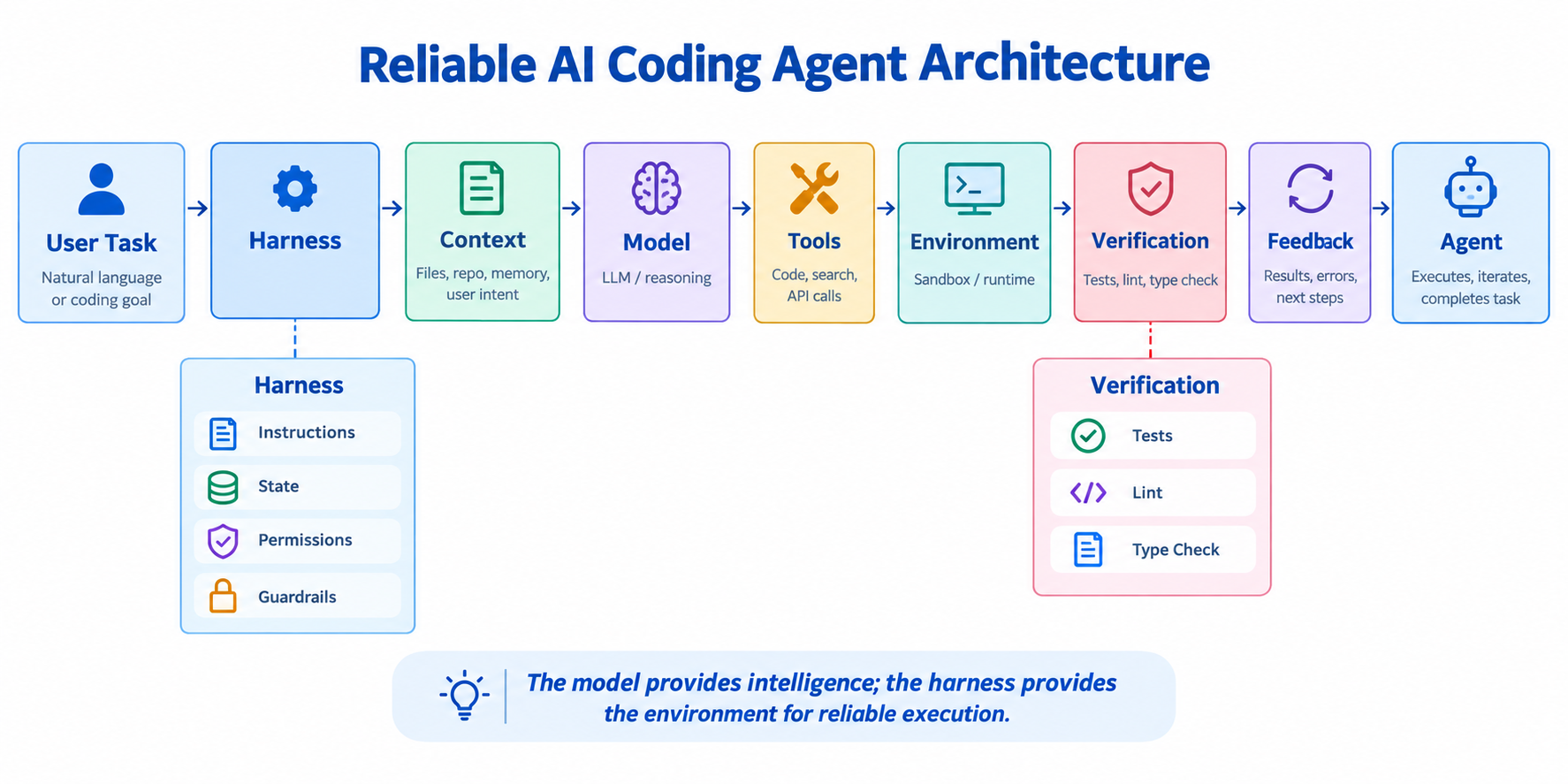
Harness engineering means designing the environment around an AI agent so it can act, verify, recover, and operate safely.
The harness connects the model with:
Context + Tools + Instructions + State + Permissions + Verification + Feedback
Model vs Harness
Think of the model as the reasoning engine and the harness as the working environment.
The model reasons about what to do.
The harness controls what the agent can see, which tools it can use, what rules it follows, and how its work is checked.
A better model can improve reasoning, but a well-engineered harness makes that reasoning useful and controllable.
The Agent Execution Loop
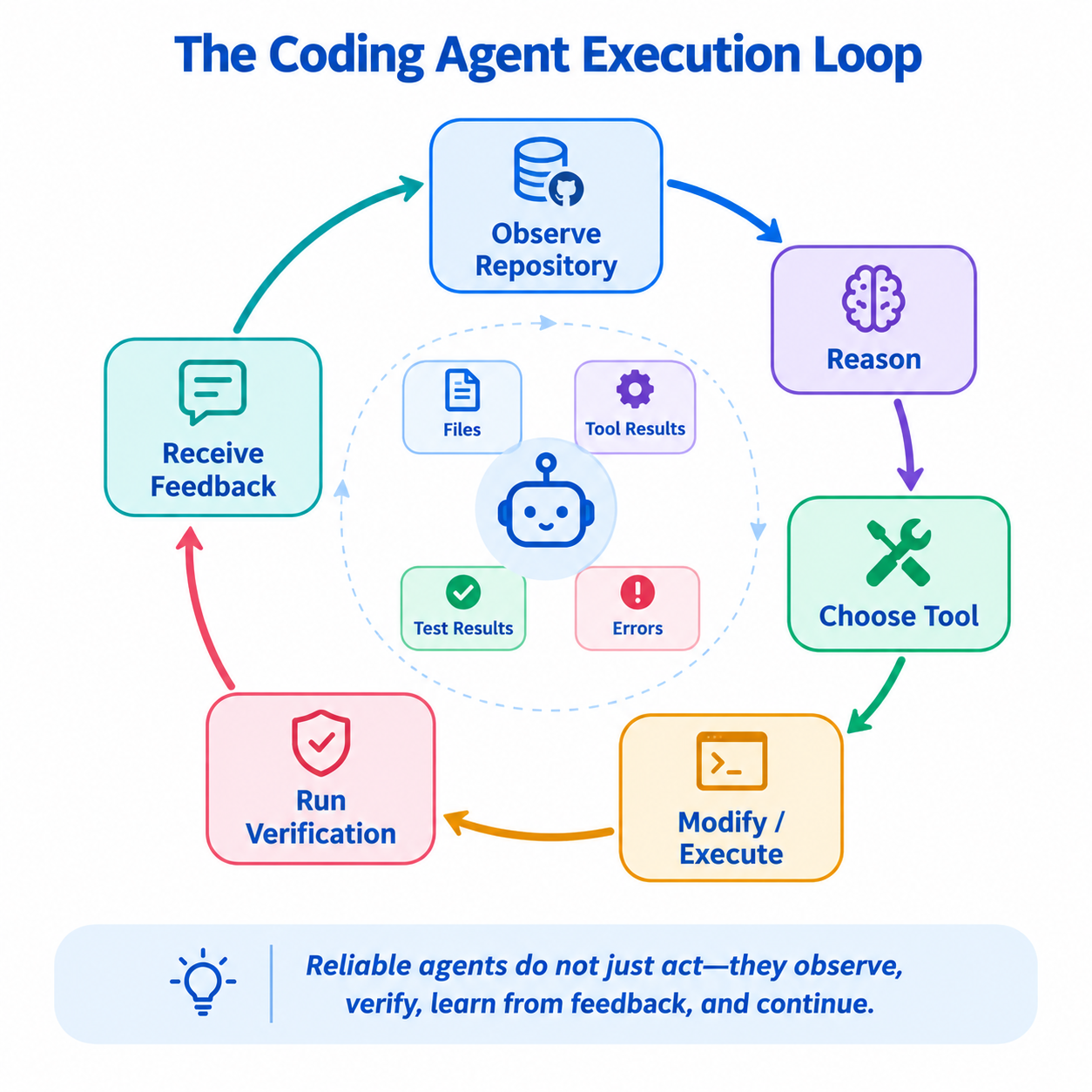
Agents usually work through repeated cycles:
Observe → Reason → Act → Verify → Feedback
For our coding agent:
Understand repository

        ↓

Find relevant code

        ↓

Modify code

        ↓

Run tests

        ↓

Analyze result

        ↓

Fix if necessary
The important part is the feedback. Test results, errors, and tool outputs become new context for the next step.
Context Engineering
Agents need the right context, not simply more context.
For a repository task, useful context might include:
1.Task
2.Repository structure
3.Relevant files
4.Project instructions
5.Previous actions
6.Test results
Sending the entire repository can create noise. Context engineering selects the information needed for the agent's next decision.
The goal is not maximum context. It is relevant context at the right time.
Repository and Project Context
Before changing code, the agent should understand the project.
Useful information includes:
- README
• Project structure
• Dependencies
• Configuration
• Existing tests
• Coding conventions
• Git status
For example, before changing auth.py, the agent may inspect the authentication code, its tests, dependencies, and project instructions.
This reduces the chance of making a change that works technically but does not fit the project.
Tools and Tool Calling
Tools allow the agent to interact with the real environment:
read_file()
search_code()
edit_file()
run_tests()
git_diff()
The model decides which action to take, while the harness controls whether that action is allowed.
The tool result then becomes new information for the agent.
Agent Skills and Instructions
Instructions define how the agent should work.
For example:
Inspect → Modify → Test → Review
A skill can package this workflow for repeated tasks such as debugging, testing, or code review.
The goal is not to give the agent hundreds of rules. It is to provide clear, reusable behavior.
State and Memory
The agent needs state to know what has already happened:
✓ Found authentication bug
✓ Changed validation logic
Run tests
Review diff
Memory can preserve useful information across steps or sessions.
But storing everything can create noise. Good memory is relevant, structured, and controlled.
Guardrails and Permissions
Autonomy needs boundaries.
For example:
Allowed:
✓ Read files
✓ Edit source code
✓ Run tests
Approval required:
! Deploy
! Delete production data
! Change critical infrastructure
This creates a balance between autonomy and control.
Agents should have freedom where exploration is safe and stricter constraints where mistakes are costly.
Verification and Testing
An agent saying “the code is fixed” is not proof.
The harness should verify the result:
pytest
ruff check .
mypy .
Example feedback:
Tests: 47 passed
Lint: passed
Type check: 2 errors
The agent can use that feedback to make another correction.
This turns tests, linting, type checking, and validation into feedback mechanisms, not just final checks.
Observability vs Evaluation
These concepts answer different questions.
Observability:
What happened during execution?
Logs, traces, metrics, tool calls, errors, and latency help explain the agent's behavior.
Evaluation:
Was the result actually correct?
Tests, expected outputs, task success, and quality checks help judge the outcome.
OpenTelemetry can provide standardized telemetry for observing application and agent execution.
So:
Observability explains the journey. Evaluation judges the destination.
Failure Handling and Recovery
Failures are normal in agent systems.
A tool may fail. A test may break. The agent may choose the wrong approach.
A good harness feeds the failure back to the agent:
Failure

   ↓

Capture Error

   ↓

Give Feedback

   ↓

Try Different Action

   ↓

Verify Again
Retries should be bounded.
Three useful attempts may help recovery; unlimited retries can create loops, waste resources, and hide deeper problems.
Human Approval
Not every action should be autonomous.
Low-risk actions such as reading files, editing code, and running tests can often happen automatically.
High-risk actions such as production deployment or destructive operations can require human approval.
The goal is not to remove humans. It is to involve them where judgment and risk matter most.
Production Considerations
A production harness brings everything together:
Context
• Tools
• Instructions
• State
• Permissions
• Verification
• Observability
• Evaluation
• Recovery
• Human Approval
Technologies can support different pieces:
- MCP — a standardized way for AI applications to connect models/agents with external tools and data through MCP servers.
- LangGraph — useful for building structured, stateful agent workflows.
- OpenTelemetry — useful for collecting telemetry such as traces, metrics, and logs.
- Agent coding environments — provide a workspace where an agent can work with repositories, terminals, tools, instructions, and verification.
These technologies are building blocks. The harness is the larger system that connects them around the agent.
The Key Idea
A powerful model can generate an answer.
A well-engineered harness helps an agent complete a task reliably.
The difference is the environment around the model:
Context → Tools → Instructions → State → Constraints → Verification → Feedback → Recovery
That is Harness Engineering:
Not making the model smarter alone, but engineering the environment that makes its intelligence reliable, controllable, and useful.