When building an AI application, one of the first questions teams often ask is:
Should we use a large language model or a small language model?
The better question is:
What is the smallest model that can reliably solve our problem within our quality, latency, privacy, and budget requirements?
A large model can provide strong general capabilities, but it may require more resources and cost more to operate. A small model can be faster and easier to deploy, but it may struggle with complex reasoning or unfamiliar requests.
There is no universal winner. The right choice depends on the application.
1. What are LLMs and SLMs?
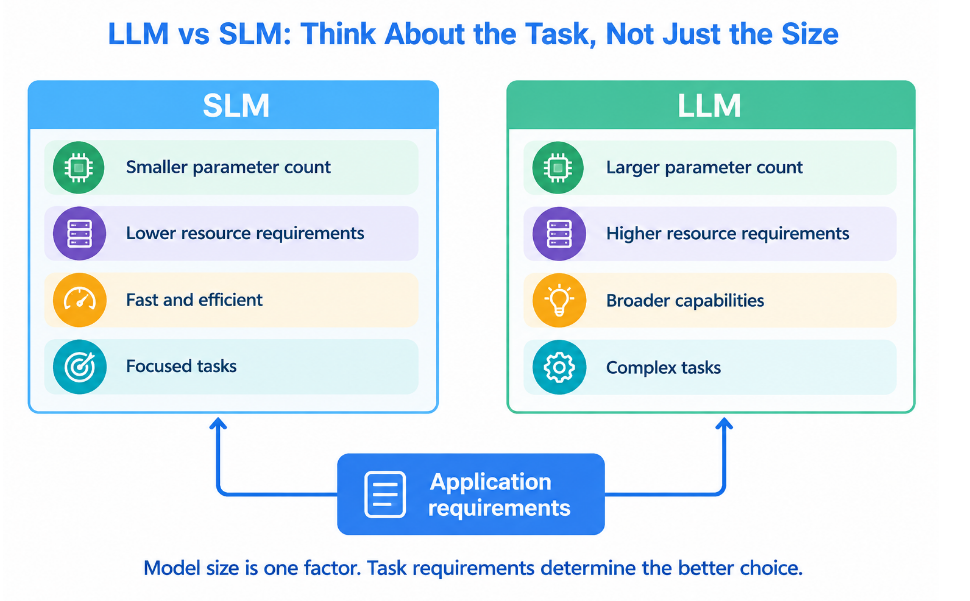
A Large Language Model, or LLM, is a language model with a large number of learned parameters and broad capabilities. These models are generally designed to handle many different tasks such as question answering, summarization, coding, reasoning, extraction, and conversation.
A Small Language Model, or SLM, is a smaller language model designed to provide useful language capabilities with fewer computational resources.
The important point is that there is no universal parameter number that separates an SLM from an LLM.
Some sources describe SLMs as models ranging from millions to several billion parameters, while research literature explicitly notes that there is no consensus on a single cutoff. The definition is often relative to the models and hardware being considered.
For example, a model that is considered small for a cloud server may be too large for a mobile phone.
This means that “small” should be understood partly in terms of deployment requirements, not just parameter count.
Support ticket example
Imagine an application receiving customer support tickets.
A ticket such as:
“My payment failed after entering the correct card details.”
might only require classification into:
Payment issue
A small model could potentially handle this very well.
But a ticket such as:
“I was charged twice, the refund from my previous transaction has not arrived, and I also want to know whether the original payment will be reversed automatically.”
requires more interpretation and possibly multiple actions.
A larger model may be more suitable.
2. Parameters and tokens
Parameters are learned numerical values inside a model. During training, the model adjusts these values so that it becomes better at recognizing patterns in data.
A model with more parameters generally has more capacity to represent patterns, but parameter count does not directly tell us how good the model will be at a particular task.
Training quality, architecture, data quality, instruction tuning, reasoning techniques, and specialization can all matter.
Tokens are different from parameters.
Tokens are pieces of text that the model processes. A token may represent a complete word, part of a word, punctuation, or another text fragment.
For example, a sentence such as:
“Payment failed again.”
is converted by the tokenizer into a sequence of tokens before the model processes it.
The number of tokens affects context usage, processing requirements, and often API cost.
Parameters describe the model.
Tokens describe the data going into and coming out of the model.
That distinction is essential when estimating both memory and cost.
3. How does a language model generate a response?
At a simplified level, a causal language model predicts what token should come next.
Suppose the input is:
“Customer says the payment”
The model estimates possible next tokens such as:
“failed”
“was”
“did”
It selects or samples from the probability distribution and continues generating.
The process repeats:
Input tokens → next token prediction → next token → next token → completed response
Modern chat models add additional formatting and training around this basic mechanism. Hugging Face explains that chat models still ultimately operate on sequences of tokens, with chat templates converting messages such as system, user, and assistant messages into the format expected by the model.
This is why prompting matters.
The model is not simply retrieving a database record. It is generating a response based on patterns learned during training and the information supplied in the current context.
4. What model size does and does not tell you
Model size can tell you something about capacity and resource requirements.
A larger model generally requires more memory to store its weights and can require more computational resources during inference.
But model size does not guarantee better results.
Consider two models:
Model A: 70 billion parameters
Model B: 7 billion parameters
If Model A is poorly instructed for your particular task while Model B has been carefully fine tuned for support ticket classification, Model B may perform better on that task.
The right question is therefore not:
Which model has more parameters?
It is:
Which model produces acceptable results for my workload?
This is especially important for narrow business tasks such as classification, extraction, routing, and controlled response generation.
5. Start with application requirements
Before selecting a model, define the application.
For a support ticket system, ask:
1.What is the task?
Classification, extraction, summarization, response generation, reasoning, or tool use?
2.Which languages are required?
English only, multiple Indian languages, European languages, or a global multilingual workload?
3.What output is expected?
Free text, JSON, labels, structured fields, or tool calls?
4.How private is the data?
5.Can customer information be sent to an external API?
6.How much traffic will the system receive?
Ten requests per hour and ten thousand requests per minute are completely different deployment problems.
7.What latency is acceptable?
A support agent might tolerate two seconds. A real time voice assistant might not.
8.What is the budget?
Do not estimate this from model reputation. Measure it from your
actual workload.
6. Model capabilities to compare
Do not compare models using parameter count alone.
Compare the capabilities that your application actually needs.
Instruction following
Can the model consistently follow instructions?
For example:
“Return only one of these labels: billing, technical, account.”
A model that adds explanations can create downstream problems.
Reasoning
Can the model solve multi step problems?
This matters when tickets contain several issues or require reasoning across multiple pieces of information.
Structured output
Can the model reliably produce the expected JSON or schema?
For example:
{
"category": "billing",
"priority": "high"
}
Your application should validate this output rather than assuming it is correct.
Tool calling
Can the model correctly select and use external tools?
For example:
Check order status → call order API → read result → draft response.
Multilingual support
A model that performs well in English may not perform equally well in Telugu, Hindi, Tamil, or other languages.
Multimodal input
If users send screenshots, images, documents, or audio, the model must support the required input modality.
The important lesson is simple:
Choose capabilities based on your workflow, not based on the model's marketing label.
7. Context windows
A context window is the amount of tokenized information a model can consider for a particular request.
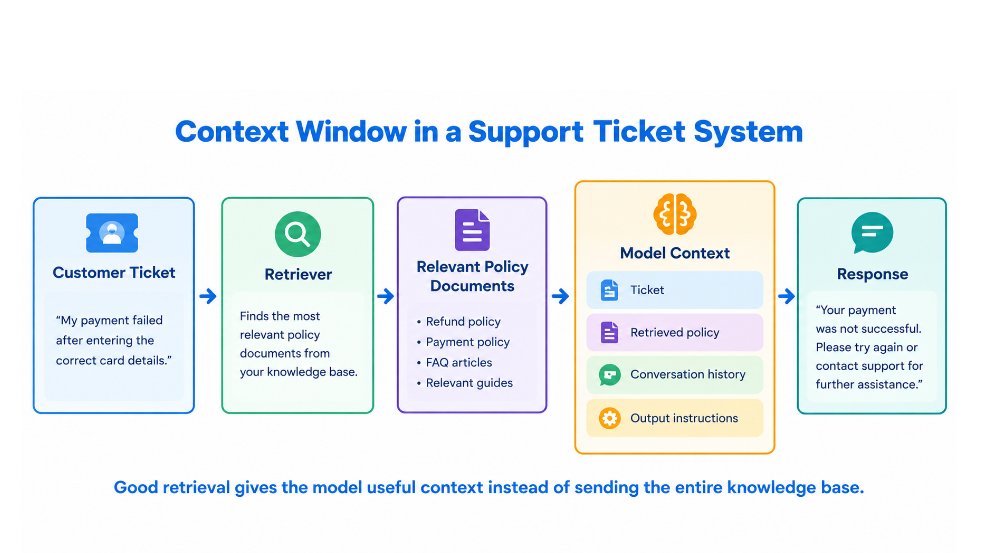
For a support application, the context could contain:
The current ticket
Previous customer messages
Customer account information
Relevant company policies
Retrieved documentation
Tool results
The requested response format
A larger context window can be useful, but more context is not automatically better.
If you send irrelevant documents to the model, you increase processing requirements and may make the model's job harder.
This is where retrieval becomes useful.
Instead of giving the model an entire knowledge base, retrieve the most relevant documents and provide those documents as context.
For example:
Customer ticket → retrieve refund policy → retrieve payment policy → send relevant sections to model → generate response
This is often more useful than blindly placing every available document into the prompt.
8. Hosted APIs versus self hosting
There are two broad deployment approaches.
1.With a hosted API, the model provider operates the infrastructure and your application sends requests to it.
Advantages include:
Fast setup
Managed scaling
Less infrastructure work
Access to powerful models
The disadvantages can include:
Ongoing API costs
Dependence on the provider
Data handling requirements
Potential vendor lock in
2.With self hosting, your team runs the model on its own infrastructure.
Advantages include:
More control
Greater control over data handling
Ability to operate in private environments
Potential cost advantages at sufficiently high and predictable workloads
The disadvantages include:
Hardware requirements
Deployment complexity
Monitoring
Scaling
Model updates
Security
Maintenance
For example, a hospital processing sensitive internal documents may have stronger reasons to consider private deployment than a small application generating public marketing text.
Neither approach is automatically better.
9. What is quantization?
Quantization stores model weights using fewer bits.
A model might use 16 bit or 32 bit representations, while quantization can reduce weights to 8 bit or 4 bit representations.
This can significantly reduce memory requirements.
Hugging Face describes quantization as a technique for reducing memory and computational requirements by representing weights or activations with lower precision. It also notes that lower precision introduces a trade off between efficiency and accuracy.
A simplified example:
A 7 billion parameter model at 16 bits requires approximately:
7,000,000,000 × 16 ÷ 8
= 14 GB of weight storage
At 8 bits:
7,000,000,000 × 8 ÷ 8
= 7 GB
At 4 bits:
7,000,000,000 × 4 ÷ 8
= 3.5 GB
These are approximate weight memory figures.
They are not the total memory required to run the model.
Quantization can introduce quality degradation, especially at very low precision, so the quantized model should be evaluated on the actual application workload.
10. Prompting, RAG, or fine tuning?
These techniques solve different problems.
Prompting
Prompting changes the instructions given to the model.
Use prompting when the model already has the necessary knowledge and capability but needs clearer instructions.
Example:
“Classify the ticket into exactly one of these categories and return JSON.”
RAG
Retrieval Augmented Generation gives the model relevant external information at inference time.
Use RAG when the model needs information that may be private, changing, or too specific to reliably remember.
Example:
Retrieve the company's latest refund policy before answering the customer's question.
Fine tuning
Fine tuning changes the model itself by training it further on task specific examples.
Use it when you need consistent behavior, formatting, style, or specialized task performance that prompting alone cannot achieve.
For example, if you have thousands of correctly labeled support tickets, fine tuning a smaller model may make sense.
A useful decision rule is:
Need better instructions → prompting
Need external or changing knowledge → RAG
Need learned task specific behavior → fine tuning
These approaches can also be combined.
11. Build a fair model comparison
Never compare models using random examples.
Create a representative evaluation dataset.
For support tickets, include:
Normal tickets
Difficult tickets
Ambiguous tickets
Long tickets
Short tickets
Multilingual tickets
Tickets with multiple issues
Tickets requiring structured output
Tickets where the correct answer is “escalate”
You should also define expected answers or evaluation rubrics before testing.
For example:
Input:
“My card was charged twice for the same order.”
Expected category:
billing
Expected priority:
high
Expected action:
investigate duplicate charge
Then send exactly the same test cases to both models.
Use the same:
Dataset
Prompt
System instructions
Temperature settings where applicable
Output schema
Evaluation criteria
Hardware conditions when self hosting
This makes the comparison much more meaningful.
12. Measure quality, latency, memory, and cost
Suppose you test 200 support tickets.
Model A solves 184 correctly.
Task success rate:
184 ÷ 200 × 100
= 92 percent
Model B solves 176 correctly.
Task success rate:
176 ÷ 200 × 100
= 88 percent
Model A wins on this particular dataset.
But quality is not the only metric.
You should also measure latency.
Useful measurements include:
P50 latency
P95 latency
P99 latency
P50 tells you what a typical request feels like.
P95 tells you how slow the slower part of your traffic can become.
For customer facing applications, tail latency can matter more than average latency.
Token cost
Suppose an illustrative API charges:
$1 per million input tokens
and
$4 per million output tokens.
These numbers are only for demonstrating the calculation. They are not current provider pricing.
Suppose one request uses:
1,500 input tokens
500 output tokens
Input cost:
1,500 ÷ 1,000,000 × $1
= $0.0015
Output cost:
500 ÷ 1,000,000 × $4
= $0.002
Total:
$0.0035 per request
For 100,000 requests:
100,000 × $0.0035
= $350
Cost per successful task
Suppose 92 percent of requests are successful.
For 100,000 requests:
92,000 successful tasks
Cost:
$350
Cost per successful task:
$350 ÷ 92,000
= approximately $0.0038
This metric is more useful than looking at token price alone.
A cheaper model that fails frequently may actually be more expensive per successful task.
Model weight memory
The basic estimate is:
Weight memory = parameter count × bits per parameter ÷ 8
For a 13 billion parameter model using 16 bit weights:
13,000,000,000 × 16 ÷ 8
= 26 GB
At 4 bit:
13,000,000,000 × 4 ÷ 8
= 6.5 GB
Again, this is only model weight memory.
Total runtime memory can be higher because the system also needs memory for the KV cache, activations, temporary buffers, runtime overhead, and other components.
The KV cache can become especially important when context length and concurrent requests increase.
13. Routing and fallbacks
You do not necessarily have to choose one model for every request.
A practical architecture is:
Simple request → SLM
Difficult request → LLM
Failed validation → retry or escalate
Unsupported request → human agent
For example:
Ticket:
“Where can I change my email address?”
SLM handles it.
Ticket:
“I changed my email address, lost access to my account, my previous recovery number no longer works, and I need to update my billing information.”
The router can escalate this to a larger model or a human workflow.
The routing rule should be based on tested conditions.
Possible signals include:
Ticket complexity
Language
Required tool
Output validation failure
Low confidence where available
Ticket length
Previous model failure
The objective is not to use the smallest model everywhere.
The objective is to use the least expensive model that reliably completes each task
14. Practical tools
For experimentation, two useful Python ecosystems are a provider SDK for hosted models and Hugging Face Transformers for models you can run locally.
A basic hosted model experiment can look like this:
from openai import OpenAI

client = OpenAI()

response = client.responses.create(
    model="YOUR_MODEL_NAME",
    input="Classify this support ticket: My payment failed twice."
)

print(response.output_text)
Install the SDK:
pip install openai
Set your API key through an environment variable rather than writing it directly in your source code.
For Hugging Face Transformers:
pip install transformers torch
A simplified local generation example is:
from transformers import AutoTokenizer, AutoModelForCausalLM

model_name = "YOUR_MODEL_NAME"

tokenizer = AutoTokenizer.from_pretrained(model_name)
model = AutoModelForCausalLM.from_pretrained(
    model_name,
    device_map="auto"
)

prompt = """
Classify this support ticket as billing, technical, account, or other.

Ticket:
My payment was charged twice.
"""

inputs = tokenizer(prompt, return_tensors="pt").to(model.device)

outputs = model.generate(
    **inputs,
    max_new_tokens=30
)

print(tokenizer.decode(outputs[0], skip_special_tokens=True))
Sample output:
billing
The model names in these examples are intentionally placeholders. For a real comparison, select two models that satisfy your hardware, licensing, language, and task requirements.
For chat models, use the model's expected chat template rather than assuming every model accepts the same prompt format. Hugging Face specifically warns that different chat models can use different control tokens and templates.
15. A practical comparison experiment
Suppose you have 500 historical support tickets.
You select:
Model A: smaller model
Model B: larger model
You give both models the same 500 tickets.
You record:
Classification accuracy
Response quality
Structured output validity
P50 latency
P95 latency
Input tokens
Output tokens
Cost
Memory consumption
Failure rate
Then you might obtain the following illustrative result:
| Metric | Model A | Model B |
| Task success rate | 91% | 95% |
| JSON validity | 97% | 99% |
| P50 latency | 180 ms | 650 ms |
| P95 latency | 420 ms | 1.8 s |
| Cost per successful task | $0.002 | $0.009 |
| Weight memory | 4 GB | 28 GB |
These numbers are illustrative, not benchmark results.
Now the decision becomes clearer.
If the application requires at least 90 percent task success and P95 latency below 500 ms, Model A passes and Model B fails the latency requirement.
If the application requires 95 percent task success, Model B may be necessary.
This is much better than simply saying:
“Model B is larger, so we should use Model B.”
16. Common model selection mistakes
1: Choosing the largest model
Bigger does not automatically mean better for your task.
2: Choosing the cheapest model
A cheap model that produces incorrect answers can create more operational cost.
3: Looking only at benchmark scores
A model can perform well on public benchmarks and poorly on your company's support tickets.
4: Ignoring structured output failures
An answer can be semantically correct but unusable by your application if the expected JSON is invalid.
5: Ignoring long context costs
A large context window does not mean you should send every available document with every request.
6: Ignoring privacy
The cheapest hosted API is not necessarily appropriate for sensitive customer or business data.
7: Comparing models under different conditions
Different prompts, datasets, hardware, quantization settings, and generation parameters can make the comparison unfair.
8: Assuming SLM means weak
A specialized small model can perform extremely well on a narrow task. AWS has also demonstrated production oriented work where small models are used for targeted tool calling and enterprise workloads.
9: Assuming one model must handle everything
A routing architecture can allow small models to handle routine requests while larger models handle difficult cases.
17. Final model selection checklist
Before choosing a model, answer these questions.
| Requirement | Question |
| Task | What exactly must the model do? |
| Quality | What minimum success rate is acceptable? |
| Languages | Which languages must work reliably? |
| Context | How much information must the model process? |
| Output | Do you need text, JSON, classification, or tool calls? |
| Privacy | Can the data leave your infrastructure? |
| Latency | What are your P50 and P95 targets? |
| Traffic | How many requests will you receive? |
| Memory | Can your hardware load the model and KV cache? |
| Cost | What is the cost per successful task? |
| Maintenance | Who will operate and update the model? |
| Evaluation | Have you tested it on representative real data? |
| Routing | Can difficult requests be escalated? |
18. Final comparison
| Area | SLM | LLM |
| Model size | Smaller | Larger |
| Resource requirements | Usually lower | Usually higher |
| Latency | Often lower | Often higher |
| Local deployment | Often easier | Often harder |
| Privacy control | Strong option when self hosted | Depends on deployment |
| Narrow tasks | Often excellent | Usually capable |
| Broad reasoning | Can be limited | Often stronger |
| High traffic | Attractive | Can become expensive |
| Complex tasks | May require escalation | Often better suited |
| Best approach | Specialized and efficient | Broad and capable |
The most practical architecture is often not SLM versus LLM.
It is SLM plus LLM.
Use a smaller model when the task is predictable and high volume. Use a larger model when the task requires broader reasoning or handles difficult cases. Measure the boundary using your own evaluation dataset.
The final decision should therefore follow this sequence:
Define the workload.
Set minimum quality requirements.
Measure latency requirements.
Calculate memory requirements.
Estimate cost.
Test multiple models using the same dataset.
Analyze failures.
Choose the smallest model that passes the requirements.
Add a larger model as a fallback when necessary.
Revisit the decision when traffic, requirements, model capabilities, or infrastructure change.
The best AI model is not necessarily the largest model.
It is the model that reliably solves your problem at the quality, latency, privacy, and cost your application can support.