Lesson 2: Configuration and Secrets
Your code needs an API key. It must not contain one. This lesson covers where configuration should live instead, and how to make a missing or malformed value announce itself immediately rather than fifteen minutes into a job.
.env files and environment variables
An environment variable is a named value that the operating system hands to your process when it starts. Putting configuration there rather than in code means the same code artifact runs in development, staging, and production with different behaviour and no edits.
import os
api_key = os.environ["RECIPE_API_KEY"]
Use bracket access rather than os.environ.get("RECIPE_API_KEY"). The bracket form raises KeyError immediately when the variable is missing. The .get() form returns None, which travels silently into your HTTP client and surfaces as a confusing 401 several layers away from the actual mistake. This is the fail-fast principle, formalised later in this lesson.
Local development with .env files. Setting variables by hand every session is tedious, so local development uses a .env file.
# .env, never committedRECIPE_API_KEY=sk-real-key-hereDATABASE_URL=postgresql://localhost:5432/recipesLOG_LEVEL=DEBUGMake sure it is ignored:
# .gitignore.env.venv/__pycache__/Then commit a companion file that documents the shape without the values:
# .env.example, committedRECIPE_API_KEY=DATABASE_URL=postgresql://localhost:5432/recipesLOG_LEVEL=DEBUGA new contributor copies .env.example to .env, fills in their own values, and is running. This tiny file removes most "how do I set this up" questions before they are asked.
One important limit. .env files are a local development convenience only. In production, environment variables come from your deployment platform, container orchestrator, or a secrets manager, never from a file sitting on disk.
The first rule of API keys
A secret never appears in a file that git tracks. Not temporarily, not in a comment, not in a notebook cell, not in a test fixture.
The reason is that git remembers. Committing a key and removing it in the next commit does not remove it. It remains in history, retrievable by anyone with a copy of the repository, forever, unless the history is rewritten. Public repositories are scanned continuously by automated tools, and a leaked cloud credential is typically exploited within minutes. The bill arrives before you notice.
If it happens anyway, the order of operations matters. Rotate the key first. Revoke it at the provider and issue a new one. Cleaning git history is secondary and, on its own, insufficient. Assume that anything ever pushed has been seen.
Two automated safeguards help here, and both appear in Lesson 3. A pre-commit hook that detects private keys blocks the commit before it enters history. A hook that blocks large files stops someone committing a 400 MB model checkpoint that will live in the repository forever.
Config that fails fast at startup
A program that starts successfully and then fails forty minutes into a job because a setting was missing has wasted forty minutes and told you nothing useful. A program that refuses to start, naming the missing setting, has cost you five seconds.
Fail fast means validating all configuration once, at startup, before doing any work.
Pydantic Settings makes this a few lines.
uv add pydantic-settings# src/recipe_extractor/config.pyfrom pydantic import Fieldfrom pydantic_settings import BaseSettings, SettingsConfigDict
class Settings(BaseSettings): """Application configuration, validated once at startup."""
model_config = SettingsConfigDict( env_file=".env", env_file_encoding="utf-8", extra="forbid", )
api_key: str = Field(min_length=10) database_url: str log_level: str = "INFO" request_timeout_seconds: float = Field(default=30.0, gt=0) max_retries: int = Field(default=3, ge=0, le=10)
settings = Settings()What this gives you:
Loading. Values come from real environment variables first, then from .env. Field names map to variable names case insensitively, so api_key reads API_KEY.
Type coercion. MAX_RETRIES=5 arrives as the string "5" and becomes the integer 5. Every environment variable is a string. Without this you would convert by hand in every place you use one, and eventually forget once.
Validation. min_length, gt, and the ge/le pair are enforced at startup. A timeout of 0 is rejected there rather than causing every request to fail instantly at runtime.
Typo protection. extra="forbid" rejects unrecognised keys. Writing API_KEYS= instead of API_KEY= is caught immediately instead of appearing later as a missing value.
Editor support. settings.request_timeout_seconds autocompletes and is type checked. os.environ["REQUEST_TIMEOUT_SECONDS"] is neither.
A missing value produces a precise error before any work begins:
pydantic_settings.exceptions.SettingsError: 1 validation error for Settingsapi_key Field required [type=missing]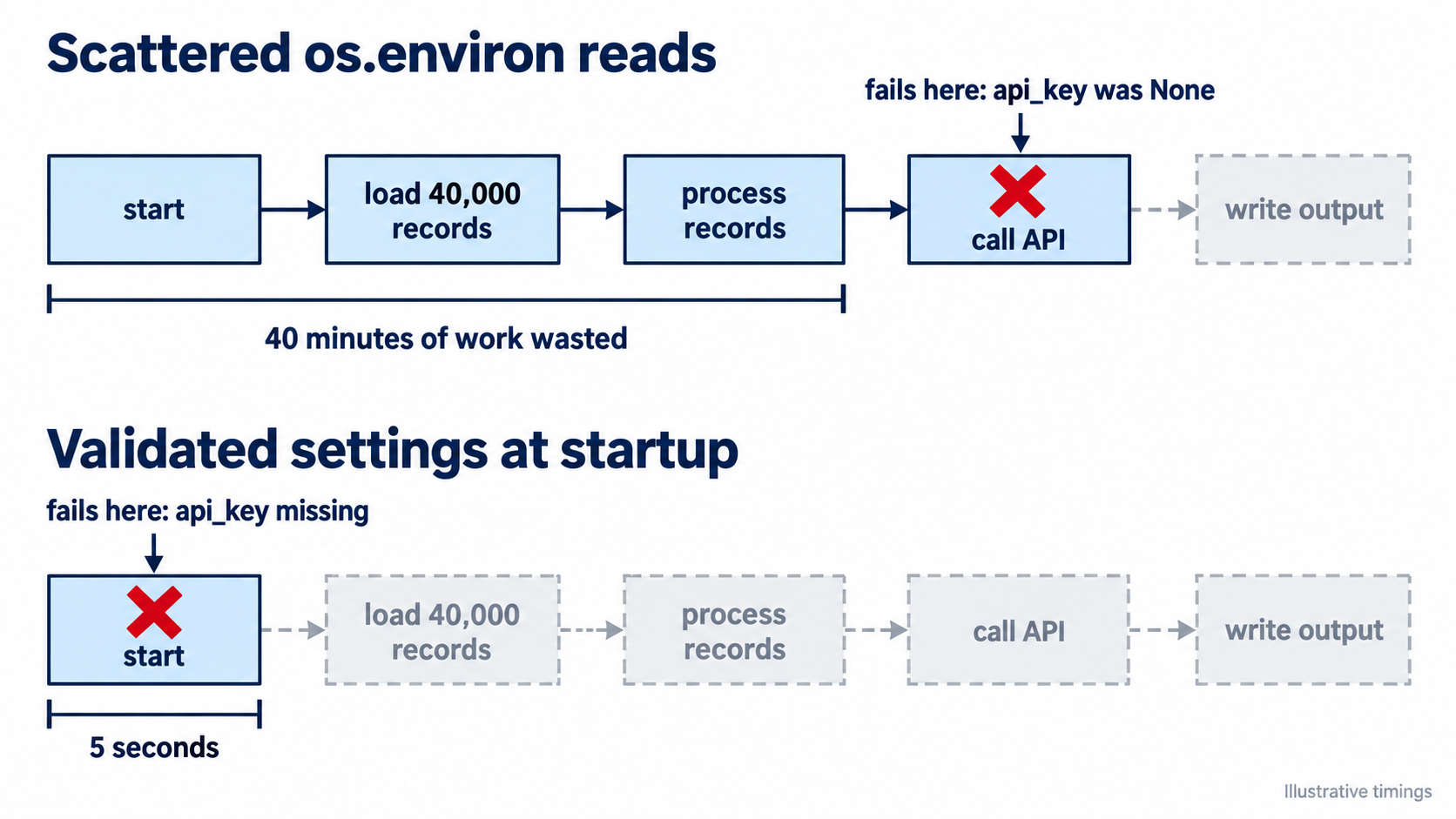
Use it everywhere.
# src/recipe_extractor/parser.pyimport httpx
from recipe_extractor.config import settings

def fetch_recipe(url: str) -> dict:    response = httpx.get(        url,        headers={"Authorization": f"Bearer {settings.api_key}"},        timeout=settings.request_timeout_seconds,    )    response.raise_for_status()    return response.json()
No os.environ calls scattered through the codebase. One validated object, imported where it is needed.
Common mistakes.
Giving secrets a default value. api_key: str = "" turns a loud startup failure into a silent runtime one. Secrets get no default.
Reading configuration at import time inside library modules. Only the settings module should read the environment. Everything else imports the settings object.
Logging the settings object. It contains secrets. If you want to log configuration at startup, log the non-secret fields explicitly.
Concept check. Your service reads a TIMEOUT variable. In staging, someone sets TIMEOUT=thirty. What happens with os.environ["TIMEOUT"], and what happens with the Settings class above?
Answer
With os.environ["TIMEOUT"] you get the string "thirty". It passes through your code silently until something attempts arithmetic on it or hands it to an HTTP client, producing a TypeError far from the cause. In a worse version, a library coerces it in some unexpected way and you get behaviour nobody intended.
With the Settings class, startup fails immediately with a message naming the field, the expected type, and the value received. The deployment fails visibly instead of running incorrectly.