Module 0: Project overview: a guided tour of the running app
Start here · About 15 minutes · No code · Every screenshot below is the real app, running locally with Docker, writing with a real model on the author's Mac.
Slidesmith Studio turns one sentence into a finished, on-brand LinkedIn carousel or a 16:9 slide deck. You describe a topic, pick a format and a template, and three AI agents do the writing: a research agent that looks up facts on the web (when a search key is set), a content strategist that plans the slides, and a designer that writes each slide. The agents never write HTML. They write a deck spec, a small JSON document that says what is on each slide, and ordinary code draws it in your colours, font, name and call to action. A headless browser then measures every slide, and any slide whose text spills out is sent back to be shortened. You edit the result by clicking on the text, switch template or format without waiting for the model again, ask the AI to redo one slide, and export PDF, PNG, ZIP or a single HTML file.
Everything runs on your own machine by default: the model is qwen3.8:27b on Ollama, using the Mac's GPU. That makes it private and free to run, and also slow: a slide takes from about 15 seconds to a minute, so the app streams its progress live.
This page is a guided tour of the finished product. The 20 modules after it take every part apart and show how to build it.
Open the full-size architecture diagram
The tour
The tour follows two accounts. A new user, Maya Iyer, signs up and answers the brand questionnaire. Then the demo account takes over: demo@slidesmith.local, whose brand is Northwind Labs, a fictional cloud cost studio with the handle @northwindlabs. All names, brands and decks here are invented for the project. The screenshots were taken on 25 October 2026 from the Docker stack, with the local model already loaded and without a web search key, so the research step was off; the tour says where that shows.
1. Sign up or log in
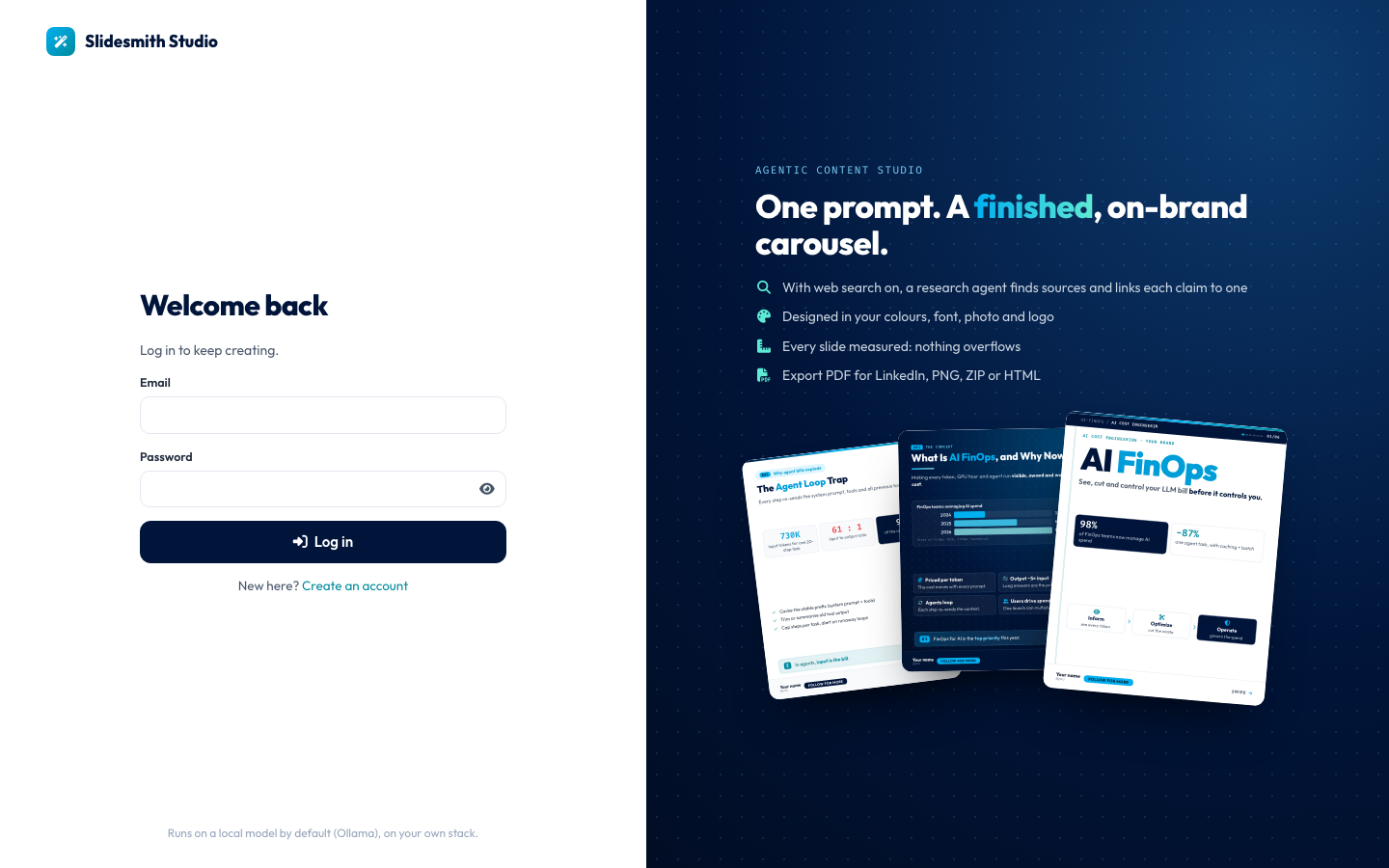
The login page. The right half says what the product promises: one prompt, a finished, on-brand carousel; with web search on, a research agent finds sources and links each claim to one; slides in your colours, font, photo and logo; every slide measured so nothing overflows; export as PDF for LinkedIn, PNG, ZIP or HTML. The line at the bottom says the app runs on a local model by default, on your own stack.
Fixed: the login page promised more than the app does. The research line used to say that a research agent checks every claim. With research off, as in this tour, nothing is looked up at all, so the promise was untrue. It was noticed while writing this tour, and the line now names the condition: "With web search on".
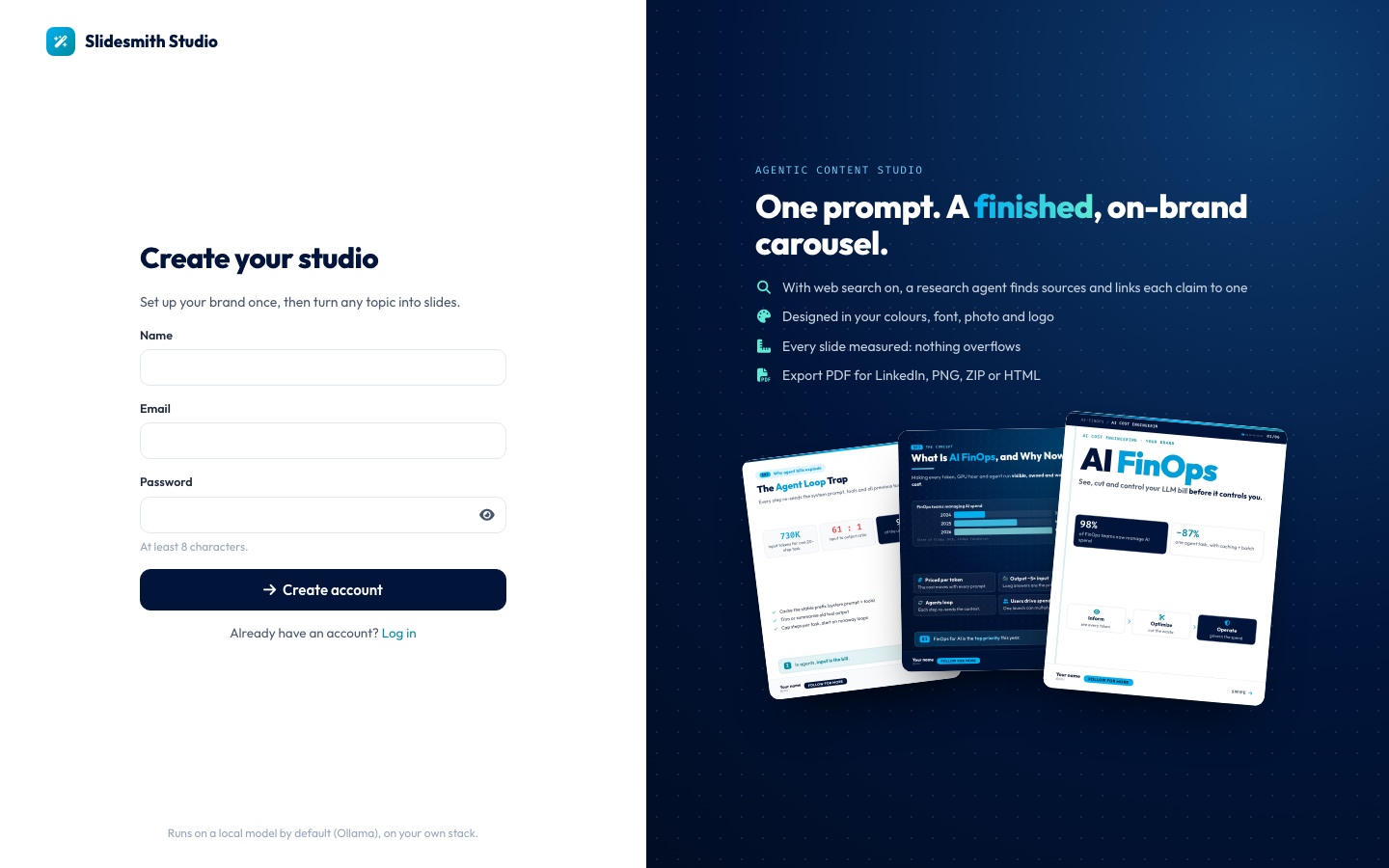
Creating an account takes a name, an email and a password of at least 8 characters. There are no roles and no teams: each account is one creator, and everything they make is visible only to them. Passwords are hashed with argon2id and the session lives in an httpOnly cookie (sign-in and sessions are Module 6; the attacks they resist are Module 16).
2. Five questions about your brand
A new account lands on a five-step questionnaire. Every answer becomes part of the brand profile that the agents read before they write and the templates use when they draw. On the right, a live preview shows a sample slide in the user's brand, switchable between the three templates, with the note "Rendered by the same engine that exports your slides". Its numbers (98%, -87%) are sample content of the template, not facts.
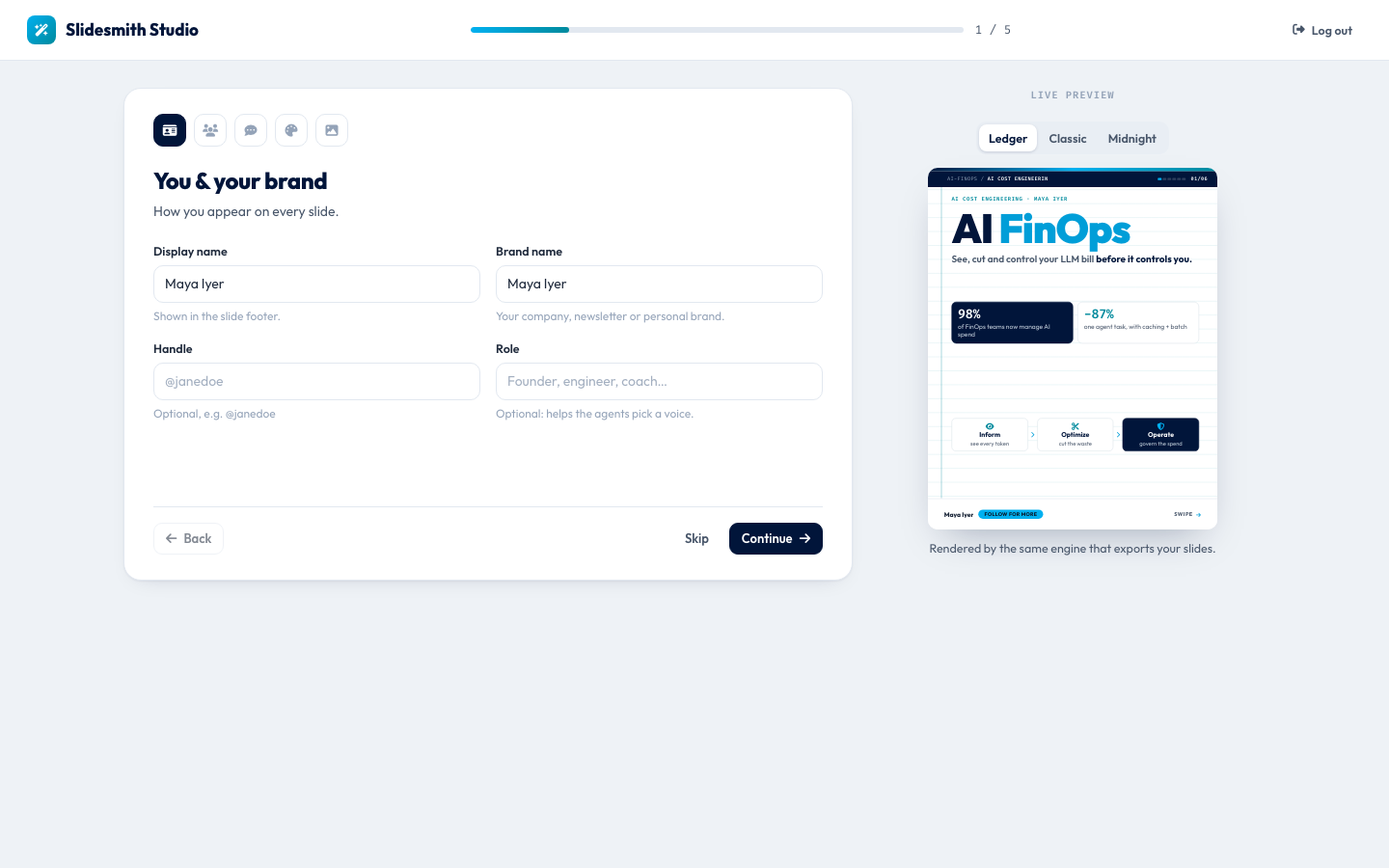
Step 1, you and your brand. Maya types her name as display name and brand name; the handle and role are optional ("helps the agents pick a voice"). The preview's kicker and footer already say "Maya Iyer".
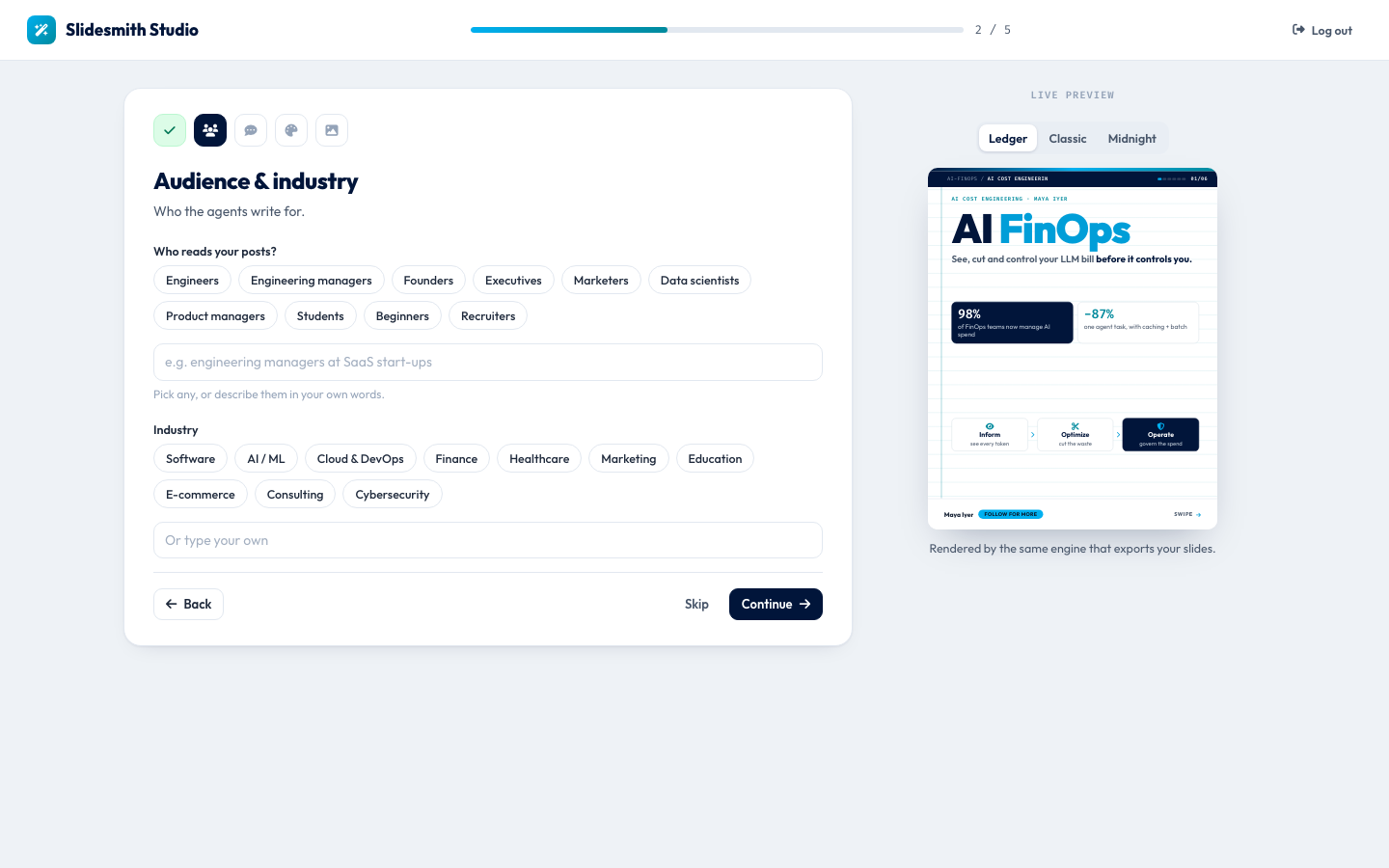
Step 2, audience and industry. Chips for common readers (engineers, founders, marketers, recruiters and more) and industries, or your own words. The agents write for this audience.
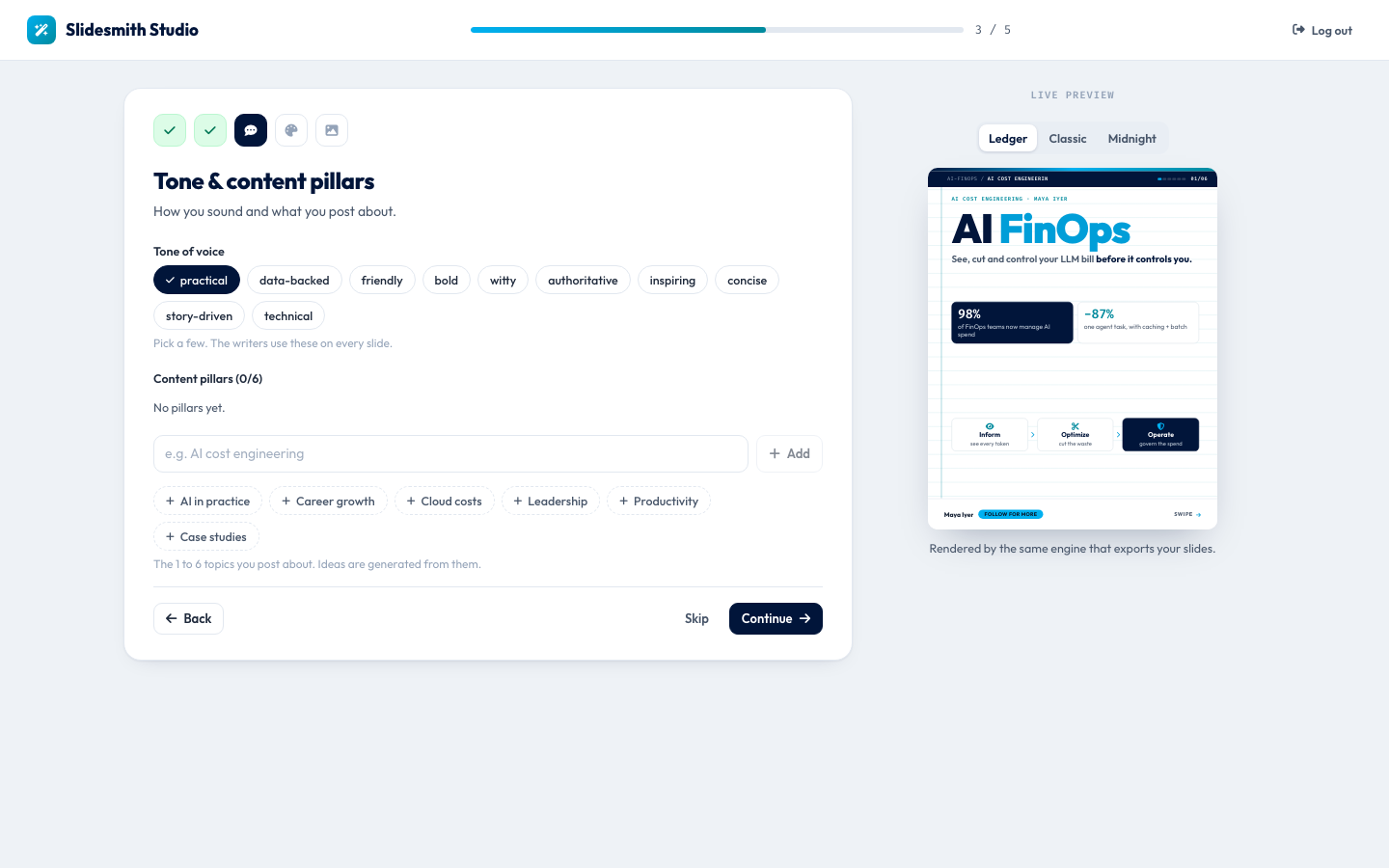
*Step 3, tone and content pillars. Maya picks "practical". Content pillars are the 1 to 6 topics a creator posts about; the Ideas page later suggests posts from them (Module 14).*
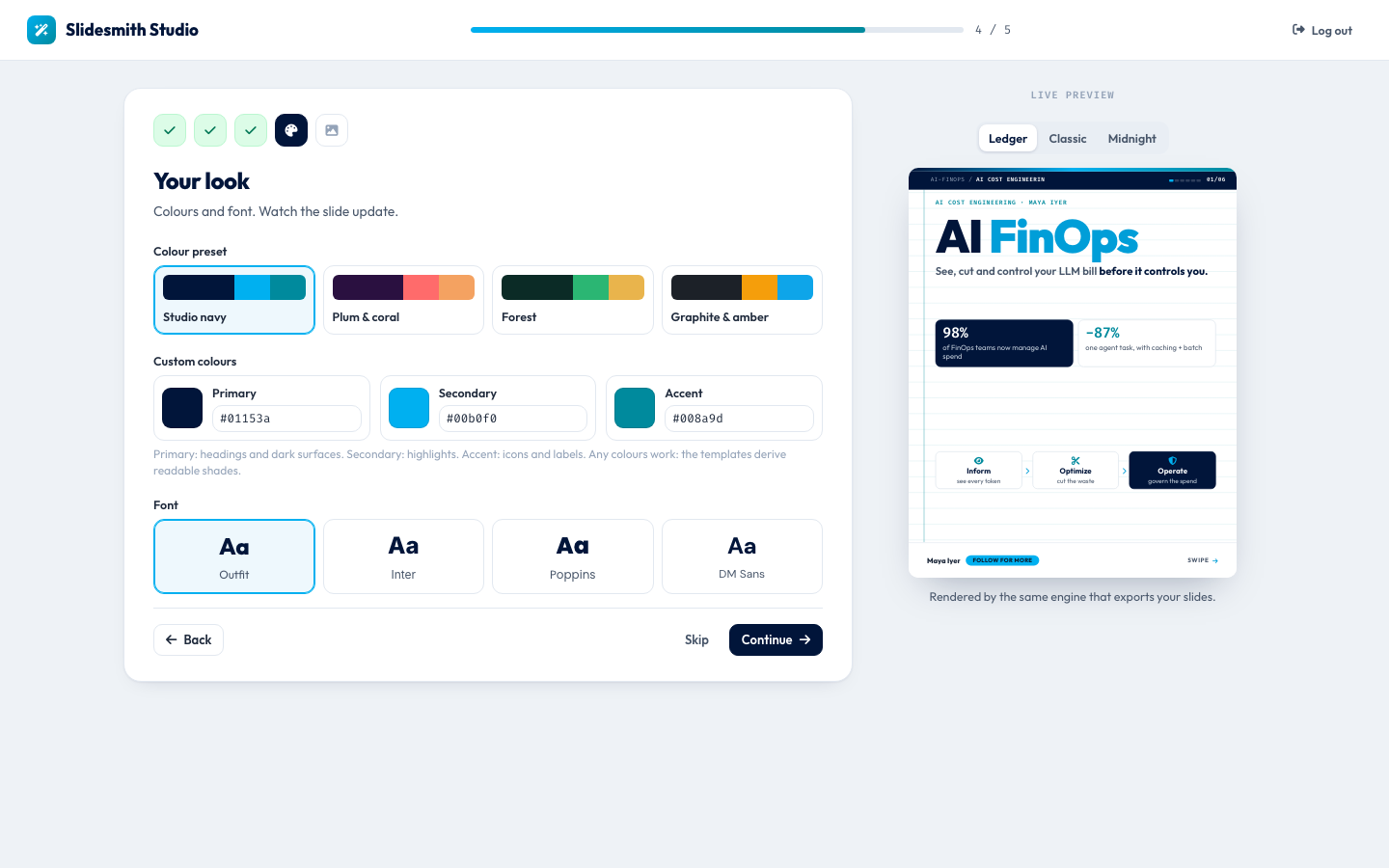
Step 4, your look. Four colour presets (Studio navy is selected), three custom colours (primary #01153a, secondary #00b0f0, accent #008a9d, the defaults) and four fonts (Outfit, Inter, Poppins, DM Sans). The hint explains that any colours work because the templates derive readable shades from them (theming is Module 7).
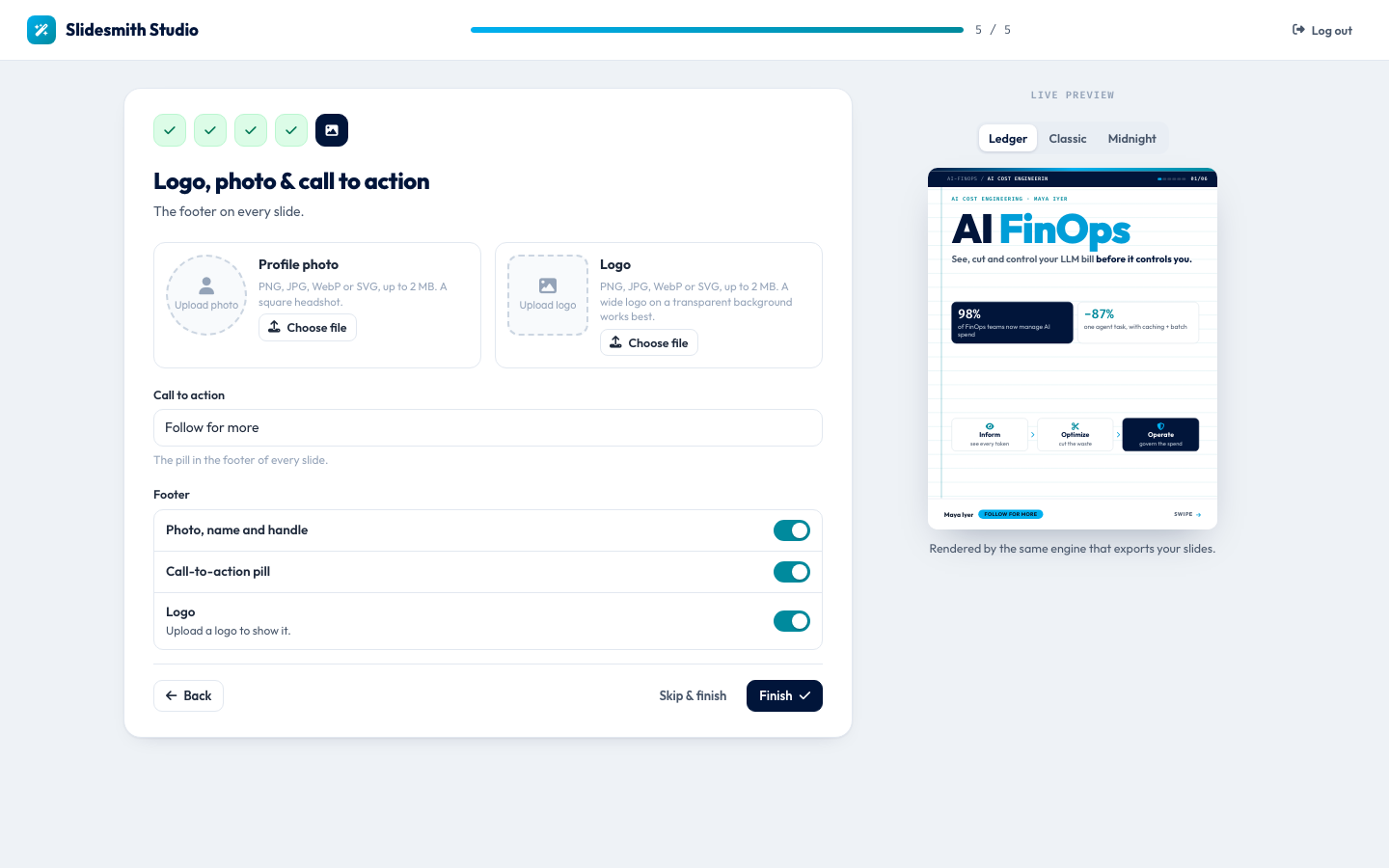
Step 5, logo, photo and call to action. Uploads accept PNG, JPG, WebP or SVG up to 2 MB; the server checks the real file type from its bytes and screens SVGs for scripts (Module 16). The call to action, "Follow for more" by default, is the pill in every slide's footer, and three switches choose what the footer shows. Maya can skip any step and change everything later in the brand kit (step 11).
3. The dashboard
From here on, the tour uses the demo account.
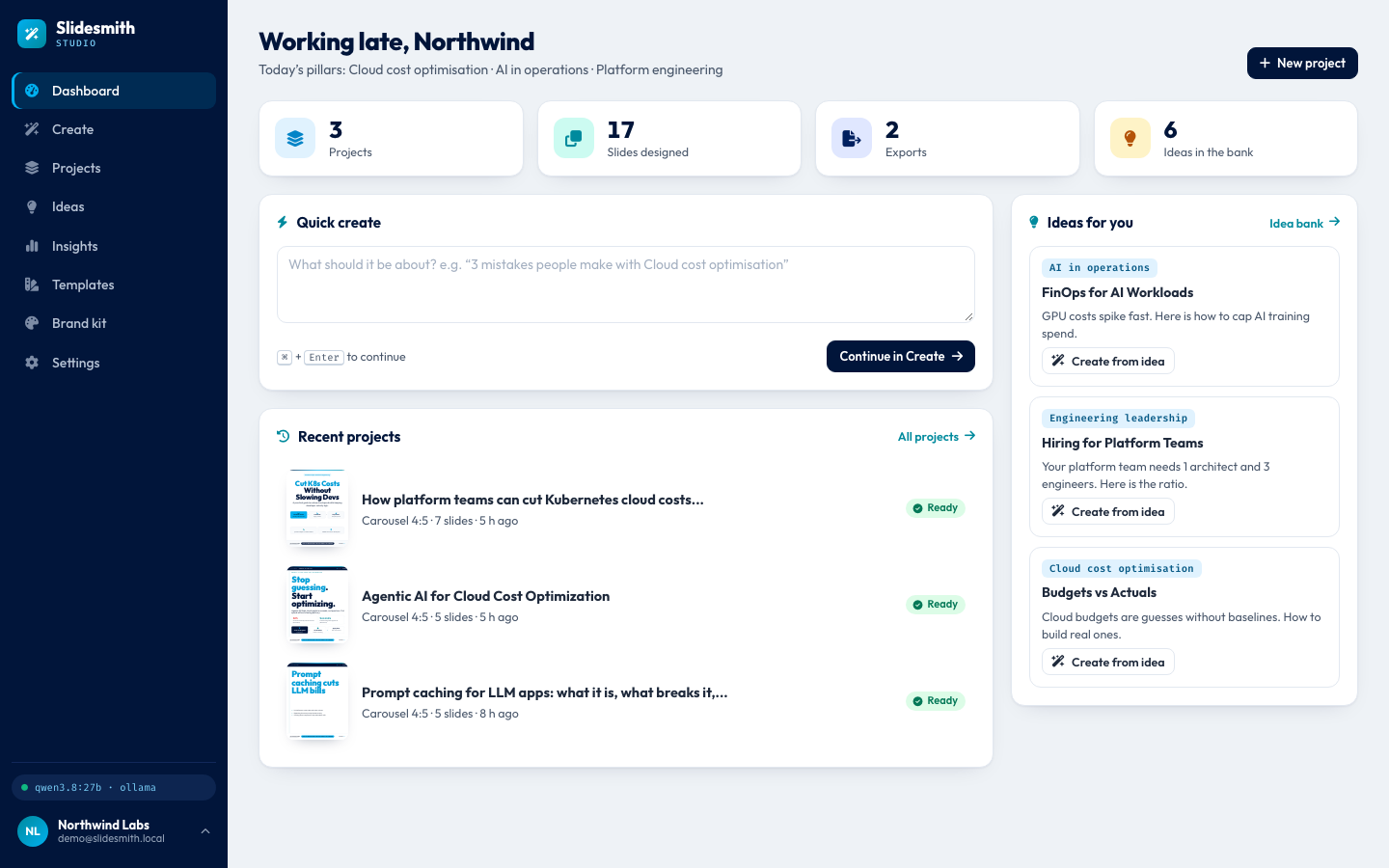
"Working late, Northwind", with the brand's pillars under the greeting: cloud cost optimisation, AI in operations and platform engineering. Four tiles count what exists before the new deck: 3 projects, 17 slides designed, 2 exports and 6 ideas in the bank. Quick create takes a topic straight to the Create page; recent projects show a thumbnail drawn by the real renderer; "Ideas for you" offers three of the saved ideas. Bottom left, a green dot and qwen3.8:27b · ollama show which model the server uses and that it answers (Module 14).
4. Create a deck
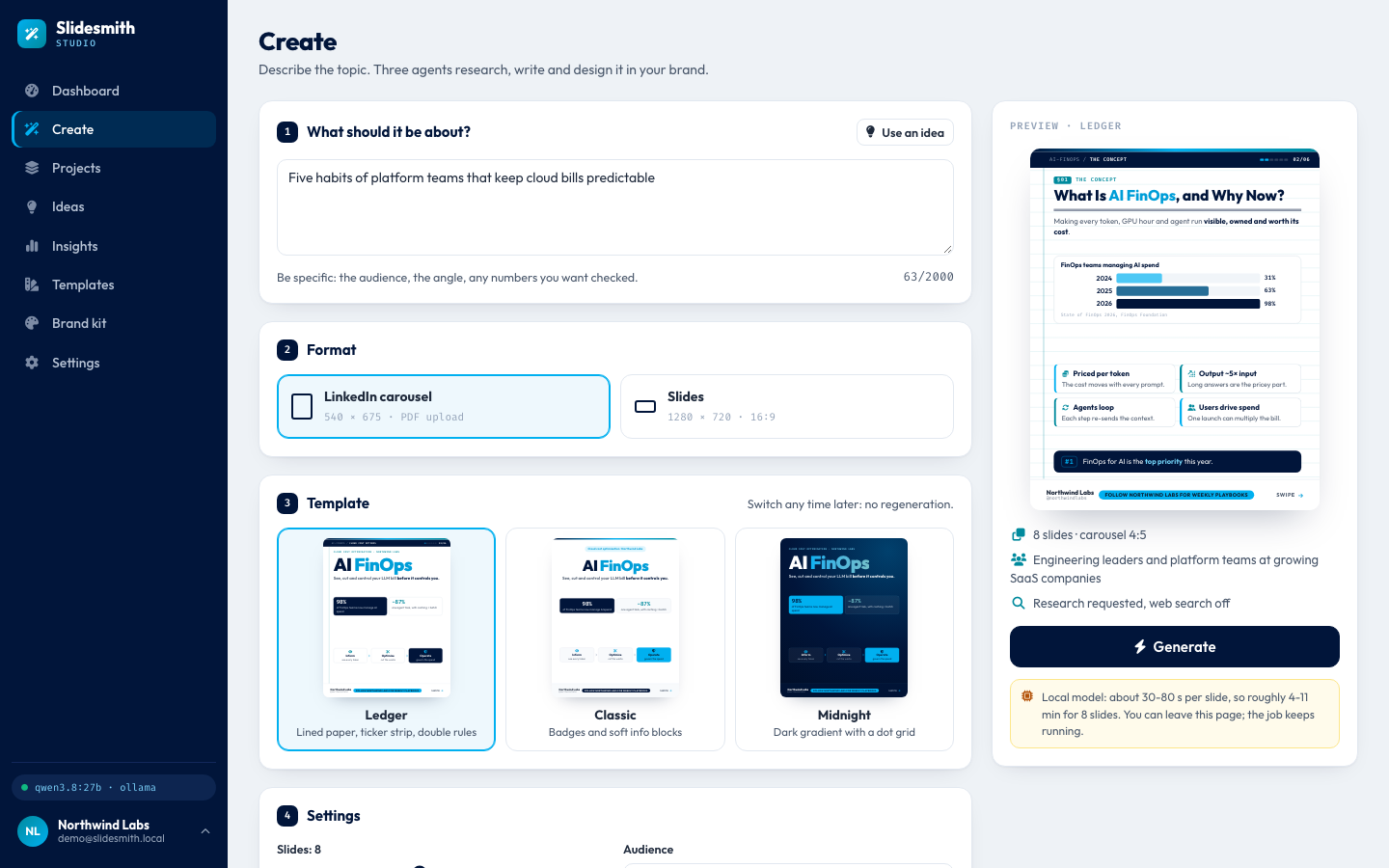
The Create page in four numbered parts: the topic ("Five habits of platform teams that keep cloud bills predictable", 63 of 2,000 characters), the format (a LinkedIn carousel, 540 x 675, or slides, 1280 x 720), the template (Ledger, Classic or Midnight, "Switch any time later: no regeneration") and the settings. The panel on the right sums up the choice ("Research requested, web search off") and warns honestly: a local model needs about 30 to 80 seconds per slide, so roughly 4 to 11 minutes for 8 slides, and you can leave the page while the job runs. Opening this page also asks the server to load the model into memory early, so the first generation does not start cold (warming up the local model is Module 3).
At the moment of this screenshot the settings still showed the default of 8 slides. For the run, the deck was set to 6 slides in the Midnight template, with research off. Then Generate.
5. Watching the agents work
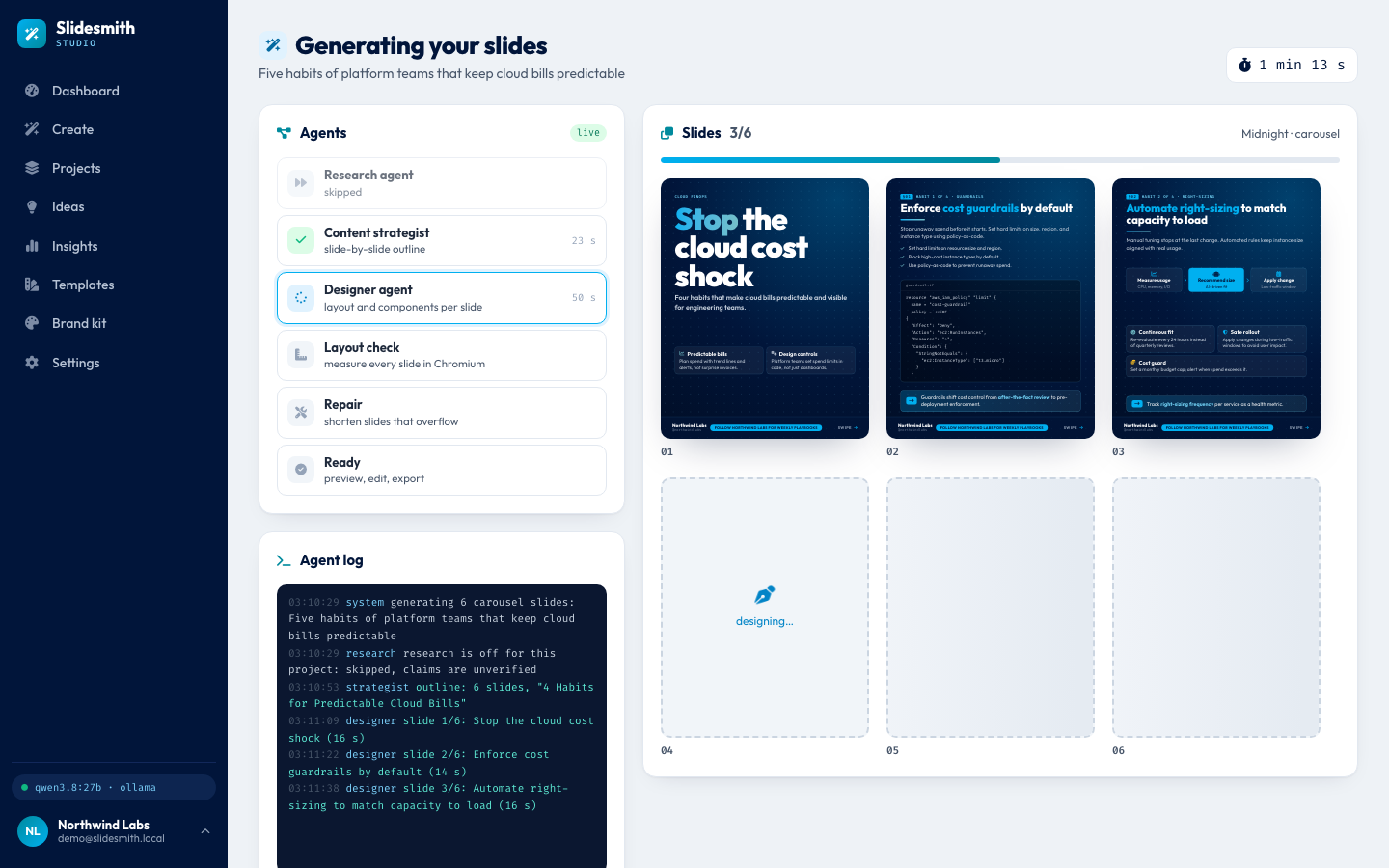
A live generation, 1 minute 13 seconds in. The agents panel shows each step: the research agent skipped, the content strategist done in 23 seconds (the slide-by-slide outline), the designer working for 50 seconds so far, and the layout check, repair and ready steps still waiting. On the right, 3 of 6 slides are already drawn in Midnight; the fourth says "designing...". The agent log below is the job's own record: research is off for this project, so claims are unverified; the outline has 6 slides titled "4 Habits for Predictable Cloud Bills"; slide 1 took 16 s, slide 2 14 s and slide 3 16 s. Every event reaches the browser over a server-sent event stream, and each slide is saved the moment it is ready, so you could close the tab and come back (Module 13).
Look at the outline's title. The prompt asked for five habits, but a 6-slide deck has room for a cover, four content slides and a summary, so the plan says 4. The kickers of slides 2 and 3 already read "Habit 1 of 4" and "Habit 2 of 4". The page header still shows the prompt; when the job ends, the project takes the deck's own title.
The generation is a background job: the request that starts it returns at once, and the work runs inside the API process while the page listens. Behind the panel, a LangGraph graph runs research, plan, design and check, and loops through repair when a slide does not fit (Module 8).
6. The finished deck in the editor
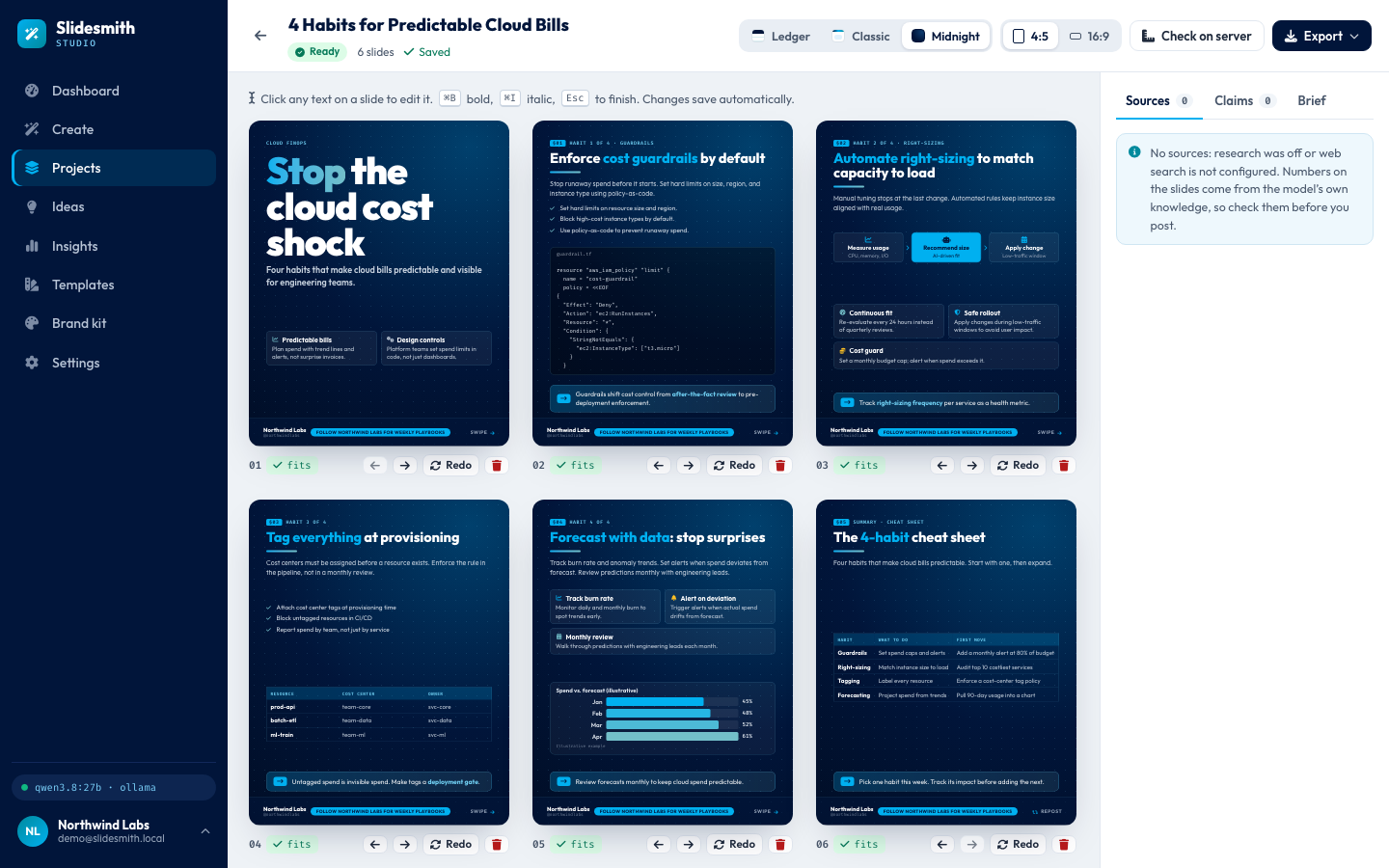
When the job is done, the job page opens the editor by itself: "4 Habits for Predictable Cloud Bills", ready, 6 slides, saved. A cover ("Stop the cloud cost shock", "Four habits that make cloud bills predictable"), four habit slides (guardrails with a checklist and a policy file, right-sizing with a three-step flow, tagging with a checklist and a table, forecasting with a bar chart), and a summary, "The 4-habit cheat sheet", whose table has one row per habit. Under each slide, a green "fits" chip says the layout check measured it in Chromium and nothing spills out; next to it are buttons to move, redo and delete the slide. The hint at the top says how editing works: click any text to edit it, ⌘B for bold, ⌘I for italic, Esc to finish, and changes save automatically (Module 12).
Look at the panel on the right. Sources 0, Claims 0, and a note: "No sources: research was off or web search is not configured. Numbers on the slides come from the model's own knowledge, so check them before you post." That is the honest state of this deck. With research off, nothing on these slides was looked up. The bar chart on slide 5 is labelled "Spend vs. forecast (illustrative)", because the prompts tell the model to mark example numbers that no source backs. (Research, sources and claims are Module 9.)
Fixed: a deck that miscounted its own items. The first take of this tour, from the same prompt, gave a 6-slide deck titled "Five habits" with only four habit slides. Its kickers were numbered 1, 2, 1, 4, 5, and its summary said "four habits" while the title said five. The layout check measures fit and the honesty guard removes invented quotes, but nothing counted. It was found by reading those screenshots. Now the strategist is told how many content slides there are, a small function rewrites a counted title ("Five habits", "7 mistakes") to the real number, each designer call hears "content item 2 of 4", and the summary is asked for one table row per item. Tests: test_a_counted_title_matches_the_content_slides, test_designer_is_told_its_item_number and test_summary_prompt_knows_the_item_count. The retake above is the result: "Habit 1 of 4" to "Habit 4 of 4" and four rows in the cheat sheet (Module 10). Read the words anyway: the model writes a strong first draft, and the person posting it still checks it.
7. Switch template or format without regenerating
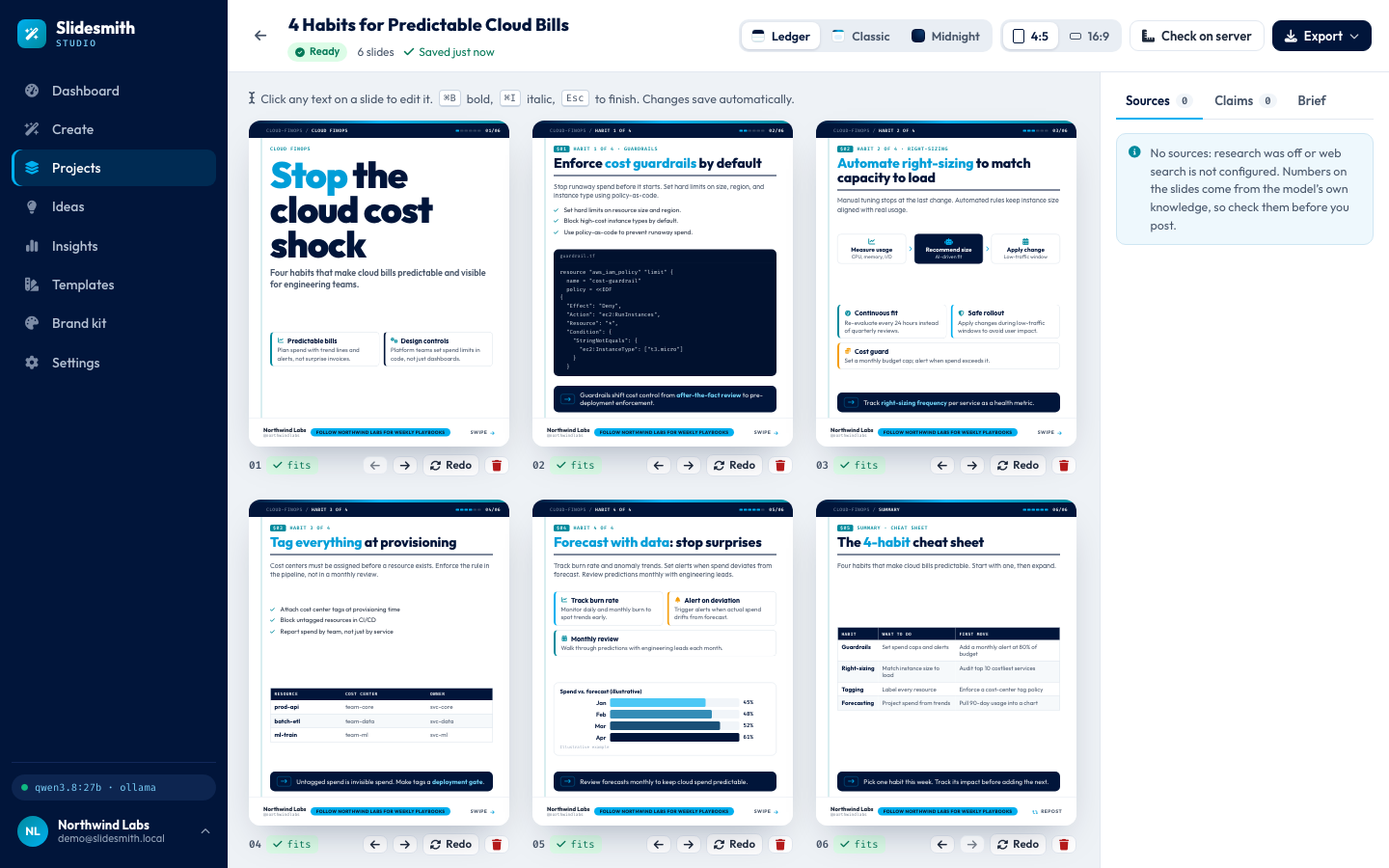
*One click on Ledger, and the same deck is redrawn on lined paper with a ticker strip at the top ("CLOUD-FINOPS", "01/06"). The words, the blocks and the six "fits" chips are unchanged, and "Saved just now" shows the switch was stored. No model call was made: the template is only a different way of drawing the same deck spec (Module 7).*
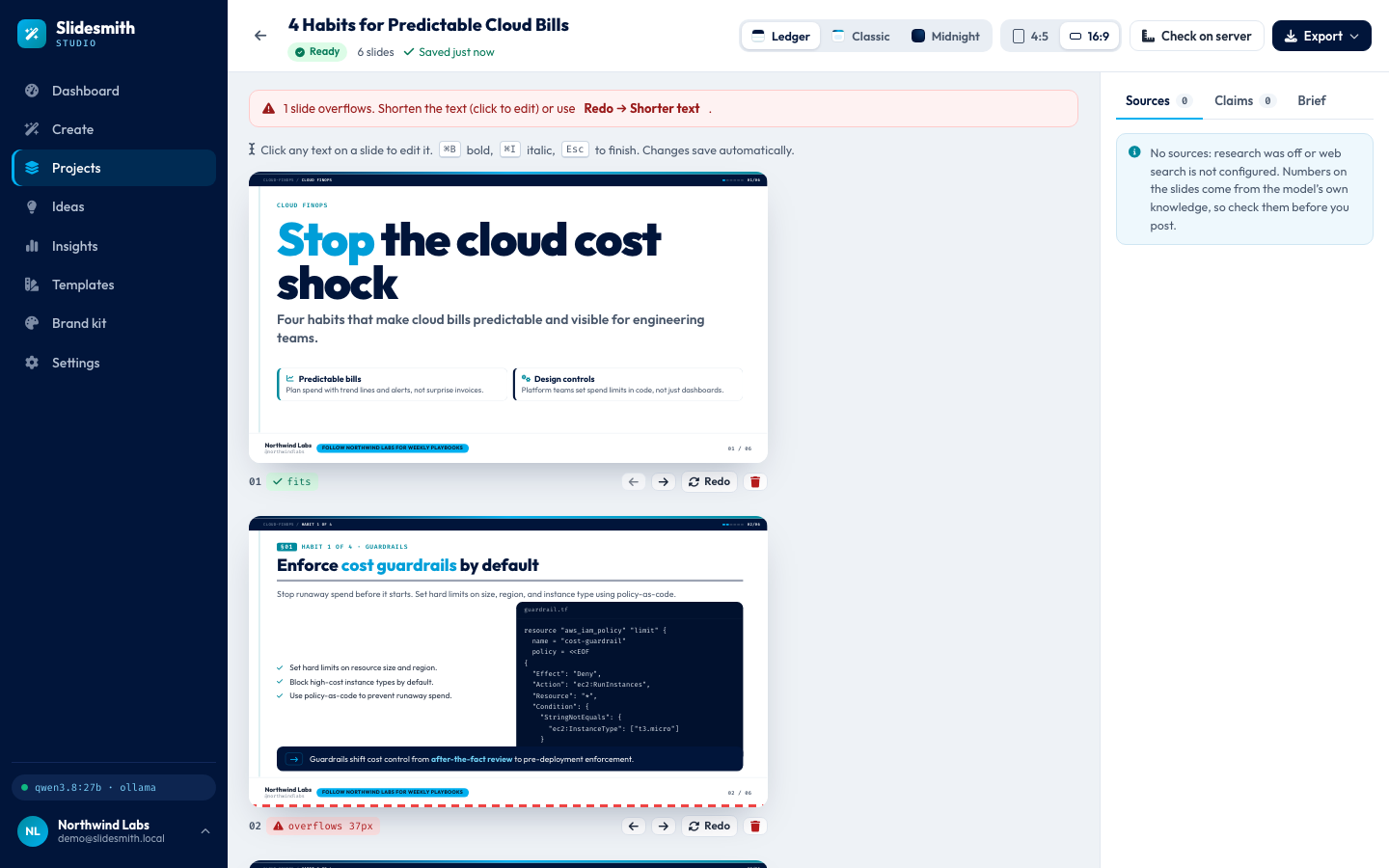
*One more click, on 16:9, and every slide becomes 1280 x 720, drawn larger and in two columns when a slide has two or more blocks. The editor measures again in the browser after each change, and this time it finds a problem: slide 2, whose policy file now sits in a narrower column, overflows by 37 px. A red dashed line marks the slide's bottom edge, and a banner offers two ways out: shorten the text by clicking it, or Redo → Shorter text. A format switch never calls the model, so nothing repairs the slide by itself; the measuring is what keeps the overflow from reaching an export unnoticed. One renderer draws the preview, every template, both sizes and every export, which is the main reason the agents write a deck spec instead of HTML.*
8. Redo one slide
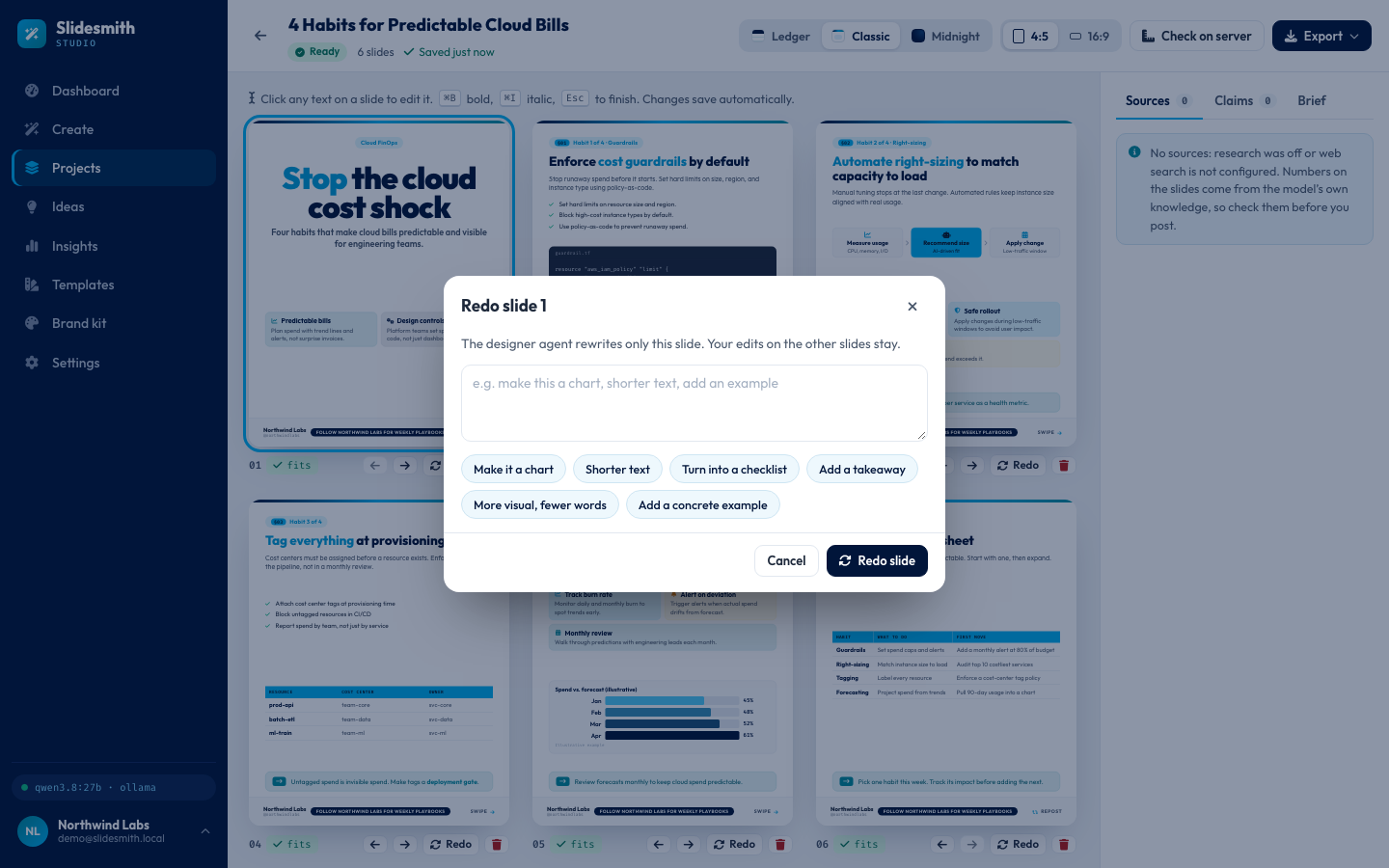
*Back in 4:5, now in the Classic template, the Redo button under slide 1 opens this dialog. "The designer agent rewrites only this slide. Your edits on the other slides stay." You type an instruction or pick a quick chip: "Make it a chart", "Shorter text", "Turn into a checklist", "Add a takeaway", "More visual, fewer words", "Add a concrete example". A redo is a small job of its own: the designer rewrites that one slide, and only that slide is measured and, if needed, repaired. A live redo took 97 s; in the evaluation, eight redo instructions took a median of 15.1 s with the model warm, and all eight were followed (Module 12).*
9. Export
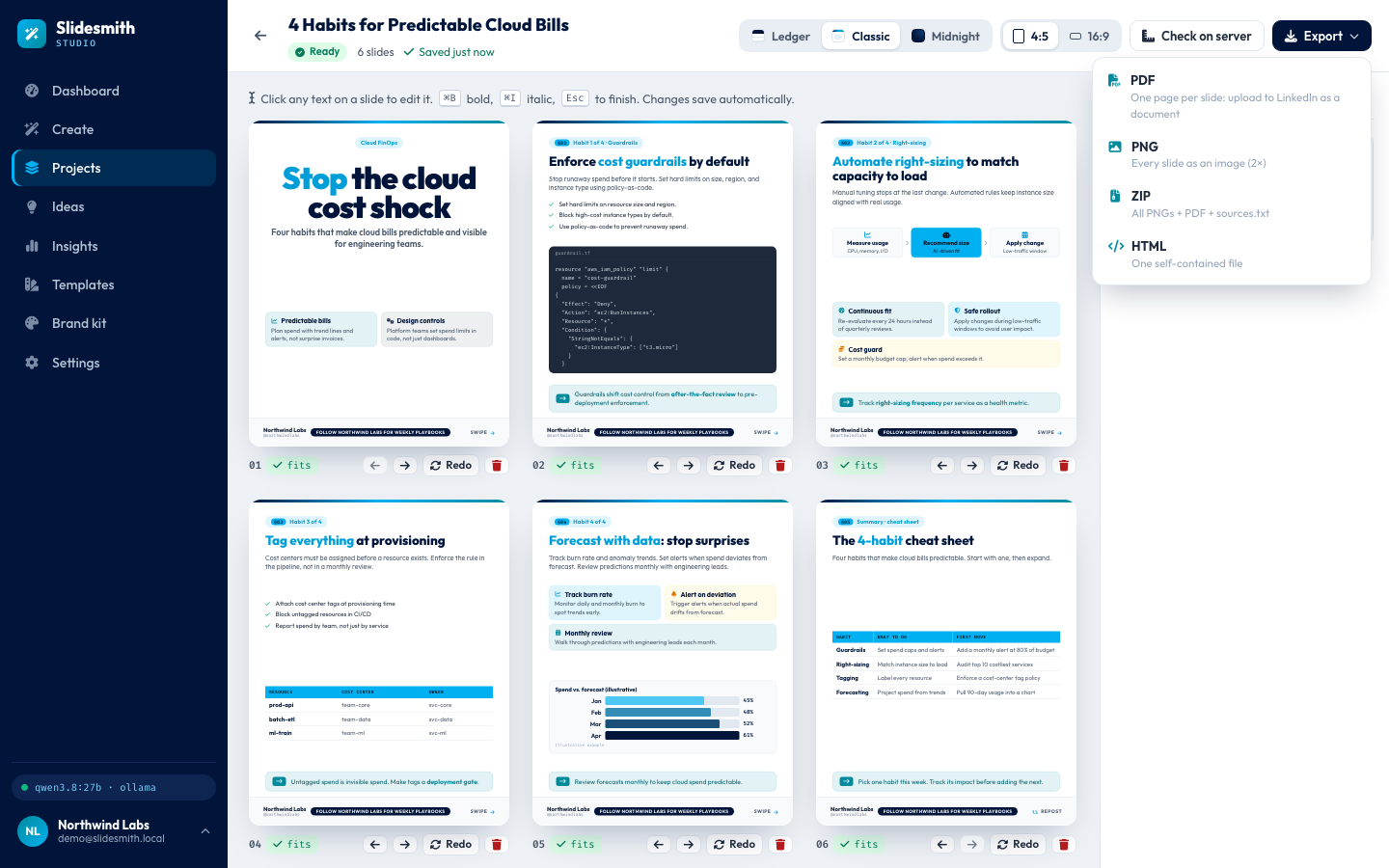
The export menu. PDF: one page per slide, the file you upload to LinkedIn as a document. PNG: every slide as an image at twice the size. ZIP: all the PNGs, the PDF and a sources.txt. HTML: one self-contained file with the styles, fonts and images inside it. The server's own Chromium opens the same /render page the app uses, draws the deck and prints or photographs it (Module 15).
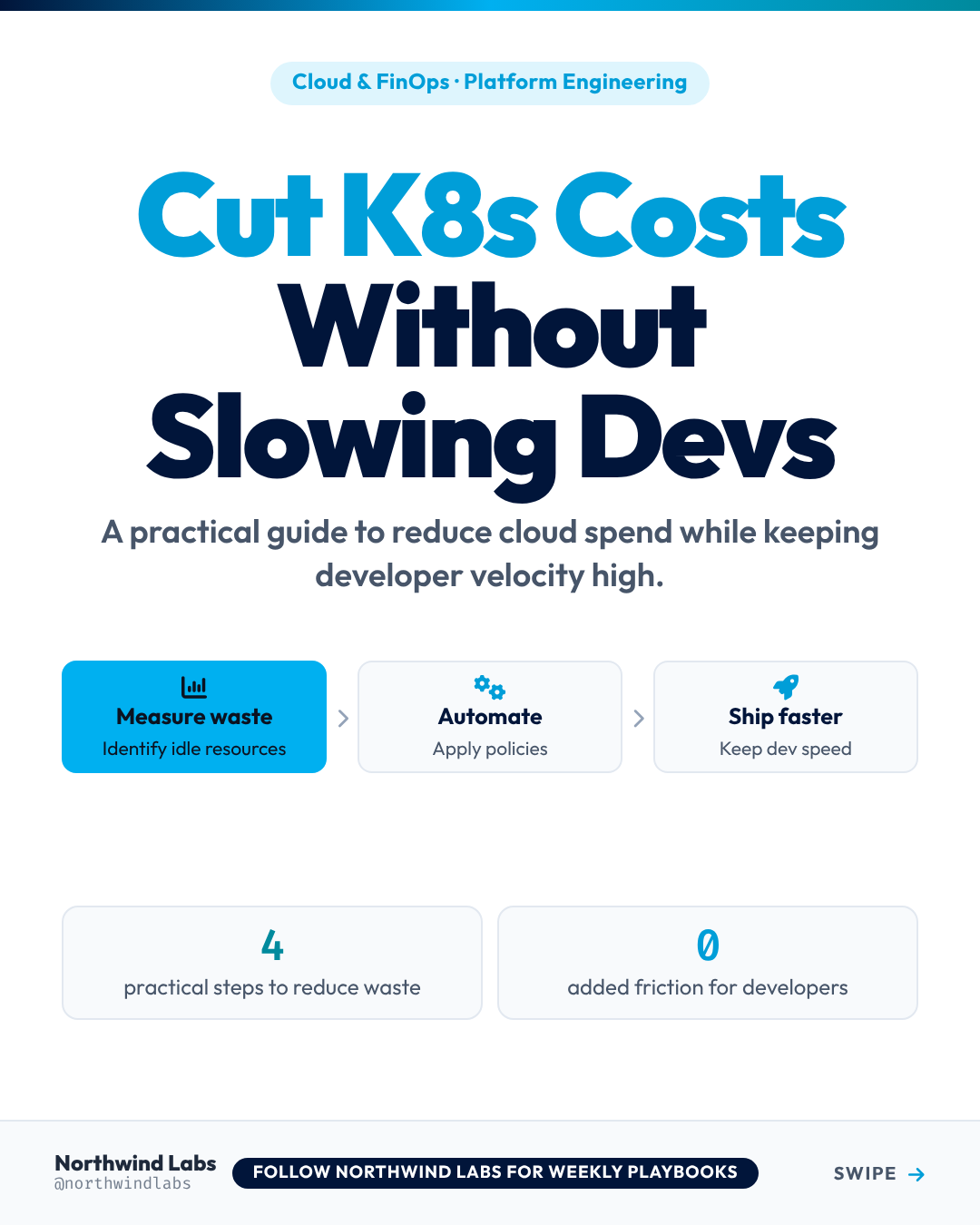
One exported PNG, at its real size of 1080 x 1350 pixels (a 540 x 675 slide at scale 2). This one is the cover of an earlier deck in the same account, "Cut K8s Costs Without Slowing Devs", in the Classic template: the brand's blue on the accent words, a three-step flow, two number cards, and the footer with the name, the handle @northwindlabs, the call to action "Follow Northwind Labs for weekly playbooks" and "Swipe". As before, the numbers on it ("4 practical steps", "0 added friction") are the model's words, written without research.
10. Projects, ideas and insights
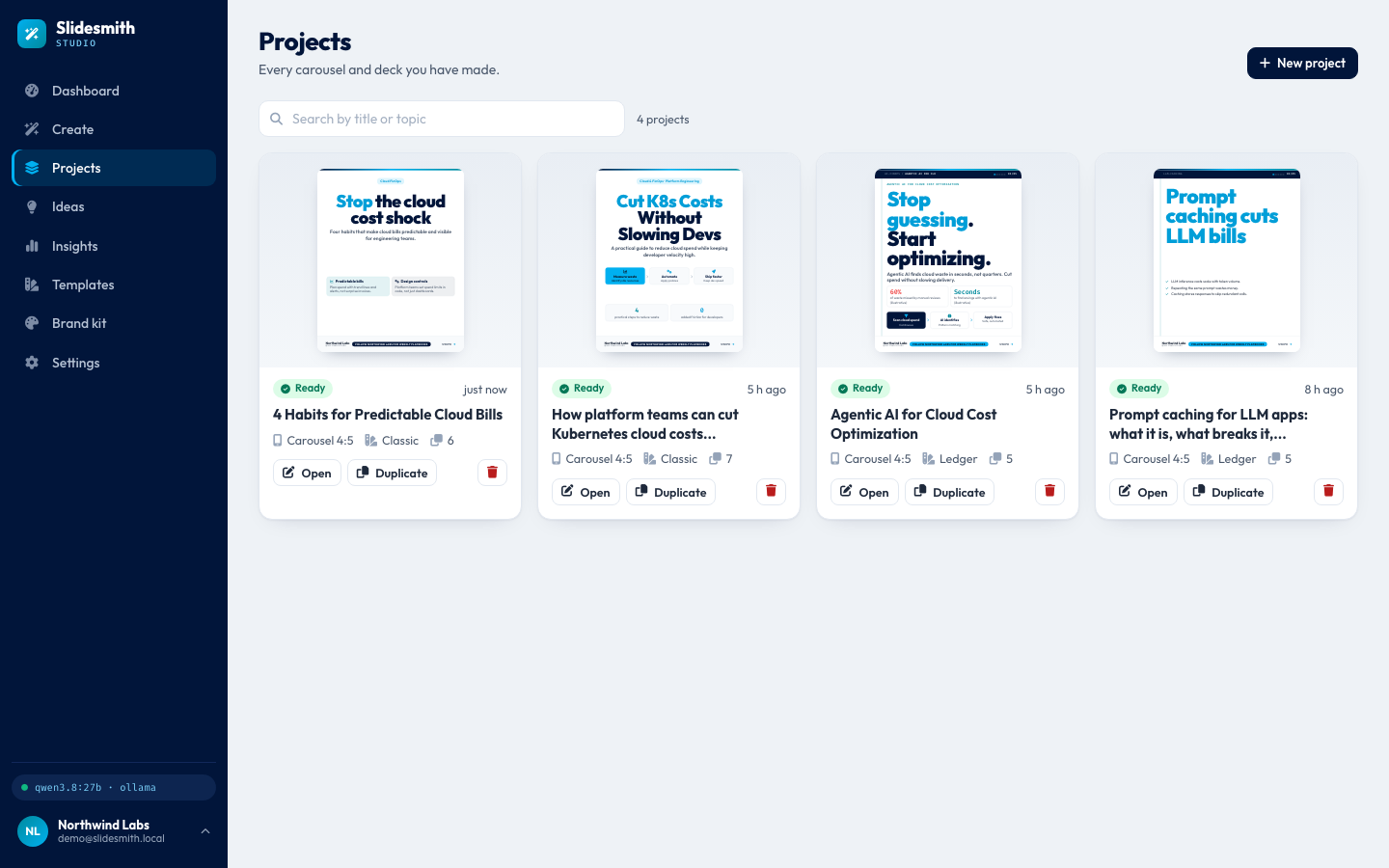
Projects: every deck the account has made, here 4, with a search box. Each card shows the first slide, the status, the format, the current template and the number of slides, with Open, Duplicate and Delete. The new deck is first, "just now", in Classic, because that is the template it was last saved in.
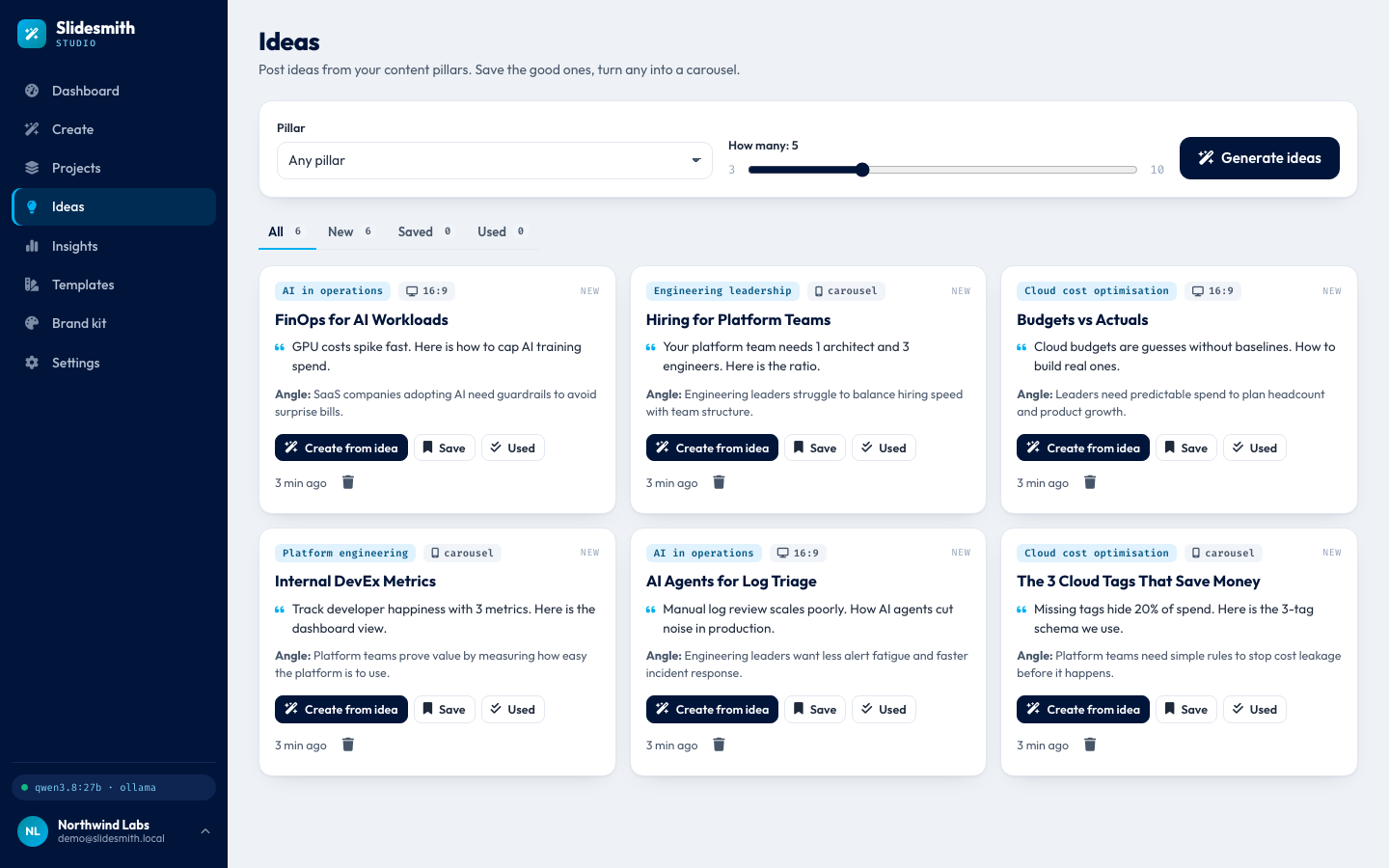
*Ideas: post ideas from the brand's content pillars. You pick a pillar (or any) and how many, 3 to 10, and the model writes each idea with a title, a hook, an angle, a pillar and a suggested format: here six new ideas, such as "FinOps for AI Workloads", "Budgets vs Actuals" and "The 3 Cloud Tags That Save Money". Create from idea fills the Create page; Save and Used sort them (Module 14).*
Treat the ideas as drafts to check. The ideas prompt tells the model not to invent the author's own results, and none of these six hooks claims a result for Northwind Labs. But some still state a figure that nobody looked up: "Missing tags hide 20% of spend" quotes a general statistic with no source, and "the 3-tag schema we use" assumes a schema the brand never described. With research off there is nothing to check them against, so the person posting reads them first.
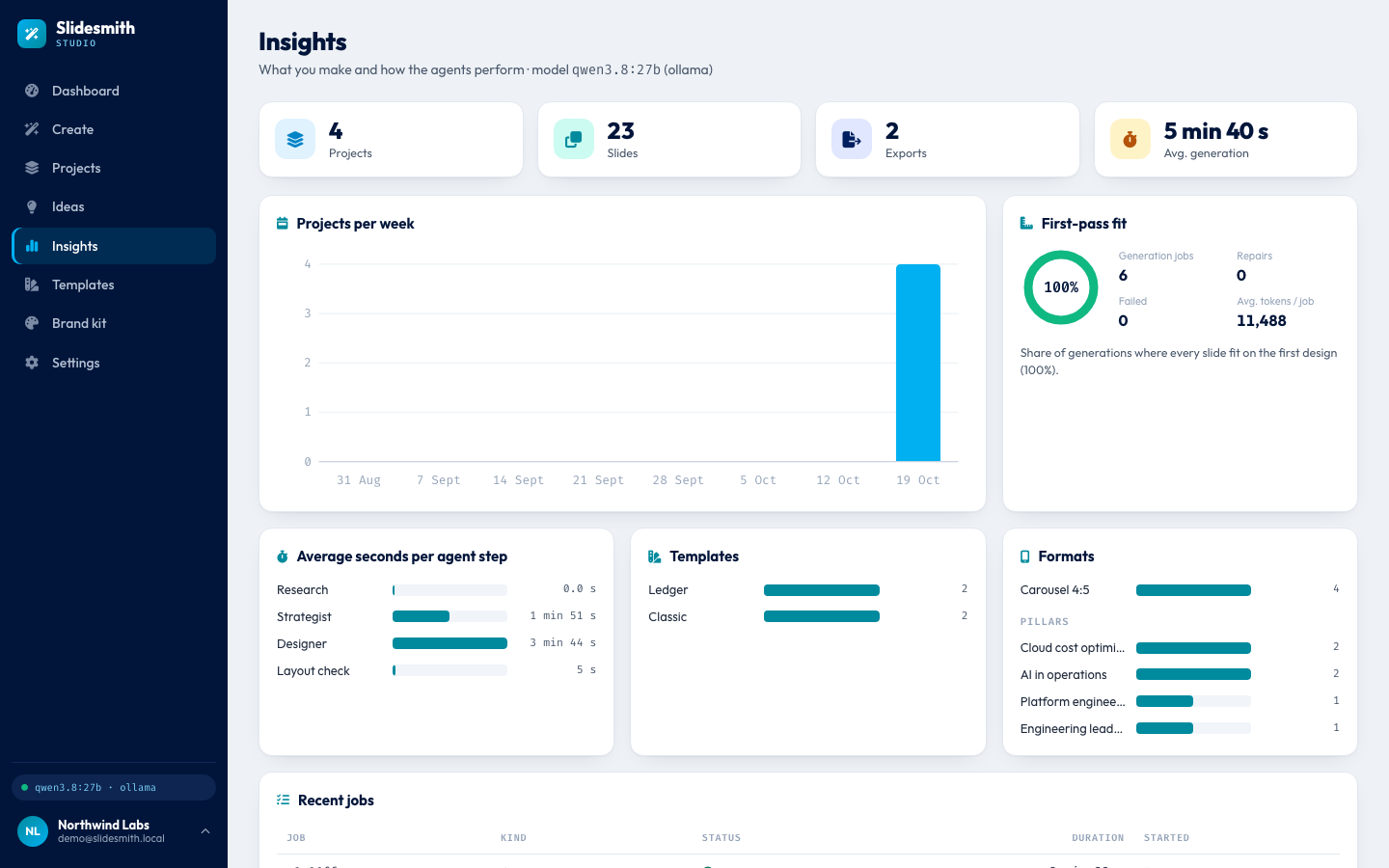
*Insights: what the account has made and how the agents performed. Four projects, 23 slides, 2 exports and an average generation of 5 minutes 40 seconds. The first-pass fit ring shows the share of generations where every slide fit on the first design, before any repair: 100% over 6 generation jobs, with 0 repairs and 0 failures, and on average 11,488 tokens per job. (The 16:9 overflow in step 7 came from a format switch in the editor, not from a generation, so it is not counted here.) Average seconds per agent step: strategist 1 minute 51 seconds, designer 3 minutes 44 seconds, layout check 5 seconds, research 0 (it never ran). An average hides a wide spread: in this tour's job the strategist took 23 seconds, while a first plan with the model still loading took 368 seconds in another live run (the figure in step 5). The template and format counts describe each project as it is now, which is why the deck generated in Midnight is counted under Classic (insights are Module 14).*
11. Templates, brand kit and settings
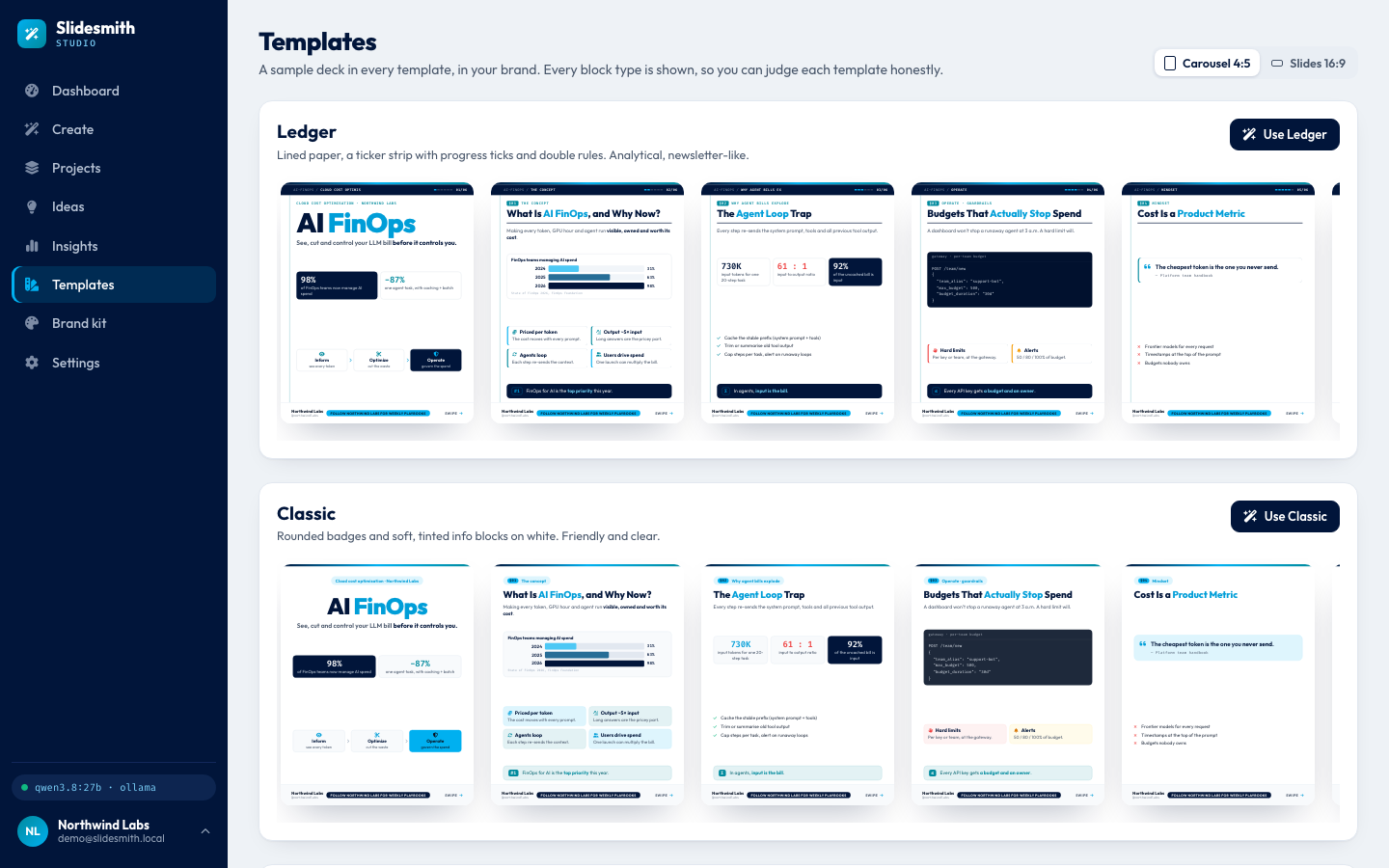
Templates: a sample deck drawn in every template, in the user's own brand, showing every block type (cards, number cards, bars, a table, a checklist, a flow, code and a quote) so each template can be judged fairly. Ledger is "lined paper, a ticker strip with progress ticks and double rules"; Classic "rounded badges and soft, tinted info blocks"; Midnight, further down, a dark gradient with a dot grid. A switch shows them in 4:5 or 16:9 (Module 7).
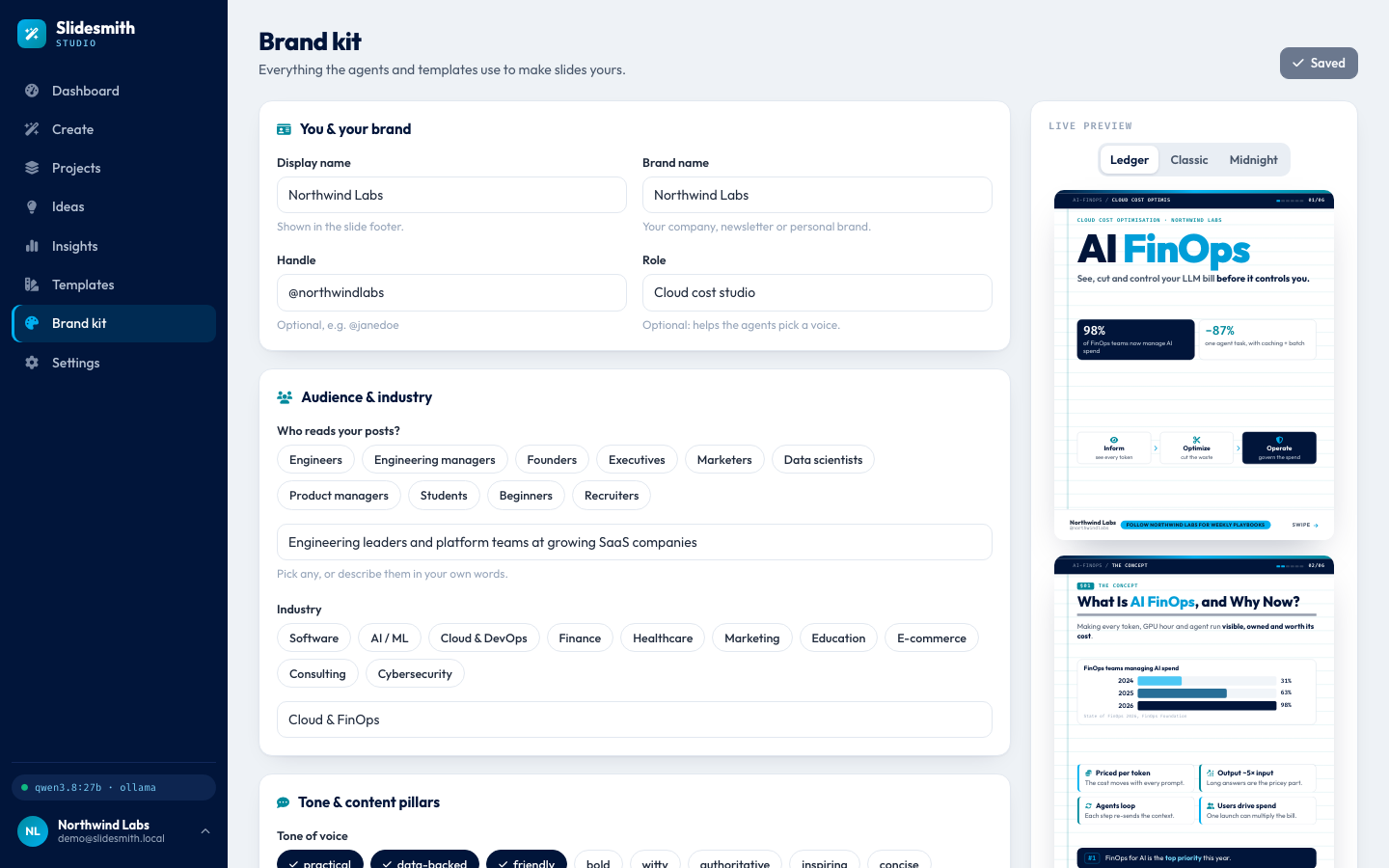
The brand kit holds the same answers as the questionnaire, here for Northwind Labs: role "Cloud cost studio", audience "Engineering leaders and platform teams at growing SaaS companies", industry "Cloud & FinOps", tone practical, data-backed and friendly. The live preview on the right shows the brand on the template's sample slides (the brand kit as data is Module 6).
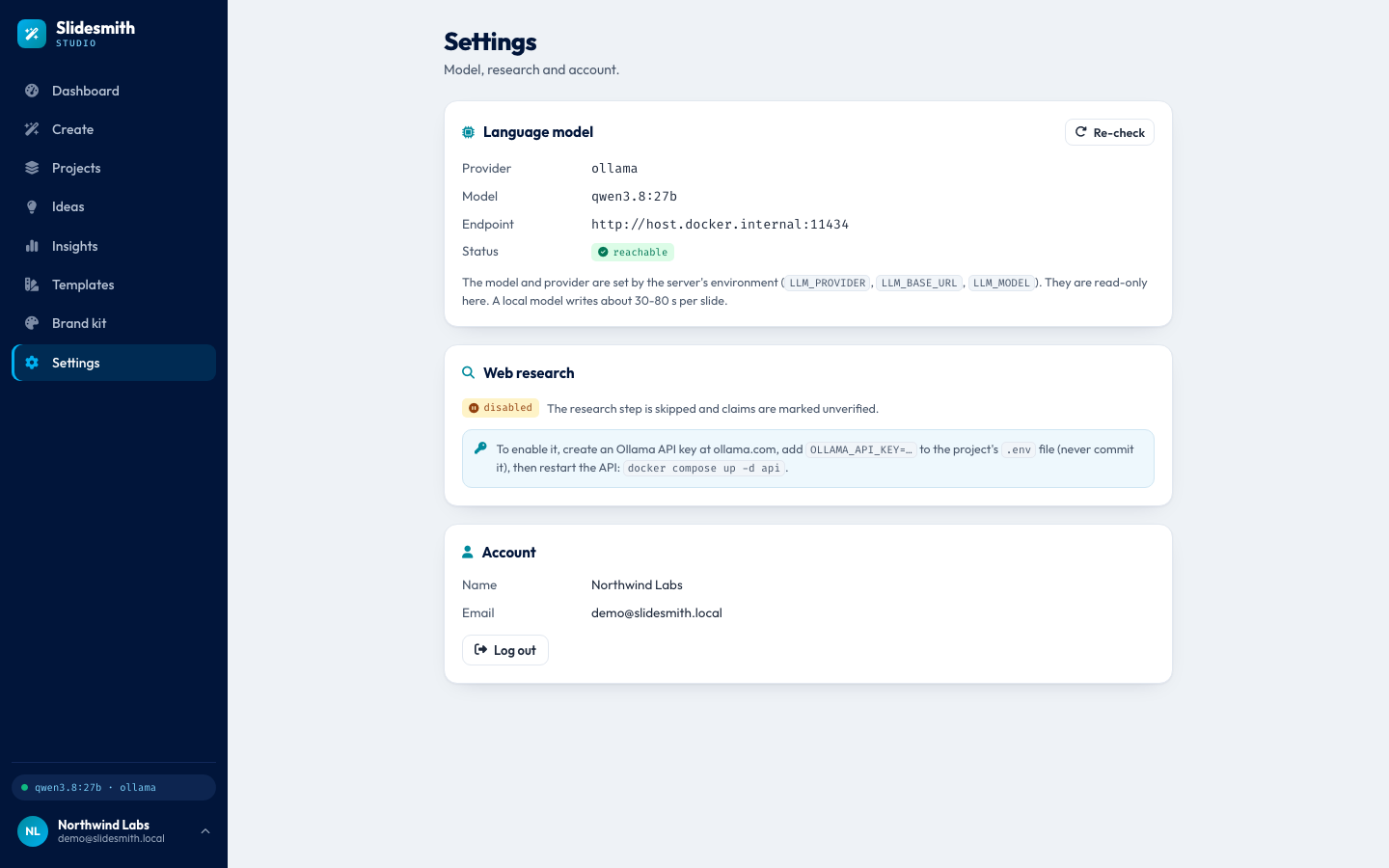
*Settings. The language model: provider ollama, model qwen3.8:27b, endpoint http://host.docker.internal:11434 (the API container reaching Ollama on the Mac), status reachable. These come from the server's environment and are read-only here, with the reminder that a local model writes about 30 to 80 s per slide. Web research: disabled, "The research step is skipped and claims are marked unverified", with the fix spelled out: create an Ollama API key, put it in the project's .env as OLLAMA_API_KEY (never commit it) and restart the API. This is why the tour's deck has no sources (Module 3).*
What is inside
| Part | What it does | Module |
|---|---|---|
| The problem and the solution | why one prompt to a finished design fails when a model writes HTML, and the three-agent, one-spec answer | 1, 2 |
| Design | model and infrastructure choices, the high-level and the low-level design | 3, 4, 5 |
| Sign-in and brand | passwords, cookie sessions, the five-step questionnaire, the brand as data | 6 |
| The deck spec and templates | the JSON contract, length limits, sanitising, three templates as CSS | 7 |
| The agent pipeline | a LangGraph graph: research, plan, design, check, repair | 8 |
| Research | web search, facts with sources, unverified claims | 9 |
| Prompts and JSON | the strategist and designer prompts, JSON extraction, repair and one retry, honesty rules | 10 |
| Render and repair | Chromium measures every slide; overflow goes back to be shortened or trimmed | 11 |
| Editing and redo | click to edit, autosave, instant template and format switch, redo one slide | 12 |
| Jobs and progress | background jobs, server-sent events, catching up after a reload | 13 |
| Ideas and insights | post ideas from pillars, the dashboard, usage and agent timings | 14 |
| Exports | PDF, PNG, ZIP and a self-contained HTML file | 15 |
| Security | sessions, uploads, SSRF, XSS, CSRF, rate limits | 16 |
| Evaluation | five suites with a release gate, run on the real model | 17 |
| Frontend | the React studio and the shared renderer | 18 |
| Containers | one command runs the whole stack locally | 19 |
| Cloud | Google Cloud with Terraform, keyless CI/CD | 20 |
Three things are not part of this project, and the modules say so where it matters: posting to LinkedIn (you download the file and upload it yourself), teams or shared brand kits (one account is one creator), and a cloud deploy that was actually run (the Terraform for Google Cloud was written but never validated or applied).
Results in numbers
Measured on 24 October 2026 in one full evaluation run with qwen3.8:27b on the author's 24 GB Apple M5 Pro, the Docker stack serving the render page. All five suites passed their gates. Module 17 explains every metric and gate.
| What was measured | Result | Pass mark |
|---|---|---|
| 20 slide plans, valid JSON from the designer | 20 of 20 on the first try, 0 retries | 85% first try, 95% after a retry |
| The same 20 slides, honesty rules (no invented quotes, no slide numbers) | 0 violations | 0 |
| Seconds per designed slide | median 24.8 s, 95th percentile 42.1 s | 95th percentile at most 120 s |
| 120 layout measurements (20 slides, 2 formats, 3 templates) | 119 fit on the first design (0.992), all 120 after repair | 60% first pass, 95% after repair |
| 4 whole decks of 5 to 7 slides | right slide count, cover first and summary last, no repeated titles, all slides fit after 3 repairs | all correct, 95% fit |
| Seconds per whole deck | median 220.6 s, 95th percentile 270.5 s | no gate |
| 8 redo instructions | all followed, all still valid, all fit; median 15.1 s | 85% followed |
| 15 ideas for 3 brands | right count, no duplicates, every pillar valid; 0 hooks invented the author's results (read by hand) | count exact, 0 duplicates |
The model was already loaded for this run, so the deck times leave out the cold load (368 s seen live). One metric, an [accent] phrase in the model's own slide titles, scored 0.90, exactly on its gate; the cleanup code adds the missing two.
The tech stack
| Layer | Choice |
|---|---|
| Frontend | React 18, TypeScript, Vite, served by nginx; one renderer for preview, editor and export |
| API | Python 3.12, FastAPI, SQLAlchemy 2, Alembic; jobs as asyncio tasks with server-sent events |
| Data | PostgreSQL 17; uploads on a disk volume or in a Google Cloud Storage bucket |
| Agents | LangGraph: research, content strategist, designer, then check and repair |
| Model | qwen3.8:27b on local Ollama (Metal GPU), or the same model on any OpenAI-compatible endpoint (Groq in the cloud) |
| Research | Ollama web search and fetch (optional key) |
| Rendering | Playwright Chromium: measure overflow, print PDF, take PNGs |
| Quality and safety | 185 backend and 59 frontend tests, five evaluation suites with a release gate, a security review whose fixes carry tests |
| Delivery | Docker Compose locally; Cloud Run, Cloud SQL, Secret Manager and Terraform on Google Cloud; GitHub Actions |
Run it yourself
You need Docker Desktop and Ollama on the Mac (the model uses its GPU). Start Ollama and pull the model once; it is about 18 GB:
ollama serve
ollama pull qwen3.8:27b
What you should see
The pull downloads the model layers and ends with success. Then, from the source-code folder, copy the settings file and start the stack:
cd source-code
cp .env.example .env
docker compose up -d --build
docker compose exec api python -m app.cli create-demo-user
What you should see
Three containers start: postgres, api and web. The last command creates the demo account. Open http://localhost:8095 and log in as demo@slidesmith.local with the password Demo-Pass-2026 (a published demo password; do not use it on anything public), or create your own account and answer the five questions. In Settings, the language model should say "reachable". Web research stays disabled unless you put an OLLAMA_API_KEY from your Ollama account in .env, never in code, and restart the API with docker compose up -d api. Expect the first deck of a session to be slow while the model loads. Module 19 explains every container, and Module 20 puts the same studio on Google Cloud.
Where to go next
Read the modules in order. Module 1 starts with the problem of making carousels by hand, and each module after it opens one box of the architecture diagram at the top of this page.