Part 1: The decision first
By the end of this module, you'll have:
- A symptom-based way to choose between prompting, retrieval, and fine-tuning, plus a cost script that prices the "just put more examples in the prompt" option per month.
- A frozen evaluation plan and a measured baseline for ticket triage (TinyLM prompted three ways, keyword rules, TF-IDF, and retrieval), all with n and 95% confidence intervals, written down before any training.
- A supervised fine-tuning dataset built from the 48 dev tickets: scrubbed, augmented, deduplicated, and checked for train/test contamination with real n-gram overlap, plus a log-review pipeline and a "how few examples is enough" curve.
- LoRA written from scratch on TinyLM's linear layers, compared with full fine-tuning on trainable parameters, training time, accuracy, and file size, plus a QLoRA-style int8 and 4-bit base, an adapter server that swaps adapters in about 0.1 ms, and continued pretraining with before-and-after perplexity.
- Real DPO on TinyLM (reference = the SFT model) that moves a held-out house-style win rate from 0% to 100%, and a reward-hacking run where a flawed reward drives correct answers from 12/12 to 2/12.
- A verification harness (held-out eval, forgetting checks, paired significance test) that ends in a written "do not ship" decision, with the numbers that justify it.
Prerequisites: Modules 1 to 8. You need TinyLM and the ticket dataset from Module 1, tokens and pricing.py from Module 2, next-token probabilities and sampling from Module 3, few-shot prompting from Module 4, and KB retrieval from Module 7. Working Python; no machine learning background. The one new library is scikit-learn (for a baseline).
Where we are: Module 8 gave the assistant hands: an agent loop that calls tools under guards. Everything so far changed what goes into the model: prompts, retrieved context, tool results. This module is about the other lever, changing the model's weights. It is the most expensive lever you have, so we spend as much effort on deciding whether to pull it, and on proving whether it worked, as on pulling it.
How this module is organized
| Part | What it covers |
|---|---|
| Part 1: The decision first | Choosing by symptom; what fine-tuning fixes and does not; cost, data, and maintenance as real inputs |
| Part 2: Measure before you train | The shared setup, a frozen eval plan, the prompted baseline (and a decoding trap), the cheap alternatives |
| Part 3: Data | The SFT format, splits, augmentation, synthetic data, dedupe and contamination, production logs, distillation and licences |
| Part 4: Methods | LoRA from scratch, full fine-tuning vs LoRA, a hyperparameter sweep, a failure diagnosed, QLoRA, continued pretraining |
| Part 5: Preference and reasoning training | Preference pairs, DPO in practice, logs with review and how few examples is enough, RLHF and RLVR, reward hacking measured |
| Part 6: Serving many adapters | One base model, many adapters, swap time |
| Part 7: Verification | Forgetting and regression checks, and deciding the fine-tune was not worth it |
All examples run in order from the root of your supportdesk copy. Every script is a file under examples/, and later scripts import helpers from earlier ones (for example, everything imports examples/m09_setup.py), so run them in the order shown. Here is the setup once:
cd supportdesk
source .venv/bin/activate            # or however you activated the course venv in Module 1
export PYTHONPATH=.
pip install scikit-learn==1.9.1      # the only new dependency in this module
mkdir -p models data/m09
python -c "import torch, sklearn; from supportdesk.tinylm import load; m, t = load(); print(torch.__version__, sklearn.__version__, m.num_parameters(), t.get_vocab_size())"
Code explained
- In simple words: get into the project, install the one new library, and check that TinyLM loads.
- What happens:
PYTHONPATH=.lets the examples importsupportdesk.*and each other.models/is where every model this module trains is saved, always under a name starting withm09-so the pretrainedmodels/tinylm-baseis never overwritten (Module 3 and later modules depend on it).data/m09/holds the datasets we build. - Comes out:
2.14.0+cu130 1.9.1 1071872 1503
(The +cu130 suffix only names the wheel build; your suffix may differ, and everything in this module runs on the CPU.) The model has 1,071,872 parameters. The tokenizer reports 1,503 tokens even though the embedding table has 2,048 rows: the last 545 rows are never used. Keep that in mind when you look at label tokens in Part 4.
Two honesty notes before we start.
First, everything in this module is real. TinyLM is small enough (about 1 million parameters) to fine-tune on a laptop CPU in seconds, so every accuracy, loss, perplexity, timing, and file size you see was measured while this module was built. Timings were taken with torch.set_num_threads(1) on a busy 2-core machine; yours will differ, so read them as "about" numbers. Accuracy numbers are reproducible because every run sets its seeds.
Second, TinyLM is not a real model, and it shows. It was pretrained on 0.7 MB of templated support text and memorizes it. Some results below (LoRA forgetting more than full fine-tuning, for example) are about this tiny model and these settings, not laws of nature. The mechanisms, the data hygiene, and the verification steps transfer directly to a 7-billion-parameter model; the specific numbers do not. Where a real model would behave differently, the text says so and cites evidence.
Part 1: The decision first
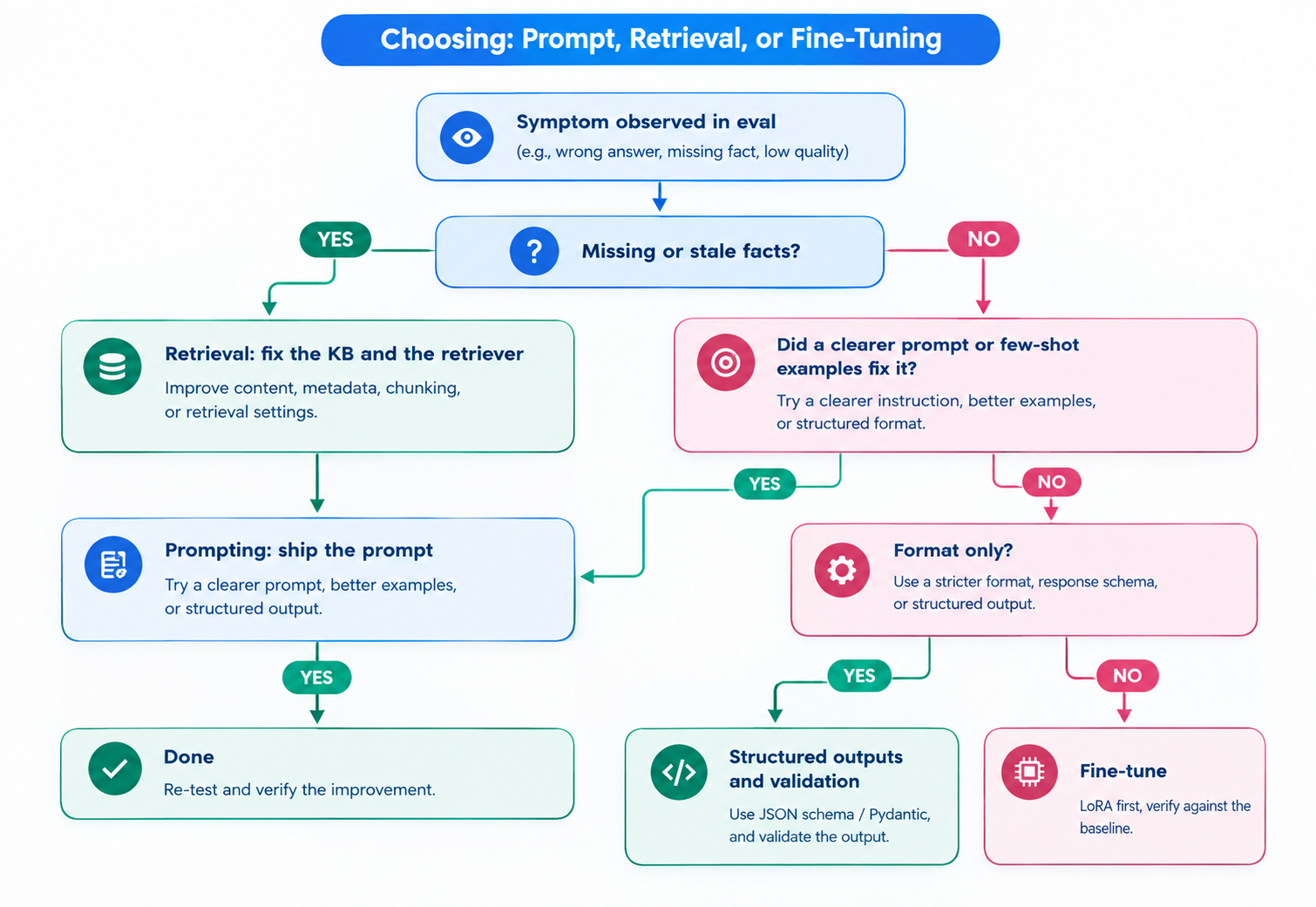
Choosing by symptom
Fine-tuning means continuing to train a model that was already trained, on your own examples, so its weights change. Supervised fine-tuning (SFT) is the plain version: you show the model (input, desired output) pairs and train it to produce the output. Prompting (Modules 4 and 5) and retrieval (Module 7) leave the weights alone.
Pick the lever by the symptom you actually see, not by what sounds most serious:
| Situation | Use this | Why |
|---|---|---|
| The model does not know a fact (new pricing, a policy that changed last week) | Retrieval (Module 7) | Facts change; retrieval updates in minutes by editing a KB article. Fine-tuning bakes in a snapshot and is poor at adding facts reliably. |
| The model ignores an instruction you never actually gave clearly | Prompting (Module 4) | Cheapest fix, testable in minutes. Most "the model can't do X" turns out to be "the prompt never said X". |
| The format is right 95% of the time and wrong 5% | Structured outputs (Module 6) or a validator and retry | Constrained decoding and schemas fix format for free. |
| Output must follow a house style or tone that is hard to describe but easy to show | Few-shot prompting first; fine-tuning if the prompt gets long or inconsistent | Style is what SFT and DPO are good at, and showing beats describing. |
| A narrow, high-volume task (triage, extraction) where a big model works but is too slow or costly | Fine-tune a small model, or distill from the big one | A small tuned model can match a big one on one narrow task at a fraction of the latency and price. |
| The prompt has grown to thousands of tokens of examples on every call | Fine-tuning (to move the examples into the weights) | You pay for those tokens on every request (see the cost script below). |
| Domain language the model has barely seen (internal jargon, a rare language) | Continued pretraining, then SFT | Teaching vocabulary needs lots of raw text, not labeled pairs. |
| The model is confidently wrong about your policies | Retrieval plus grounding checks (Module 7), not fine-tuning | Fine-tuning on answers can make the model more confident without making it more right. |
| A simple rule or classic classifier already hits your target | The rule or classifier | Cheapest to run, explain, and maintain. We will measure exactly this in Part 7. |
What fine-tuning fixes, and what it does not
Fine-tuning changes behavior: which of the things the model can already do it does by default. It is good at:
- Format: always answer with exactly one label, always use a fixed JSON shape, always stop after one line.
- Tone and style: Brightlane's house style ("Thank you." then the answer), shorter replies, no hedging.
- Task-specific behavior: a consistent triage policy for edge cases that a prompt keeps getting wrong.
- Latency and cost: a small tuned model replacing a large prompted one, and a short prompt replacing a long few-shot one.
It is bad at:
- Adding knowledge you need to be right about. A model trained on "Team costs 12 USD" will say it, and will also say something confident about prices it never saw. Retrieval gives you a source you can cite and update.
- Freshness. The weights are a snapshot. When Brightlane changes the refund window, the fine-tuned model is wrong until you retrain, retest, and redeploy.
- Fixing a task the base model has no ability for. With 48 examples you are steering, not teaching from scratch. Part 4 shows this sharply with TinyLM.
Cost, data, and maintenance as real inputs
Fine-tuning has three bills. The first is data: someone has to collect, label, review, and version the examples (Part 3). The second is compute and evaluation: training runs, sweeps, and the eval you run after every one. The third is maintenance, and it is the one teams forget: every time the base model is deprecated, the policy changes, or the provider changes its offer, you redo the first two.
That third bill is not hypothetical. On 7 May 2026 OpenAI announced it is winding down its self-serve fine-tuning platform: new organizations can no longer start training jobs, organizations that have not used a fine-tuned model recently lost access on 2 July 2026, and active customers can no longer create new jobs from 6 January 2027, while inference on existing fine-tuned models continues until their base models are deprecated (OpenAI deprecations page, checked 21 September 2026). Google's Gemini API has had no tunable model since Gemini 1.5 Flash-001 was deprecated in May 2025; tuning Gemini now happens on Google Cloud's Vertex AI platform instead (Gemini API fine-tuning page). A fine-tune tied to one vendor's platform is a dependency with an end date. Owning the recipe (data, eval, training script) and using open-weight bases (Part 4) is how you keep it portable.
The benefit side is easy to price. A common reason to fine-tune is to replace a long few-shot prompt. Here is what that prompt actually costs:
"""Cost as a real input: what a long few-shot prompt costs per month, and what a fine-tune would save.

Token counts are real (o200k_base via supportdesk.tokens); prices come from supportdesk/pricing.py.
"""
from supportdesk.data import CATEGORIES, load_tickets
from supportdesk.llm import Usage
from supportdesk.pricing import cost_usd
from supportdesk.tokens import count_messages

SYSTEM = "You triage support tickets for Brightlane. Reply with exactly one category: " + ", ".join(CATEGORIES) + "."
dev, test = load_tickets("dev"), load_tickets("test")


def messages(ticket, shots):
    msgs = [{"role": "system", "content": SYSTEM}]
    for s in shots:  # each worked example is a user turn and the right answer
        msgs += [{"role": "user", "content": s.text}, {"role": "assistant", "content": s.gold["category"]}]
    return msgs + [{"role": "user", "content": ticket.text}]


TICKETS_PER_MONTH = 10_000
print(f"{'prompt':<16} {'tokens/call':>11} " + " ".join(f"{m:>22}" for m in ("openai/gpt-oss-120b", "gemini-3.5-flash")))
for name, shots in (("zero-shot", []), ("12-shot", dev[:12]), ("48-shot", dev)):
    per_call = sum(count_messages(messages(t, shots)) for t in test) / len(test)
    monthly = [cost_usd(Usage(input_tokens=round(per_call), output_tokens=5), m) * TICKETS_PER_MONTH
               for m in ("openai/gpt-oss-120b", "gemini-3.5-flash")]
    print(f"{name:<16} {per_call:>11.0f} " + " ".join(f"{d:>15.2f} USD/mo" for d in monthly))
Code explained
- In simple words: count the real tokens of a zero-shot, 12-shot, and 48-shot triage prompt, then price 10,000 tickets a month on two models.
- What happens:
messagesbuilds a chat request with a system prompt, then each example ticket as a user turn followed by its correct label as an assistant turn (the few-shot pattern from Module 4), then the new ticket.count_messagesfrom Module 2 counts tokens witho200k_baseplus 4 tokens of overhead per message.cost_usduses the prices inpricing.py(checked 21 September 2026; verify before relying on them). We assume 5 output tokens per call. Withgpt-oss-120b, a reasoning model, hidden reasoning tokens also bill as output, so the real output count is higher; measure it with your key. Run it withpython -m examples.m09_cost. - Comes out:
prompt           tokens/call    openai/gpt-oss-120b       gemini-3.5-flash
zero-shot                 64            0.13 USD/mo            1.41 USD/mo
12-shot                  527            0.82 USD/mo            8.36 USD/mo
48-shot                 1707            2.59 USD/mo           26.06 USD/mo
The 48-shot prompt is 27 times longer than the zero-shot one, but at 10,000 tickets a month the difference is about 2.50 USD on gpt-oss-120b and about 25 USD on gemini-3.5-flash. That is far less than one engineer-day of building and maintaining a fine-tune. At Brightlane's volume, "fine-tune to save prompt tokens" does not pay. At 10 million calls a month it would be a 25,000 USD monthly question, and the answer could flip. Always run this arithmetic with your own volume before you start.