Part 3: Other modalities
Voice messages: audio input and transcription
Some Brightlane customers, especially on mobile, record a voice message instead of typing. There are two ways to handle audio:
- Speech-to-text (ASR, automatic speech recognition) turns audio into a transcript, which then flows into the text pipeline you already have (triage, retrieval, drafting). Whisper is the best-known ASR model family; Groq serves
whisper-large-v3andwhisper-large-v3-turbothrough the same OpenAI-compatible API as its chat models. - Speech-native models accept audio directly in the chat request (next section).
Before choosing, know what audio files weigh. Uncompressed PCM audio (what a WAV file holds) is sample rate x channels x bytes per sample per second. Speech APIs recommend 16 kHz mono; Groq's speech-to-text page suggests converting to 16 kHz mono before upload, and Google's audio page says Gemini downsamples audio to 16 Kbps and merges channels to mono anyway.
"""Voice messages on tickets: sizes, durations, speech segments, cost, and transcription.

Everything except transcribe() and ask_about_audio() runs offline. transcribe() calls
Groq's OpenAI-compatible transcription endpoint (GROQ_API_KEY); ask_about_audio() sends
the audio to a Gemini chat model (GEMINI_API_KEY). Both run only with M12_LIVE=1.
Note: voice_note.wav holds tones, not speech, so a real transcript of it is
meaningless; record your own voice note to try the live call.
Run: PYTHONPATH=. python examples/m12_audio.py
"""
from __future__ import annotations

import base64
import math
import os
import struct
import wave
from pathlib import Path

from supportdesk.llm import Usage, chat, make_client
from supportdesk.pricing import cost_usd

WAV = Path("data/attachments/voice_note.wav")
# console.groq.com/docs/speech-to-text, checked 21 Sep 2026: USD per hour, 10 s minimum per request
WHISPER_PRICES = {"whisper-large-v3": 0.111, "whisper-large-v3-turbo": 0.04}
MIN_BILLED_S = 10
GEMINI_AUDIO_TOKENS_PER_S = {"audio-understanding page": 32, "media-resolution page, Gemini 3": 25}


def wav_info(path: Path) -> dict:
    with wave.open(str(path), "rb") as w:
        frames, rate = w.getnframes(), w.getframerate()
        return {"seconds": frames / rate, "rate": rate, "channels": w.getnchannels(),
                "bits": 8 * w.getsampwidth(), "bytes": path.stat().st_size}


def speech_segments(path: Path, frame_ms: int = 20, threshold: float = 0.02, min_gap_ms: int = 200) -> list[tuple[float, float]]:
    """Energy-based voice activity detection: the simplest endpointing a voice agent can do."""
    with wave.open(str(path), "rb") as w:
        rate, raw = w.getframerate(), w.readframes(w.getnframes())
    samples = struct.unpack(f"<{len(raw) // 2}h", raw)
    step = rate * frame_ms // 1000
    active = []
    for i in range(0, len(samples) - step + 1, step):
        chunk = samples[i:i + step]
        rms = math.sqrt(sum(s * s for s in chunk) / len(chunk)) / 32768
        active.append(rms > threshold)
    segments, start, silent = [], None, 0
    for k, on in enumerate(active + [False] * (min_gap_ms // frame_ms + 1)):
        if on:
            start = k if start is None else start
            silent = 0
        elif start is not None:
            silent += 1
            if silent * frame_ms >= min_gap_ms:
                segments.append((start * frame_ms / 1000, (k - silent + 1) * frame_ms / 1000))
                start, silent = None, 0
    return segments


def whisper_cost(seconds: float, model: str) -> float:
    return max(seconds, MIN_BILLED_S) / 3600 * WHISPER_PRICES[model]


def chunk_plan(total_s: float, chunk_s: float = 600, overlap_s: float = 5) -> list[tuple[float, float]]:
    """Split long audio into overlapping chunks so no word is cut in half at a boundary."""
    plan, start = [], 0.0
    while start < total_s:
        plan.append((start, min(start + chunk_s, total_s)))
        start += chunk_s - overlap_s
    return plan


def transcribe(path: Path, model: str = "whisper-large-v3") -> dict:
    """Groq Whisper through the OpenAI client (same base URL and key as supportdesk.llm)."""
    client = make_client("groq")
    with path.open("rb") as f:
        result = client.audio.transcriptions.create(
            model=model, file=f, response_format="verbose_json", temperature=0.0)
    return {"text": result.text, "language": getattr(result, "language", None),
            "duration": getattr(result, "duration", None)}


def ask_about_audio(path: Path, question: str, model: str = "gemini-3.5-flash") -> str:
    """Speech-native path: the audio goes straight into a chat model (Gemini's OpenAI-compatible input_audio)."""
    audio_b64 = base64.b64encode(path.read_bytes()).decode("ascii")
    messages = [{"role": "user", "content": [
        {"type": "text", "text": question},
        {"type": "input_audio", "input_audio": {"data": audio_b64, "format": "wav"}},
    ]}]
    return chat(messages, provider="gemini", model=model, max_tokens=300).text


def main() -> None:
    info = wav_info(WAV)
    print(f"{WAV.name}: {info['seconds']:.1f} s, {info['rate']} Hz, {info['channels']} ch, "
          f"{info['bits']}-bit, {info['bytes']:,} bytes")
    for label, rate, ch, bits in [("16 kHz mono 16-bit (speech APIs)", 16_000, 1, 16),
                                  ("44.1 kHz stereo 16-bit (phone recorder)", 44_100, 2, 16)]:
        print(f"  one minute as {label}: {rate * ch * bits // 8 * 60 / 1e6:.2f} MB")

    segs = speech_segments(WAV)
    print(f"\nSpeech segments found by energy VAD: {len(segs)}")
    print("  " + ", ".join(f"{a:.2f}-{b:.2f}s" for a, b in segs))

    print("\nTranscription cost per voice note (Groq Whisper, 10 s minimum):")
    for seconds in (info["seconds"], 45, 180):
        row = ", ".join(f"{m} ${whisper_cost(seconds, m):.6f}" for m in WHISPER_PRICES)
        print(f"  {seconds:6.1f} s: {row}")
    monthly = 3000 * whisper_cost(45, "whisper-large-v3")
    print(f"  3,000 notes/month at 45 s each with whisper-large-v3: ${monthly:.2f}")

    print("\nSending the same audio to a speech-native LLM instead (input side only):")
    for source, rate in GEMINI_AUDIO_TOKENS_PER_S.items():
        tokens = math.ceil(45 * rate)
        usd = cost_usd(Usage(input_tokens=tokens), "gemini-3.5-flash")
        print(f"  45 s at {rate} tokens/s ({source}): {tokens:,} tokens, ${usd:.6f} at pricing.py's input rate")

    plan = chunk_plan(45 * 60)
    print(f"\nA 45-minute call recording in 10-minute chunks with 5 s overlap: {len(plan)} chunks")
    print("  " + ", ".join(f"{a / 60:.1f}-{b / 60:.1f} min" for a, b in plan))

    if os.environ.get("M12_LIVE") == "1":
        print("\nLive transcription:", transcribe(WAV))
        print("Speech-native answer:", ask_about_audio(
            WAV, "Is this a person speaking? Describe the recording and the speaker's tone in two sentences."))


if __name__ == "__main__":
    main()
Code explained
- In simple words: measure the voice note, find where the sound is, price transcribing it two ways, plan how to split long recordings, and (with keys) transcribe it or ask a model about it.
- What happens:
wav_info()reads the header with the standardwavemodule: frames, rate, channels, sample width.speech_segments()is energy-based voice activity detection (VAD): split the audio into 20 ms frames, compute each frame's loudness (root mean square), mark frames above a threshold as active, and merge active runs separated by less than 200 ms of quiet. This is the simplest possible endpointing.whisper_cost()applies Groq's per-hour prices (0.111 USD forwhisper-large-v3, 0.04 USD for turbo, checked 21 September 2026) with the documented 10-second minimum per request.chunk_plan()splits long audio into 10-minute chunks with 5 seconds of overlap so no word is cut at a boundary. Groq's free tier caps uploads at 25 MB; a 45-minute 16 kHz mono WAV is about 86 MB.transcribe()callsclient.audio.transcriptions.create()on Groq's client frommake_client(), asking forverbose_json, which adds segment timestamps and the detected language.ask_about_audio()sends the audio as aninput_audiocontent part to a Gemini chat model, the format Google's OpenAI-compatibility page documents.main()prints everything and runs the live calls only withM12_LIVE=1.
- Comes out:
With a Groq key, the live transcription is one call:
export GROQ_API_KEY=your-key-here GEMINI_API_KEY=your-other-key
M12_LIVE=1 python examples/m12_audio.py
Code explained
- In simple words: the same script, plus a real transcription and a real speech-native answer.
- What happens:
transcribe()uploads the WAV to Groq's/audio/transcriptionsendpoint;ask_about_audio()sends it to Gemini asinput_audio. - Comes out: Illustrative sample run (not captured in this build; produced for teaching). Your output will differ.text
Live transcription: {'text': ' Thank you.', 'language': 'English', 'duration': 5.2}
Speech-native answer: This is not a person speaking. It is a series of evenly spaced electronic tones, about a second apart, with no words or vocal tone.
Our voice note is tones, not speech, so the only correct transcript is empty. The illustrative "Thank you." shows a real, documented failure mode: ASR models can hallucinate words over non-speech audio. In "Careless Whisper" (Koenecke et al., FAccT 2024, arXiv 2402.08021), roughly 1% of Whisper transcriptions contained entire phrases or sentences that were not in the audio, and hallucinations were more common for speakers with long non-vocal pauses. Two defenses follow. Run VAD first and do not transcribe audio without speech (our energy VAD cannot tell tones from speech, so production systems use a trained VAD model such as Silero VAD). And keep the audio attached to the ticket so an agent can check a transcript that matters. To test transcription for real, record yourself reading ticket T-1001 aloud on your phone, save it as WAV or M4A, and point
WAVat it.
Speech-native models
A speech-native model takes audio tokens directly, the same way a VLM takes image tokens, instead of reading a transcript. Audio is cut into short frames (Gemini documents 25 to 32 tokens per second), encoded, and placed in the context. Because the model hears the audio rather than a transcript, it can use tone, hesitation, background noise, and non-speech sounds, and it can answer questions about the recording ("does the caller sound angry?", "is there music in the background?"). Real-time voice models go one step further and also generate audio tokens, so one model listens and speaks (examples current in September 2026: OpenAI's gpt-realtime-2.1 over WebRTC or WebSocket, and Google's Live API over WebSockets).
| Situation | Use this | Why |
|---|---|---|
| Voice notes on tickets that feed the existing text pipeline | ASR (Whisper) then text | Cheapest per minute, the transcript is searchable, loggable, and redactable, and every later step is unchanged |
| You need tone, emotion, or non-speech sounds | A speech-native model | A transcript throws that information away |
| Long calls you must search or audit later | ASR with timestamps (verbose_json) | Timestamps let an agent jump to the moment in question |
| Live conversation with a caller | A real-time speech-to-speech model, or a streaming ASR plus LLM plus TTS pipeline | See the latency budget below |
| Regulated data where you must show exactly what was said | ASR plus keeping the audio | A transcript is auditable text; a speech-native model's reasoning is not |
Video: frame sampling
Video understanding is mostly image understanding repeated. Models do not watch video continuously: they sample frames at some rate (Gemini's default is 1 frame per second), turn each frame into image tokens, and usually add the audio track as audio tokens. The cost is frames x tokens per frame + seconds x audio tokens per second, which makes the sampling rate the biggest lever you have. Customers send screen recordings of bugs, and a screen recording is mostly the same frame over and over.
"""Video as a stack of images: frame sampling math and real frame extraction.

The math section is exact arithmetic on published per-frame token counts.
The extraction section samples the synthetic 60 s screen recording (a GIF, so
Pillow can read it without ffmpeg) and drops near-duplicate frames.
Run: PYTHONPATH=. python examples/m12_video_frames.py
"""
from __future__ import annotations

import json
import math
from pathlib import Path

from PIL import Image, ImageChops, ImageSequence, ImageStat

from examples.m12_image_tokens import claude_tokens, openai_patch_tokens
from supportdesk.llm import Usage
from supportdesk.pricing import cost_usd

GIF = Path("data/attachments/screen_recording.gif")
# Per-frame tokens from Google's docs (checked 21 Sep 2026): video-understanding page (66 at low,
# the default there; 258 at high; audio 32 tokens/s) and media-resolution page for Gemini 3
# (70 at default/low/medium; 280 at high; audio 25 tokens/s). Values: (tokens per frame, audio tokens/s).
GEMINI_PER_FRAME = {"video page low": (66, 32), "video page high": (258, 32),
                    "Gemini 3 default": (70, 25), "Gemini 3 high": (280, 25)}


def frames_at(path: Path, fps: float) -> list[tuple[float, Image.Image]]:
    """Frames at t = 0, 1/fps, 2/fps, ... using each GIF frame's duration to find what is on screen.

    Times are kept in integer milliseconds: summing 0.2 s durations as floats drifts, and a frame
    that starts at 47.0 s would be found at 46.99999 s, one frame too early.
    """
    timeline, t_ms = [], 0
    with Image.open(path) as gif:
        for frame in ImageSequence.Iterator(gif):
            dur_ms = int(frame.info.get("duration", 100))
            timeline.append((t_ms, t_ms + dur_ms, frame.convert("L").copy()))
            t_ms += dur_ms
    count = math.floor(t_ms * fps / 1000)
    picks = [round(k * 1000 / fps) for k in range(count)]
    return [(ms / 1000, next(img for a, b, img in timeline if a <= ms < b)) for ms in picks]


def drop_near_duplicates(frames: list[tuple[float, Image.Image]], threshold: float = 1.0) -> list[tuple[float, Image.Image]]:
    """Keep a frame only if its mean absolute pixel difference from the last kept frame exceeds threshold."""
    kept = [frames[0]]
    for ts, img in frames[1:]:
        diff = ImageStat.Stat(ImageChops.difference(img, kept[-1][1])).mean[0]
        if diff > threshold:
            kept.append((ts, img))
    return kept


def main() -> None:
    seconds = 60
    print(f"Token math for a {seconds} s clip with its audio track (frames x per-frame + seconds x audio rate):")
    print(f"{'fps':>5s} {'frames':>7s} " + " ".join(f"{k:>18s}" for k in GEMINI_PER_FRAME))
    for fps in (0.25, 0.5, 1, 2, 5):
        n = int(seconds * fps)
        cells = [f"{n * per + seconds * audio:>18,d}" for per, audio in GEMINI_PER_FRAME.values()]
        print(f"{fps:>5} {n:>7d} " + " ".join(cells))
    n1 = seconds  # 1 fps
    print(f"\nSame 60 frames sent as separate 1280x720 images instead: OpenAI patch {n1 * openai_patch_tokens(1280, 720):,}"
          f" tokens, Claude {n1 * claude_tokens(1280, 720):,} tokens")
    per, audio = GEMINI_PER_FRAME["Gemini 3 high"]
    usd = cost_usd(Usage(input_tokens=n1 * per + seconds * audio), "gemini-3.5-flash")
    print(f"1 fps, Gemini 3 high, on gemini-3.5-flash at pricing.py's input rate: ${usd:.4f} per minute of video")

    truth = json.loads(Path("data/attachments/ground_truth.json").read_text())["screen_recording.gif"]
    print(f"\nReal extraction from {GIF.name} ({truth['seconds']} s, screens: {truth['screens']})")
    for fps in (0.2, 1, 5):
        sampled = frames_at(GIF, fps)
        kept = drop_near_duplicates(sampled)
        print(f"  sample at {fps} fps: {len(sampled):3d} frames, after dropping near-duplicates: {len(kept):2d} "
              f"at t = {', '.join(f'{ts:g}' for ts, _ in kept)}")


if __name__ == "__main__":
    main()
Code explained
- In simple words: compute what a one-minute video costs at several frame rates, then actually sample our screen recording and throw away frames that look the same as the last one we kept.
- What happens:
GEMINI_PER_FRAMEholds Google's published per-frame and per-second audio numbers from two pages that disagree slightly (the video page: 66 tokens per frame at low resolution, its default, or 258 at high, with 32 audio tokens per second; the Gemini 3 media-resolution page: 70 per frame at default, 280 at high, 25 audio tokens per second).frames_at()walks the GIF's frames using each frame's duration to build a timeline, then picks whatever frame is on screen att = 0, 1/fps, 2/fps, ....drop_near_duplicates()compares each sampled frame with the last kept frame by mean absolute pixel difference (Pillow'sImageChops.differenceandImageStat) and keeps it only if the difference exceeds a threshold of 1.0 (on a 0 to 255 scale).main()prints the token table, the same 60 frames priced as separate images, the dollar cost of one minute, and the real extraction at three rates.
- Comes out:text
Token math for a 60 s clip with its audio track (frames x per-frame + seconds x audio rate):
  fps  frames     video page low    video page high   Gemini 3 default      Gemini 3 high
 0.25      15              2,910              5,790              2,550              5,700
  0.5      30              3,900              9,660              3,600              9,900
    1      60              5,880             17,400              5,700             18,300
    2     120              9,840             32,880              9,900             35,100
    5     300             21,720             79,320             22,500             85,500

Same 60 frames sent as separate 1280x720 images instead: OpenAI patch 66,240 tokens, Claude 71,760 tokens
1 fps, Gemini 3 high, on gemini-3.5-flash at pricing.py's input rate: $0.0274 per minute of video

Real extraction from screen_recording.gif (60 s, screens: ['Board: Q3 Launch', 'Export > CSV clicked', 'Exporting... 38%', 'Error E-4012: export failed'])
  sample at 0.2 fps:  12 frames, after dropping near-duplicates:  8 at t = 0, 15, 25, 30, 35, 40, 45, 50
  sample at 1 fps:  60 frames, after dropping near-duplicates: 11 at t = 0, 12, 25, 28, 31, 34, 37, 40, 43, 46, 47
  sample at 5 fps: 300 frames, after dropping near-duplicates: 13 at t = 0, 12, 25, 27.4, 29.8, 32, 34.4, 36.8, 39.2, 41.4, 43.8, 46.2, 47
One minute of video at Gemini's default 1 fps is 5,700 to 5,880 tokens at default resolution, and three times that at high resolution. Sending the same 60 frames as ordinary 1280x720 images to a size-based provider would cost 66,000 to 72,000 tokens, because native video paths use far fewer tokens per frame. On our recording, the screen changes at 0, 12, 25, and 47 seconds. At 1 fps, near-duplicate dropping keeps 11 of 60 frames: the four screen changes, each on time, plus frames of the progress bar growing between 25 and 47 seconds, which is "different" pixel-wise but not in meaning (a higher threshold or a crop that ignores the progress bar would drop those too). At 0.2 fps (one frame every 5 seconds) it sees each change late: the export click at 15 s instead of 12, and the error at 50 s instead of 47. Anything shorter than 5 seconds could be missed entirely. The lessons: sample at least as fast as the shortest event you care about, and deduplicate before you pay. For this recording, "1 fps, then drop near-duplicates" sends 11 frames instead of 60, about 3,080 image tokens at Gemini 3 high resolution instead of 16,800.
A failure worth knowing about: the first version of frames_at() summed the GIF's frame durations (mostly 0.2 s) as floating-point seconds. After more than 200 additions the error screen's start time was 47.000000000000185 instead of 47.0, so the sample at exactly 47 s fell inside the previous (exporting) frame, and the error screen first appeared at 48 s. The symptom was a timestamp one second late; the diagnosis was printing the timeline boundaries around 47 s; the fix was integer milliseconds. Timestamps are evidence in a support ticket ("the error appeared at 0:47"), so this kind of bug matters.
| Situation | Use this | Why |
|---|---|---|
| Screen recording of a bug (mostly static) | 1 fps plus near-duplicate dropping, or scene-change detection | Measured: 11 of 60 frames kept, every screen change caught |
| Fast action (a UI animation glitch, a flicker) | Higher fps on a short clipped segment | 1 fps misses sub-second events |
| Long recordings where speech carries the content (a recorded call with screen share) | Transcribe the audio, sample frames sparsely | Most information is in the audio |
| You only need the final state | Last frame (or last few) as a single image | One image costs 70 to 2,048 tokens instead of thousands |
Image generation and editing, at a working level
Image generation models produce an image from a text prompt; image editing models change an existing image given a prompt, often with reference images or a mask (the region to change). As of September 2026 the main hosted families are Google's Gemini image models (gemini-3.1-flash-image, gemini-3-pro-image, gemini-3.1-flash-lite-image; gemini-2.5-flash-image is listed as legacy) and OpenAI's GPT Image models (gpt-image-2.5-sunburst and gpt-image-2.5-flare in the Images API and as a Responses API tool). Google's pricing page lists gemini-3.1-flash-image at about 0.067 USD per 1K-resolution image. Google states that all its image models embed a SynthID watermark.
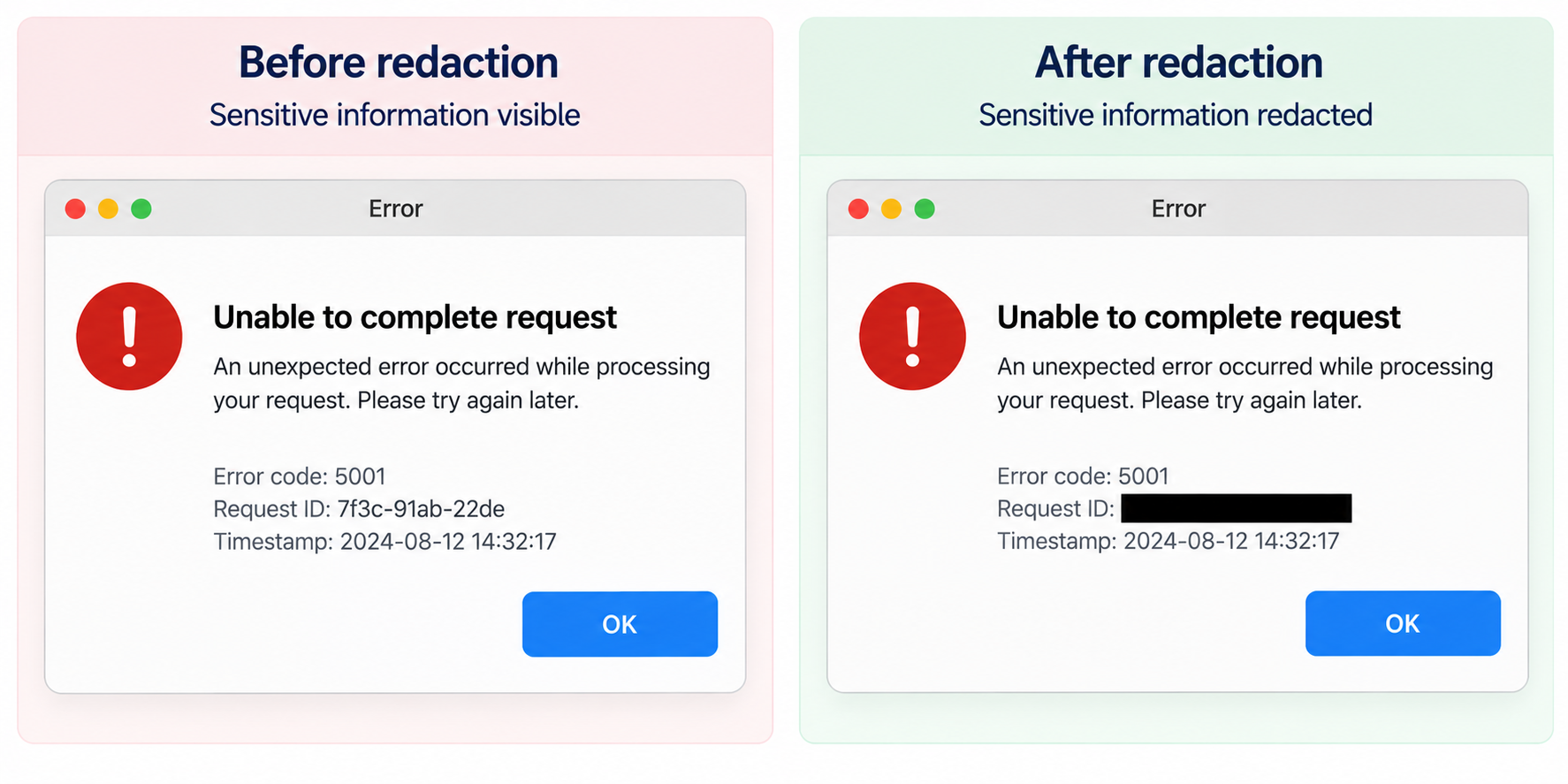
For a support desk, generation is a minor use (illustrations for help-center articles). Editing is more interesting, but the most common edit Brightlane needs, redaction of personal data from screenshots before they are stored, logged, or sent to a third-party model (Module 11), should not be done by a generative model at all. A generative edit re-draws pixels and can alter or invent content. Redaction must be exact and repeatable, so we do it with OCR and a black rectangle.
"""Image generation (hosted model) and a deterministic edit (redaction) for Brightlane.

generate_illustration() needs GEMINI_API_KEY and M12_LIVE=1; it uses the image
generation example from Google's OpenAI-compatibility docs. redact() runs
offline: it finds text with OCR and paints over it, exactly and repeatably.
Run: PYTHONPATH=. python examples/m12_image_edit.py
"""
from __future__ import annotations

import base64
import os
import re
from pathlib import Path

from PIL import Image, ImageDraw
from rapidocr_onnxruntime import RapidOCR

from supportdesk.llm import make_client

ATT = Path("data/attachments")
# The model in Google's OpenAI-compatibility example (checked 21 Sep 2026). Google lists it as legacy;
# newer image models (gemini-3.1-flash-image, gemini-3-pro-image) are documented on the native API.
IMAGE_MODEL = os.environ.get("M12_IMAGE_MODEL", "gemini-2.5-flash-image")


def generate_illustration(prompt: str, out: Path) -> Path:
    """Text-to-image through Gemini's OpenAI-compatible Images endpoint."""
    client = make_client("gemini")
    response = client.images.generate(model=IMAGE_MODEL, prompt=prompt, response_format="b64_json", n=1)
    out.write_bytes(base64.b64decode(response.data[0].b64_json))
    return out


def redact(path: Path, patterns: list[str], out: Path) -> list[str]:
    """Black out every OCR line that matches a pattern. Returns the texts removed."""
    engine = RapidOCR(intra_op_num_threads=1, inter_op_num_threads=1)
    img = Image.open(path).convert("RGB")
    result, _ = engine(img)
    draw, removed = ImageDraw.Draw(img), []
    for box, text, _ in result or []:
        if any(re.search(p, text) for p in patterns):
            xs, ys = [p[0] for p in box], [p[1] for p in box]
            draw.rectangle([min(xs) - 3, min(ys) - 3, max(xs) + 3, max(ys) + 3], fill="black")
            removed.append(text)
    img.save(out)
    return removed


def main() -> None:
    out = ATT / "error_dialog_redacted.png"
    removed = redact(ATT / "error_dialog.png", [r"Request\s*ID"], out)
    print(f"redacted {len(removed)} line(s): {removed}")
    check = redact(out, [r"[0-9a-f]{4}-[0-9a-f]{4}-[0-9a-f]{4}"], ATT / "error_dialog_recheck.png")
    print(f"re-scan of the redacted image finds request ids: {check or 'none'}")

    prompt = ("Flat illustration for a help-center article: a kanban board with three columns, "
              "one card highlighted, Brightlane blue (#406ebe) accents, no text, no logos.")
    if os.environ.get("M12_LIVE") == "1":
        print("saved", generate_illustration(prompt, ATT / "kb_illustration.png"))
    else:
        print(f"would call images.generate(model={IMAGE_MODEL!r}) with a {len(prompt)}-character prompt")


if __name__ == "__main__":
    main()
Code explained
- In simple words: black out any text line that matches a pattern, check the result by reading it again, and (with a key) generate a help-center illustration.
- What happens:
redact()runs OCR, and for every recognized line matching one of the regex patterns, draws a filled rectangle a few pixels larger than the line's box. It returns what it removed, for the audit log.main()redacts the request ID line, then runs a second pass on the redacted image looking for anything shaped like a request ID. That re-scan is the test: redaction you do not verify is redaction you hope for.generate_illustration()callsclient.images.generate()on Gemini's OpenAI-compatible endpoint with the model from Google's compatibility example, and decodes the base64 result. Override the model withM12_IMAGE_MODELto try a newer one; availability through the compatibility layer varies by model, so check the error message if a call is refused.
- Comes out: (about 4 seconds)text
redacted 1 line(s): ['RequestID:7f3c-91ab-22de']
re-scan of the redacted image finds request ids: none
would call images.generate(model='gemini-2.5-flash-image') with a 155-character prompt
OCR read the line without spaces (
RequestID:7f3c-91ab-22de) and the regex still matched it because\s*allows zero spaces. The re-scan finds nothing. One limit to know: OCR-based redaction only removes text that OCR detects. Faint, tiny, or handwritten personal data can slip through, so for high-risk data combine it with blocking whole known regions (for example, the account menu in every Brightlane screenshot).
| Situation | Use this | Why |
|---|---|---|
| Remove personal data from screenshots | OCR plus pattern matching plus rectangles, then a verification re-scan | Exact, repeatable, auditable |
| Illustrations for help articles | A hosted image generation model | Fast, cheap, good enough for decoration; review before publishing |
| Change a product screenshot for docs (new button label) | Re-capture the real UI | A generated "screenshot" can show UI that does not exist |
| Mock-ups and concepts | Image editing with reference images | Iterative edits are where these models shine |
Real-time voice: latency, interruption, and turn-taking
A voice agent on Brightlane's phone line has to decide when the caller has finished (endpointing or end-of-turn detection), transcribe, think, and start speaking, all fast enough to feel like a conversation. Human conversation sets a demanding bar: Levinson and Torreira (2015, Frontiers in Psychology) summarize the evidence that gaps between turns are "of the order of 200 ms", while producing speech takes people over 600 ms, so humans predict the end of a turn and start planning early. Stivers et al. (2009, PNAS) found the same pattern of avoiding overlap and minimizing silence across 10 languages, with average gaps differing by up to about 250 ms between languages.
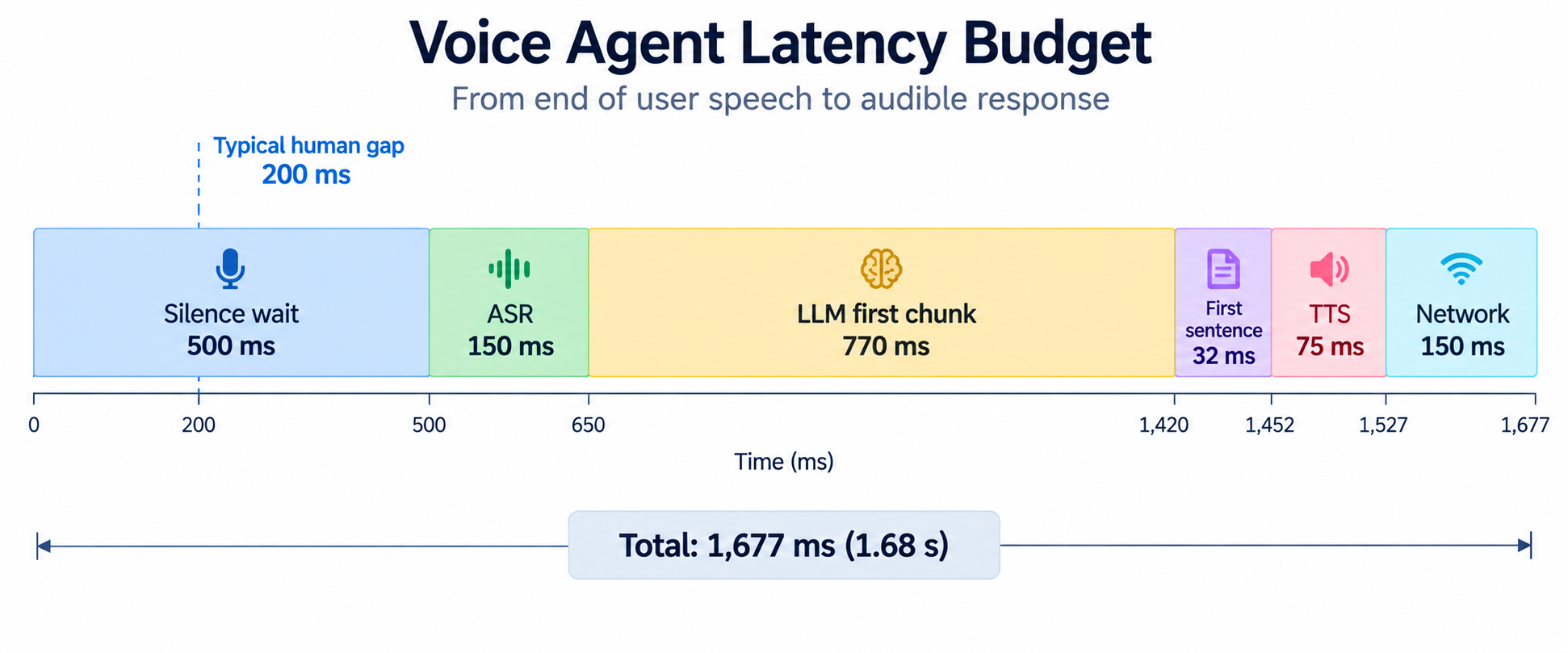
A cascaded voice agent (ASR, then LLM, then text-to-speech) adds up its stages. Here is a budget built from published figures, with the two assumptions labelled, and a turn manager that handles barge-in (the caller starts talking while the agent is speaking).
"""Real-time voice: a latency budget with sourced figures, and barge-in handling.

The budget is arithmetic on published numbers (sources in STAGES) plus two
labelled assumptions. The turn manager is deterministic code driven by a
scripted event timeline, so its output is real.
Run: PYTHONPATH=. python examples/m12_voice_latency.py
"""
from __future__ import annotations

from dataclasses import dataclass, field

# (stage, milliseconds, source). Checked 21 Sep 2026; vendor figures exclude network overhead.
STAGES = [
    ("end-of-turn wait (silence endpointing)", 500, "OpenAI realtime VAD guide example: silence_duration_ms 500"),
    ("ASR transcript after end of turn", 150, "ElevenLabs docs: scribe_v2_realtime partials in ~150 ms"),
    ("LLM first chunk", 770, "Artificial Analysis: gpt-oss-120b on Groq, median first chunk 0.77 s"),
    ("LLM first sentence (15 tokens)", round(15 / 474 * 1000), "same page: 474 tokens/s output"),
    ("TTS time to first audio", 75, "ElevenLabs docs: eleven_flash_v2_5 '~75ms'"),
    ("network, 3 hops", 150, "assumption: about 50 ms per hop; measure yours"),
]
# Same page: with reasoning_effort high, the first *answer* token arrives after 4.99 s (reasoning first).
REASONING_FIRST_ANSWER_MS = 4990
HUMAN_GAP_MS = 200  # Levinson and Torreira 2015: gaps between turns are "of the order of 200 ms"


def budget(stages: list[tuple[str, int, str]], eager_saving_ms: int = 0) -> int:
    return sum(ms for _, ms, _ in stages) - eager_saving_ms


@dataclass
class TurnManager:
    """LISTENING -> THINKING -> SPEAKING, with barge-in: user speech during SPEAKING stops playback."""
    state: str = "LISTENING"
    history: list[dict] = field(default_factory=list)
    log: list[str] = field(default_factory=list)
    _reply: str = ""
    _played_chars: int = 0

    def on(self, t_ms: int, event: str, payload: str = "") -> None:
        if event == "user_final" and self.state in ("LISTENING", "THINKING"):
            self.history.append({"role": "user", "content": payload})
            self.state = "THINKING"
        elif event == "reply_ready" and self.state == "THINKING":
            self._reply, self._played_chars, self.state = payload, 0, "SPEAKING"
        elif event == "played" and self.state == "SPEAKING":
            self._played_chars = min(len(self._reply), self._played_chars + int(payload))
            if self._played_chars == len(self._reply):
                self._finish(interrupted=False)
        elif event == "user_speech" and self.state == "SPEAKING":
            self._finish(interrupted=True)  # barge-in: stop TTS now, keep only what was heard
        self.log.append(f"{t_ms:>6d} ms  {event:12s} -> {self.state}")

    def _finish(self, interrupted: bool) -> None:
        heard = self._reply[: self._played_chars]
        if interrupted:
            heard = heard.rsplit(" ", 1)[0] + " [interrupted]"
        self.history.append({"role": "assistant", "content": heard})
        self.state = "LISTENING"


def main() -> None:
    print(f"{'stage':40s} {'ms':>5s}  source")
    for name, ms, source in STAGES:
        print(f"{name:40s} {ms:>5d}  {source}")
    total = budget(STAGES)
    print(f"{'time to first audio (sequential)':40s} {total:>5d}")
    eager = budget(STAGES, eager_saving_ms=200)
    print(f"{'with eager end-of-turn (-200)':40s} {eager:>5d}  Deepgram: fires 150-250 ms earlier, "
          "50-70% more LLM calls")
    slow = budget(STAGES) - 770 + REASONING_FIRST_ANSWER_MS
    print(f"{'same, reasoning_effort high':40s} {slow:>5d}  first answer token 4.99 s on the same page")
    print(f"human gap between turns for comparison: about {HUMAN_GAP_MS} ms")

    print("\nBarge-in on a scripted call:")
    tm = TurnManager()
    reply = "Your export failed because the board has more than ten thousand cards. You can filter the board first."
    for t, event, payload in [(0, "user_final", "Why did my CSV export fail?"),
                              (1640, "reply_ready", reply),
                              (2200, "played", "30"), (2800, "played", "30"),
                              (3100, "user_speech", ""),
                              (3900, "user_final", "Can I export to JSON instead?")]:
        tm.on(t, event, payload)
    print("\n".join(tm.log))
    print("history the model sees next turn:")
    for m in tm.history:
        print(f"  {m['role']:9s} {m['content']}")


if __name__ == "__main__":
    main()
Code explained
- In simple words: add up how long each step of a voice reply takes to see how far we are from a human pause, then run a tiny state machine that stops talking the moment the caller interrupts.
- What happens:
STAGESlists each stage with its milliseconds and source: a 500 ms silence wait (the value in OpenAI's realtime VAD guide example), about 150 ms for a streaming ASR transcript (ElevenLabs documents partial transcripts in about 150 ms forscribe_v2_realtime), 0.77 s median first chunk and 474 tokens per second forgpt-oss-120bon Groq (Artificial Analysis provider page, checked 21 September 2026), about 75 ms to first audio for ElevenLabseleven_flash_v2_5, and an assumed 50 ms per network hop. Vendor figures exclude network and application time.budget()adds the stages, optionally subtracting an eager end-of-turn saving. Deepgram reports that its Flux model's EagerEndOfTurn fires 150 to 250 ms earlier than its normal end-of-turn signal, at the cost of 50 to 70% more LLM calls (you start generating speculatively and discard the reply if the caller keeps talking).REASONING_FIRST_ANSWER_MSis the same Artificial Analysis page's time to the first answer token forgpt-oss-120bat high reasoning effort: 4.99 s, because a reasoning model thinks before it answers (Module 5).TurnManagerhas three states.user_finalmoves to THINKING,reply_readyto SPEAKING,playedadvances how many characters of the reply have been spoken, anduser_speechduring SPEAKING is a barge-in: stop playback, and write into the history only the part the caller actually heard, cut at a word boundary and marked[interrupted].main()prints the budget and replays a scripted call with an interruption. The timeline is scripted; the state machine's behavior is real.
- Comes out:text
stage                                       ms  source
end-of-turn wait (silence endpointing)     500  OpenAI realtime VAD guide example: silence_duration_ms 500
ASR transcript after end of turn           150  ElevenLabs docs: scribe_v2_realtime partials in ~150 ms
LLM first chunk                            770  Artificial Analysis: gpt-oss-120b on Groq, median first chunk 0.77 s
LLM first sentence (15 tokens)              32  same page: 474 tokens/s output
TTS time to first audio                     75  ElevenLabs docs: eleven_flash_v2_5 '~75ms'
network, 3 hops                            150  assumption: about 50 ms per hop; measure yours
time to first audio (sequential)          1677
with eager end-of-turn (-200)             1477  Deepgram: fires 150-250 ms earlier, 50-70% more LLM calls
same, reasoning_effort high               5897  first answer token 4.99 s on the same page
human gap between turns for comparison: about 200 ms

Barge-in on a scripted call:
     0 ms  user_final   -> THINKING
  1640 ms  reply_ready  -> SPEAKING
  2200 ms  played       -> SPEAKING
  2800 ms  played       -> SPEAKING
  3100 ms  user_speech  -> LISTENING
  3900 ms  user_final   -> THINKING
history the model sees next turn:
  user      Why did my CSV export fail?
  assistant Your export failed because the board has more than ten [interrupted]
  user      Can I export to JSON instead?
About 1.7 seconds from the caller going quiet to the first audio, against a human gap of about 200 ms. The biggest items are the LLM's first chunk (770 ms) and the silence wait (500 ms), so those are where to work: a faster or smaller model, a shorter or smarter end-of-turn decision, streaming the first sentence to TTS as soon as it exists (already assumed here: only 15 tokens are waited for), and filler audio ("Let me check that") when a tool call is needed. Turning on high reasoning effort makes it 5.9 seconds, which is unusable for voice: use low reasoning effort or a non-reasoning model on the voice path. The barge-in history matters for correctness: the model's next turn sees that the caller heard only "...more than ten", not the advice to filter the board, so it should not assume the caller knows about filtering.
The three hard problems in turn-taking are all trade-offs between speed and false triggers:
| Situation | Use this | Why |
|---|---|---|
| Deciding the caller has finished | A semantic or model-based end-of-turn detector (OpenAI's semantic_vad, Deepgram Flux) rather than silence alone | A 500 ms silence rule cuts off people who pause mid-sentence and waits too long for people who do not |
| Shaving latency further | Eager end-of-turn with speculative generation | 150 to 250 ms earlier, paid for with 50 to 70% more LLM calls (Deepgram's figures) |
| The caller interrupts | Stop TTS immediately, truncate the assistant's turn to what was heard, go back to listening | Otherwise the model believes the caller heard things they did not |
| Background noise or "uh-huh" while the agent talks | Require a minimum speech duration or a semantic check before treating sound as a barge-in | Backchannels are not interruptions |
| Lowest latency and natural prosody | A speech-to-speech real-time model | No separate ASR and TTS hops; less control and harder to log and test |
| Control, auditability, and choosing each component | A cascaded ASR plus LLM plus TTS pipeline | Every stage is swappable and every transcript is loggable |